
如何设置enaml窗口的背景色?
如何设置enaml窗口的背景色?
提问于 2016-03-04 21:28:28
我试图使用enaml为我的应用程序创建视图。我想知道如何设置窗口小部件的背景色。我看到我可以使用样式表为窗口内的东西设置颜色,但我似乎找不到设置窗口颜色的方法。
enamldef Main(MainWindow):
StyleSheet:
    Style:
        element = 'PushButton'

        Setter:
            field = 'background'
            value = 'indianred'

title << ""
initial_size = (1000,500)
initial_position = (300,150)
icon = loadIcon(normpath('TitleIcon.png'))
visible = True
always_on_top = True
style_class << "WindowStyle"

MyMenuBar:
    pass

Container:
    #constraints = [vbox(label, label, spacing=0)]
    PushButton:
        text = "one"
pass回答 1
Stack Overflow用户
回答已采纳
发布于 2016-03-06 19:03:21
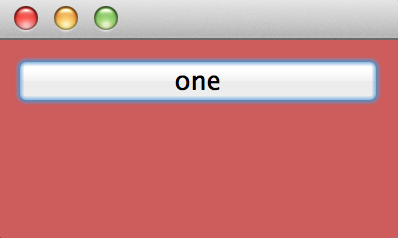
您只需将正确的元素样式:
enamldef Main(MainWindow):
    StyleSheet:
        Style:
            element = 'Main'
            Setter:
                field = 'background'
                value = 'indianred'
    Container:
        PushButton:
            text = "one"
页面原文内容由Stack Overflow提供。腾讯云小微IT领域专用引擎提供翻译支持
原文链接:
https://stackoverflow.com/questions/35806361
复制相关文章
相似问题
腾讯云开发者

Copyright © 2013 - 2026 Tencent Cloud. All Rights Reserved. 腾讯云 版权所有
深圳市腾讯计算机系统有限公司 ICP备案/许可证号:粤B2-20090059  粤公网安备44030502008569号
腾讯云计算(北京)有限责任公司 京ICP证150476号 | 京ICP备11018762号