
为每次运行生成单独的.jtl结果文件
为每次运行生成单独的.jtl结果文件
提问于 2016-03-01 06:59:35
如何为每次运行生成单独的.jtl结果文件。下面是我使用jenkins作业(性能趋势插件)运行的命令。
cd /Apache-j抄-2.13/bin ./jmeter.sh -n -t /jmxFiles/Jbpm6Rest3Jenkins1.jmx -l /jmxFiles/SIP.jtl -JUSERS=${USER_COUNT} -JRampUp=${LOOP_COUNT}{LOOP_COUNT}
当前,SIP.jtl文件在每次运行时都会追加相同的文件。
如何为每次运行生成单独的.jtl结果文件(SIP1、SIP2、SIP3等),并在Jenkins性能趋势中显示。
回答 1
Stack Overflow用户
回答已采纳
发布于 2016-03-01 08:29:02
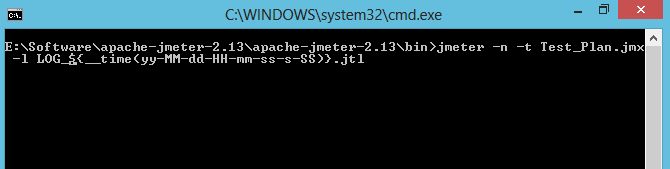
you just need to add time function just after or before your JTL file name示例:-Example -n -t Test_Plan.jmx -l LOG_${__time(yy HH-mm-SS-SS)}.jtl
页面原文内容由Stack Overflow提供。腾讯云小微IT领域专用引擎提供翻译支持
原文链接:
https://stackoverflow.com/questions/35716559
复制相关文章
相似问题
腾讯云开发者

Copyright © 2013 - 2026 Tencent Cloud. All Rights Reserved. 腾讯云 版权所有
深圳市腾讯计算机系统有限公司 ICP备案/许可证号:粤B2-20090059  粤公网安备44030502008569号
腾讯云计算(北京)有限责任公司 京ICP证150476号 | 京ICP备11018762号