
带Word范围的UserForms和循环
我使用的是一个用户表单,允许用户输入一个数字。我将用这个数字来扩展许多段落的选择。
我的想法是,我有一份有数百个定义的文档。这些以"word -意思等“开头,这样我就可以查找”意思“,选择它所在的段落,然后询问用户是否想将这一段添加到索引中。
有时,定义会分散在两个段落中。我希望用户能够输入"2",并选择这两个段落。
我已经把表格写好了,只是我一直在琢磨怎么循环这个。我不太熟悉Word VBA (但我使用Excel),所以不知道我哪里出错了。
焦点是Case 0块,请参阅我的评论。这就是我想用X段扩展选择的地方。
Sub find_Definitions()
Dim defText As String, findText$
Dim oRng    As Word.Range, rng As Word.Range
Dim myForm As frmAddDefinition
Set myForm = New frmAddDefinition

Dim addDefinition$, expandParagraph&
expandParagraph = 1

Set oRng = ActiveDocument.Range
findText = InputBox("What text would you like to search for?")

With oRng.Find
    .Text = findText
    While .Execute
Start_Find:
    Set rng = oRng.Paragraphs(1).Range
        rng.Select
        defText = oRng.Paragraphs(1).Range
        myForm.Show
        Select Case myForm.Tag
            Case 0 ' Expand the paragraph selection
                expandParagraph = InputBox("How many paragraphs to extend selection?")
                rng.MoveEnd unit:=wdParagraph, Count:=expandParagraph
                rng.Select
                defText = rng
                ' Here I want to ask if this is okay, or to expand again
                ' ?????

                ActiveDocument.Indexes.MarkEntry Range:=rng, entry:=defText, entryautotext:=defText
            Case 1 ' No, do not add to the index
                ' do nothing
            Case 2 ' Yes, add to index
                ActiveDocument.Indexes.MarkEntry Range:=rng, entry:=defText, entryautotext:=defText
            Case 3 ' Cancel, exit the sub
                MsgBox ("Exiting macro")
                GoTo lbl_Exit
        End Select
    Wend
End With

lbl_Exit:
Unload myForm
Set myForm = Nothing
End Sub
编辑:使用上面的代码,它将选择突出显示的文本:
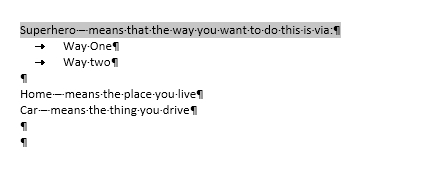
但是,我想包括“方式一”和“方式二”,所以我想通过那个inputBox 2进入,将选择扩展到两个段落。我怎么能让它这么做?这就是我被困的地方。这有意义吗?
回答 1
Stack Overflow用户
发布于 2016-03-01 19:15:13
总之,如果您想要扩展一个范围以包含“更多的东西”,通常使用Range.MoveEnd方法之一(还有一个MoveStart方法)。在Word中,范围是一组连续字符,从左到右,从上到下在文档中运行.每个范围都有一个起始点和一个结束点;它们可以是文档中相同的位置。把它想象成一个选择,除了一个范围是不可见的,而且你可以拥有你想要的多少。(在这方面与Excel非常相似。)如果要扩展所选内容,请按住Shift键并键入Arrow键;在对象模型中使用MoveEnd (和MoveStart)。
这些方法采用两个参数:Unit和Count。
Unit允许您指定“某事”(字符、词、段落、故事.)作为一个WdUnits枚举。Count允许您指定要扩展到最后的“某些东西”的数量。
下面的代码片段演示了我如何理解您希望与用户交互。它从当前的选择开始,而不是使用Find,但这对您来说应该不是问题。
Dim rng As word.Range
Dim nrParas As String

Set rng = Selection.Paragraphs(1).Range
Do
    nrParas = InputBox("How many more paragraphs do you need?")
    If Not IsNumeric(nrParas) Then Exit Sub 'Or Exit Do if other code follows
    If CLng(nrParas) > 1 Then  '>1 because 1 is a given
        rng.MoveEnd wdParagraph, CLng(nrParas) - 1 '-1 because 1 is a given
    End If
    'for visual verification
    rng.Select
Loop While IsNumeric(nrParas) And nrParas > 0https://stackoverflow.com/questions/35708858
复制相似问题
腾讯云开发者

Copyright © 2013 - 2026 Tencent Cloud. All Rights Reserved. 腾讯云 版权所有
深圳市腾讯计算机系统有限公司 ICP备案/许可证号:粤B2-20090059  粤公网安备44030502008569号
腾讯云计算(北京)有限责任公司 京ICP证150476号 | 京ICP备11018762号