
缩放图像对象以匹配另一个对象的比例
我有两组大小不同的图像。第一组是带有真实图片对象的400x400像素的图像。
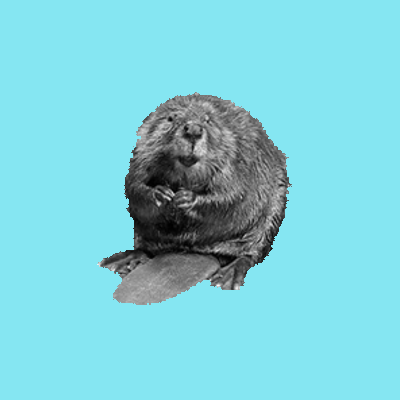
第二组为319x319,与真实的图像对象相比,具有不同比例的图像轮廓。
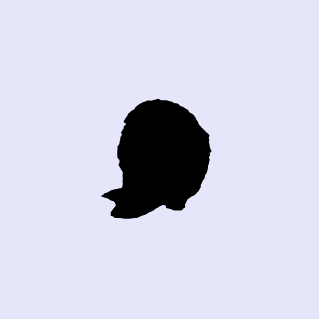
我想要实现的,基本上是用第一组的真实图片对象(即海狸)来代替剪影。因此,最终的结果将是319x319分辨率图像与真实的图片对象。下面是一个示例:
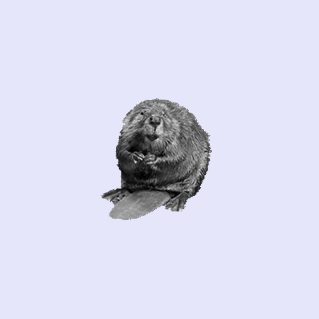
第一组图像不能简单地调整为319x319,因为海狸将与剪影不匹配。有大约100张图片与不同的“海狸大小到海狸的剪影尺寸”的关系。有办法使这个过程自动化吗?
到目前为止,我已经尝试了@cxw建议,直到第2步。这是我的代码,用椭圆拟合来绘制图像。我不知道怎么走到3-5步..。我认为从EllipseDirectFit函数-> 2*abs(A(1))应该是椭圆的主轴。(注意:a 1.bmp是真实的图像,b1.bmp是剪影)。
回答 2
Stack Overflow用户
发布于 2016-02-28 20:19:19
我没有这方面的代码,但这是我将如何进行,只是随手。几乎可以肯定有一个更好的方法:)。
- 对于每个真实图像和剪影图像:
1. Get the X, Y coordinates of the pixels that _aren't_ the background. **Edit** Example tested in Octave: background_R = img(1,1,1) background_G = img(1,1,2) background_B = img(1,1,3) xs,ys=find(img(:,:,1)ys=find( img(:,:,1)~=background_R = img(:,:,2)~=background_G x img(:,:,3)~=background_B)
逻辑OR是因为图像在任何颜色分量中都可能与背景不同。
2.在你找到的X,Y坐标对上放一个椭圆。例如,使用文件交换中的这个例程。(实际上,我认为您可以使用圆圈拟合或任何其他形状拟合,只要大小和位置是图像的非背景部分之间唯一的区别。)
- 现在,您有了真实图像和剪影图像的椭圆参数。假设长宽比相同,这些椭圆应该只在中心和尺度上有所不同。
- 根据剪影椭圆长轴长度与真实图像椭圆长轴长度之比来调整真实图像(
imresize)的大小。现在它们应该是一样大小的。 - 找到中心。使用上面的fit例程, A=EllipseDirectFit(.)%从http://mathworld.wolfram.com/Ellipse.html ma=A(1);mb=A(2)/2;mc=A(3);md=A(4)/2;mf=A(5)/2;mg=A(6);center_x =(mc*md-mb*mf)/(mb*2-ma*mc) center_y =(mf*mb*md)/(mb*mb*mc)
- 将真实图像数据移动到三维矩阵中,使椭圆中心重合.例如, cx_silhouette =。(如上所示,对于剪影图像) cy_silhouette =.cx_real =。(如上所示,对于*调整大小*真实图像) cy_real =.shifted = zeros(size(silhouette_image)) %,我们将把真实的图像删除= cx_silhouette - cx_real deltay = cy_silhouette - cy_real %,如果deltax==deltay==0完成了这个步骤。如果不是: part = resized_real_image(max(deltay,0):319-abs(deltay),max(Deltax0):319-abs(deltax),:);%或类似的东西-抓取调整大小的真实图像偏移的重叠部分(max(deltay,0):min(deltay+319,319),max(Deltax0):min(deltax+319,319),:) =部分;%或类似的东西-在x和y中滑动调整大小的真实图像的部分。现在_shifted_应该与剪影图像一致。
- 使用背景颜色(或黑色剪影相同的差异)作为掩码,复制大小调整的像素,将真实图像移动到剪影图像中。
希望这能有所帮助!
Stack Overflow用户
发布于 2016-03-01 16:37:15
如果其他人和我有同样的问题,我会发布解决我问题的代码。我实际上遵循了cxw的建议,为真实的和剪影的图片安装了一个椭圆,然后根据剪影-椭圆的长轴和真实的椭圆长轴的比率调整真实图片的大小。这使得图像对象在大小上与剪影图像对象(即海狸)相匹配。然后我要么裁剪,要么增加边框像素来匹配我所需的分辨率(即319x319)。
% fetching the images
realList = getAllFiles('./real_images'); % getAllFiles => StackOverflow function
silhList = getAllFiles('./silhouettes');

for qq = 1:numel(realList)
    % Name of the file to save
    str = realList{qq}(15:end);

    a = imread(realList{qq});   % assign real image
    background_Ra = a(1,1,1);   % getting the background colors
    background_Ga = a(1,1,2);
    background_Ba = a(1,1,3);
    % finding the points (x,y) to pass to fit_ellipse
    [x1,y1]=find(a(:,:,1)~=background_Ra | a(:,:,2)~=background_Ga | a(:,:,3)~=background_Ba);
    % fitting an ellipse to these points
    z1 = fit_ellipse(x1,y1); % Mathworks file exchange function

    b = imread(silhList{qq});   % assign silhouette image
    background_R2b = b(1,1,1);  % getting the background colors
    background_G2b = b(1,1,2);
    background_B2b = b(1,1,3);
    % finding the points (x,y) to pass to fit_ellipse
    [x2,y2]=find(b(:,:,1)~=background_R2b & b(:,:,2)~=background_G2b & b(:,:,3)~=background_B2b);
    % fitting an ellipse to these points
    z2 = fit_ellipse(x2,y2);

    % ratio of silhouette's ellipse major axis to real image's ellipse
    % major axis
    ellaxratio = z2.long_axis/z1.long_axis;
    % resizing based on ellaxratio, so that the real image object size will
    % now fit the silhouette's image object size
    c = imresize(a,ellaxratio); c = rgb2gray(c);
    bordercolor = c(end,end);

    % if the resulting image is smaller, add pixels around it until they
    % match with the silhouette image resolution
    if size(c) < 319
        while size(c) < 319
            % 'addborder' is a Mathworks file exchange function
            c = addborder(c(:,:,1),1, bordercolor ,'outer');
        end
    % if the resulting image is larger, crop pixels until they match
    else size(c) > 319
        while size(c) > 319
            c = c(2:end-1,2:end-1);
        end
    end

    % in a few cases, the resulting resolution is 318x318, instead of
    % 319x319, so a small adjustment won't hurt.
    if size(c) ~= 319
        c = imresize(c,[319 319]);
    end
    % saving..
    imwrite(c,['./good_fits/' str '.bmp'])
endhttps://stackoverflow.com/questions/35687544
复制相似问题
腾讯云开发者

Copyright © 2013 - 2026 Tencent Cloud. All Rights Reserved. 腾讯云 版权所有
深圳市腾讯计算机系统有限公司 ICP备案/许可证号:粤B2-20090059  粤公网安备44030502008569号
腾讯云计算(北京)有限责任公司 京ICP证150476号 | 京ICP备11018762号