
SystemJS和KarmaJS: TypeError: System.import不是一个函数
我正试图让我的项目与卡玛和SystemJS一起工作。我正在使用业力-系统插件与业力。
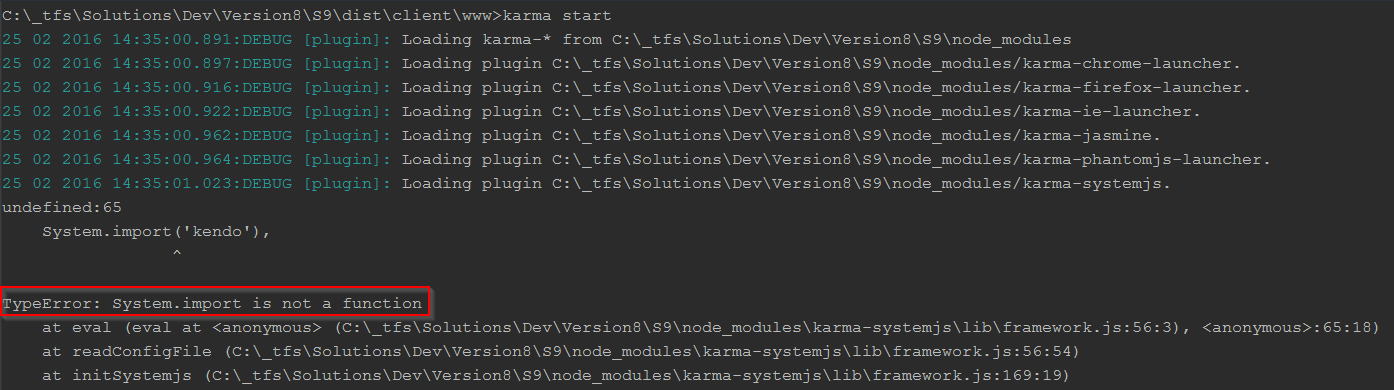
我总是在下面看到关于System.import的错误。
我相信这是因为当业力系统is插件运行时,SystemJS还没有被加载。请告诉我我做错了什么。
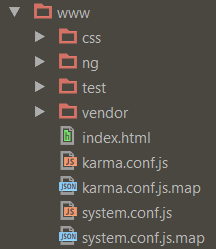
项目结构
SystemJS configuration (system.conf.js)
System.config({
    baseUrl: '',
    defaultJSExtensions: true,
    map: {
        'jquery': 'vendor/kendo/js/jquery.min.js',
        'angular': 'vendor/kendo/js/angular.js',
        'kendo': 'vendor/kendo/js/kendo.all.min.js',
        'angular-mocks': 'vendor/bower_components/angular-mocks/angular-mocks.js',
        'angular-ui-router': 'vendor/bower_components/angular-ui-router/release/angular-ui-router.min.js',
        'angular-toastr': 'vendor/bower_components/angular-toastr/dist/angular-toastr.tpls.min.js',
        'angular-local-storage': 'vendor/bower_components/angular-local-storage/dist/angular-local-storage.min.js'
    },
    paths: {
        'systemjs': 'vendor/bower_components/system.js/dist/system.js',
        'system-polyfills': 'vendor/bower_components/system.js/dist/system-polyfills.js'
    },
    meta: {
        'vendor/kendo/js/jquery.min.js': {
            format: 'global',
            exports: '$'
        },
        'vendor/kendo/js/angular.js': {
            format: 'global',
            deps: [
                'vendor/kendo/js/jquery.min.js'
            ],
            exports: 'angular'
        },
        'vendor/kendo/js/kendo.all.min.js': {
            format: 'global',
            deps: [
                'vendor/kendo/js/angular.js'
            ],
            exports: 'kendo'
        },
        'vendor/bower_components/angular-ui-router/release/angular-ui-router.min.js': {
            format: 'global',
            deps: [
                'vendor/kendo/js/angular.js'
            ]
        },
        'vendor/bower_components/angular-mocks/angular-mocks.js': {
            format: 'global',
            deps: [
                'vendor/kendo/js/angular.js'
            ],
            exports: 'angular.mock'
        },
        'vendor/bower_components/angular-toastr/dist/angular-toastr.tpls.min.js': {
            format: 'global',
            deps: [
                'vendor/kendo/js/angular.js'
            ]
        },
        'vendor/bower_components/angular-local-storage/dist/angular-local-storage.min': {
            format: 'global',
            deps: [
                'vendor/kendo/js/angular.js'
            ]
        }
    }
});
Promise.all([
    System.import('kendo'),
    System.import('angular-mocks'),
    System.import('angular-ui-router'),
    System.import('angular-toastr'),
    System.import('angular-local-storage')
]).then(function () {
    System.import('angular')
        .then(function (angular) {
        System.import('ng/app/app.module')
            .then(function (app) {
            angular.bootstrap(document, ['s9.app']);
        }, function (err) {
            console.log(err);
        });
    }, function (err) {
        console.log(err);
    });
});

//# sourceMappingURL=system.conf.js.map
karma.conf.js
// Karma configuration
var configure = function (config) {
    config.set({
        // base path that will be used to resolve all patterns (eg. files, exclude)
        basePath: '.',
        transpiler: null,
        // frameworks to use
        // available frameworks: https://npmjs.org/browse/keyword/karma-adapter
        frameworks: ['systemjs', 'jasmine'],
        systemjs: {
            // Path to your SystemJS configuration file
            configFile: 'system.conf.js',
            // Patterns for files that you want Karma to make available, but not loaded until a module
            //     requests them. eg. Third-party libraries.
            serveFiles: [
                'vendor/kendo/js/**/*.js',
                'vendor/bower_components/**/*.js',
                'ng/**/*.js',
                'test/**/*Spec.js'
            ],
            config: {
                paths: {
                    'systemjs': 'vendor/bower_components/system.js/dist/system.js',
                    'system-polyfills': 'vendor/bower_components/system.js/dist/system-polyfills.js'
                }
            }
        },
        // list of files / patterns to load in the browser
        files: [
            {pattern: 'vendor/kendo/js/**/*.js', included: false},
            {pattern: 'vendor/bower_components/**/*.js', included: false},
            {pattern: 'ng/**/*.js', included: false},
            {pattern: 'test/**/*Spec.js', included: false}
        ],
        // list of files to exclude
        exclude: [],
        // preprocess matching files before serving them to the browser
        // available preprocessors: https://npmjs.org/browse/keyword/karma-preprocessor
        preprocessors: {},
        // test results reporter to use
        // possible values: 'dots', 'progress'
        // available reporters: https://npmjs.org/browse/keyword/karma-reporter
        reporters: ['progress'],
        // web server port
        port: 9876,
        // enable / disable colors in the output (reporters and logs)
        colors: true,
        // level of logging
        // possible values: config.LOG_DISABLE || config.LOG_ERROR || config.LOG_WARN || config.LOG_INFO || config.LOG_DEBUG
        logLevel: config.LOG_DEBUG,
        // enable / disable watching file and executing tests whenever any file changes
        autoWatch: true,
        // start these browsers
        // available browser launchers: https://npmjs.org/browse/keyword/karma-launcher
        browsers: ['PhantomJS'],
        // Continuous Integration mode
        // if true, Karma captures browsers, runs the tests and exits
        singleRun: false,
        // Concurrency level
        // how many browser should be started simultaneous
        concurrency: Infinity
    });
};
module.exports = configure;

//# sourceMappingURL=karma.conf.js.map
误差
回答 1
Stack Overflow用户
发布于 2016-04-30 23:26:53
我通过将引导代码从配置代码中移出来修正这个问题。显然,当使用业力-systemjs插件时,System.import在调用它时是不可用的(尽管它在正常运行时)。
我所做的:我移动了引导代码(即Promise.all([.)放入一个名为bootstrap.js (名称并不重要)的单独文件中,然后在我的index.html中按以下顺序添加它们:

也是从这个链接(业力系统js插件作者说):https://github.com/rolaveric/karma-systemjs/issues/71
我明白问题所在了。这是因为你有你的引导代码(例如。System.import()调用在您的SystemJS配置文件-- system.conf.js业力--系统to中,只需要一个简单的System.config()调用,然后它就可以拦截该调用,以找出传输程序和多填充器所在的位置。它通过使用假系统对象计算配置文件来实现这一点,该对象只记录传递给System.config()的任何内容。这个假对象没有System.import()方法,这会导致您的错误。 我建议将引导代码移动到一个单独的文件中(我个人将其放在带有HTML的脚本标记中)。否则,如果尝试使用systemjs,则会遇到类似的问题,而且您可能不希望在单元测试开始时调用angular.bootstrap()。
https://stackoverflow.com/questions/35636823
复制相似问题
腾讯云开发者

Copyright © 2013 - 2026 Tencent Cloud. All Rights Reserved. 腾讯云 版权所有
深圳市腾讯计算机系统有限公司 ICP备案/许可证号:粤B2-20090059  粤公网安备44030502008569号
腾讯云计算(北京)有限责任公司 京ICP证150476号 | 京ICP备11018762号