
Google脚本(GAS)使用具有用户名和密码的url记忆体
Google脚本(GAS)使用具有用户名和密码的url记忆体
提问于 2016-02-25 16:51:08
我不是一个天生的程序员,在气体中自学(只有我用过的代码)。我在诺维奇城市学院工作,我想创建一个脚本,自动登录到他们的网站上,这样我就可以获取时间表数据并将其放入电子表格中。
在做了一些研究之后,我放弃了想办法解决这个问题,所以我在寻求帮助。
我试过这样做:
function getTimetables() {
 var url = "https://ccn.ac.uk/user/";
   var options = {
      "method": "post",
      "payload": {
      "user-login" : "username",
      "edit-pass" : "password",
      "BUTTON_Submit" : "Log In",
      },
      "testcookie": 1,
      "followRedirects": false
   };
   var response = UrlFetchApp.fetch(url, options);
   if ( response.getResponseCode() == 200 ) {
     // Incorrect user/pass combo
     Logger.log('Incorrect user/pass combo')
   } else if ( response.getResponseCode() == 302 ) {
     // Logged-in
     var headers = response.getAllHeaders();
     if ( typeof headers['Set-Cookie'] !== 'undefined' ) {
        // Make sure that we are working with an array of cookies
        var cookies = typeof headers['Set-Cookie'] == 'string' ? [ headers['Set-Cookie'] ] : headers['Set-Cookie'];
        for (var i = 0; i < cookies.length; i++) {
           // We only need the cookie's value - it might have path, expiry time, etc here
           cookies[i] = cookies[i].split( ';' )[0];
        };

        url = "https://mytimetable.ccn.ac.uk/timetable.aspx?week=30&room=C5A";
        options = {
            "method": "get",
            // Set the cookies so that we appear logged-in
            "headers": {
               "Cookie": cookies.join(';')
            }
        }
     }
   }
}
返回“不正确的用户/传递组合”。
我试过这样做:
function getTimetablev2() {
var site = "https://ccn.ac.uk/user"
var USERNAME = PropertiesService.getScriptProperties().getProperty('username');
var PASSWORD = PropertiesService.getScriptProperties().getProperty('password');

var url = PropertiesService.getScriptProperties().getProperty(site);

  var headers = {
    "Authorization" : "Basic " + Utilities.base64Encode(USERNAME + ':' + PASSWORD)
  };

var params

 = {
    "method":"GET",
    "headers":headers
  };

var response =

UrlFetchApp.fetch(site, params);
  Logger.log(response.getResponseCode())
}
返回代码200 -登录失败。
如果有人能帮我解决这个问题,我将永远欠你的债,因为它会为我节省很多时间。我已经创建了一个实用的预订系统,每个老师都有自己的电子表格和时间表,所有的预订都会交给技术人员使用的电子表格。如果我能自动生成他们的时间表,那就太棒了。
回答 1
Stack Overflow用户
发布于 2016-02-26 08:50:10
如果不知道到https://ccn.ac.uk/user/的有效HTTP看起来如何,就很难回答您的问题。所以..。
使用hurl.it和第一个代码片段中提供的有效负载.看起来这不是一个有效的帖子。
使用火虫并将虚拟数据输入表单中,您可以查看POST是如何正确完成的。
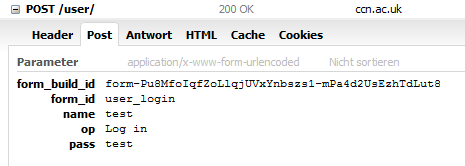
这些是您应该在请求体中使用的参数。
如果这个站点本机不支持身份验证,那么您的第二个代码片段就不太可能工作,而不是使用此表单。
页面原文内容由Stack Overflow提供。腾讯云小微IT领域专用引擎提供翻译支持
原文链接:
https://stackoverflow.com/questions/35633433
复制相关文章
相似问题
腾讯云开发者

Copyright © 2013 - 2026 Tencent Cloud. All Rights Reserved. 腾讯云 版权所有
深圳市腾讯计算机系统有限公司 ICP备案/许可证号:粤B2-20090059  粤公网安备44030502008569号
腾讯云计算(北京)有限责任公司 京ICP证150476号 | 京ICP备11018762号