
snapToPoint以外的其他东西是控制UISnapBehavior中的布局。
我对动画很陌生,很难理解为什么UIAnimation和UISnapBehavior会让UIButtons偏离中心位置。显然,除了代码中的内容之外,还有一些可以控制的布局。也许有人能告诉我我错过了什么。
最初,我的ViewController将五个UIButtons以编程方式放置在圆周上(即没有XIB文件),如图A所示。在修改我的应用程序时,我引入了snap动画,将UIButtons从中心点移到位置。图B显示了动画开始的中心点。图C显示了五个UIButtons,它们在动画完成后被替换,尽管用于snapToPoint:的CGPoints与用于放置UIButtons的CGPoints完全相同。
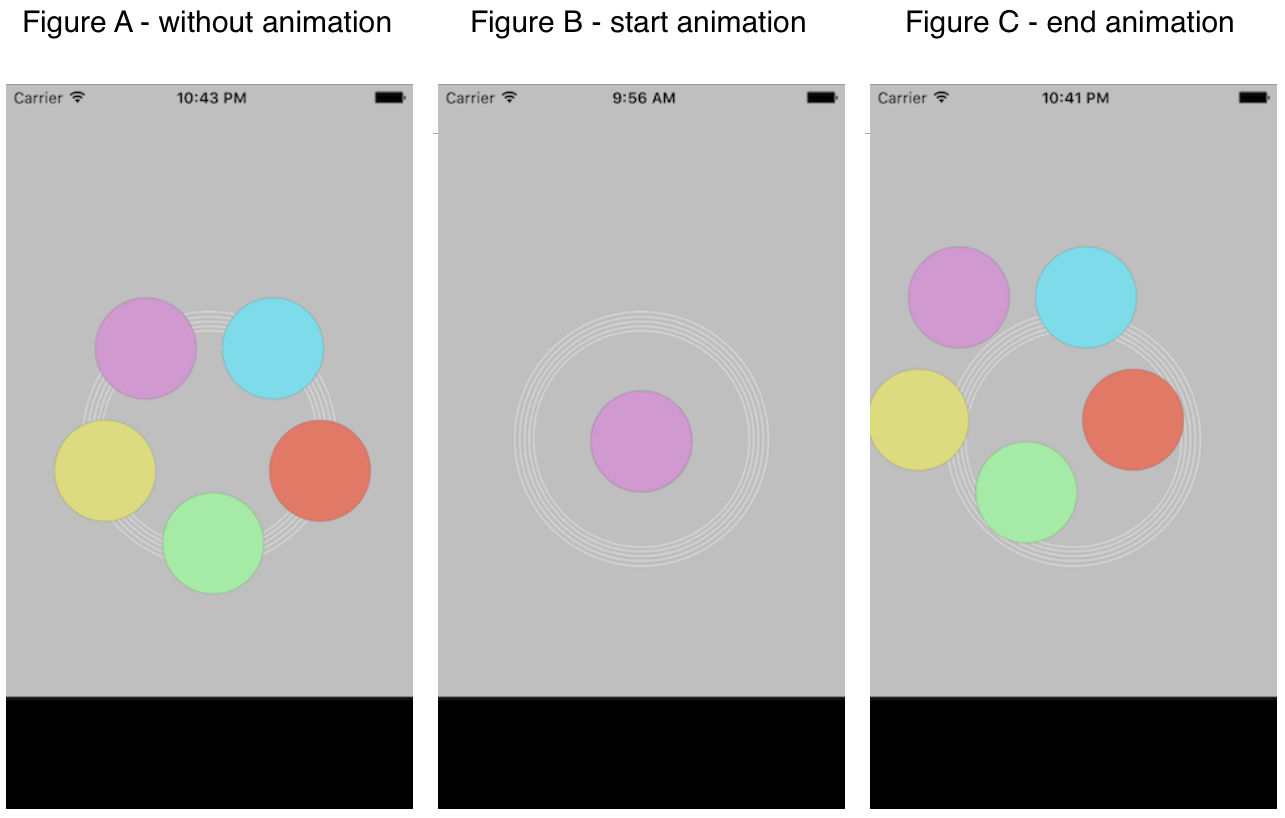
当我在屏幕底部的黑色矩形区域中单击时,我注意到日志报表unexpected nil window in _UIApplicationHandleEventFromQueueEvent中有一条消息,其中包括帧的大小属性。这表明帧或边界可能是UIButtons在动画后偏离中心的原因之一。
下面是我用来演示发生什么的代码的最新版本。我相信这是正确的,即使它不会在面向对象的选美比赛中赢得任何奖项:
首先,图A中没有动画的五个按钮。
- (void)viewDidLoad {
NSLog(@"load GlobalView");

CGRect dot1 = (CGRect) { .origin.x = 38.0f,  .origin.y = 263.0f, .size.width = 80.0f, .size.height = 80.0f,};
CGRect dot2 = (CGRect) { .origin.x = 207.0f, .origin.y = 263.0f, .size.width = 80.0f, .size.height = 80.0f,};
CGRect dot3 = (CGRect) { .origin.x = 123.0f, .origin.y = 320.0f, .size.width = 80.0f, .size.height = 80.0f,};
CGRect dot4 = (CGRect) { .origin.x = 170.0f, .origin.y = 167.0f, .size.width = 80.0f, .size.height = 80.0f,};
CGRect dot5 = (CGRect) { .origin.x = 70.0f, .origin.y = 167.0f, .size.width = 80.0f, .size.height = 80.0f,};编辑。下面的代码行重新定义了origin,因此CGRect以圆周为中心。它们取代了上面将origin定义为CGRect的左上端的线条。动画现在根据图A所示的布局放置UIButtons。
 */

float width  = 80.0f;
float height = 80.0f;

CGRect dot1 = (CGRect) { .origin.x =  38.0f + width/2, .origin.y = 263.0f + width/2, width, height};
CGRect dot2 = (CGRect) { .origin.x = 207.0f + width/2, .origin.y = 263.0f + width/2, width, height};
CGRect dot3 = (CGRect) { .origin.x = 123.0f + width/2, .origin.y = 320.0f + width/2, width, height};
CGRect dot4 = (CGRect) { .origin.x = 170.0f + width/2, .origin.y = 167.0f + width/2, width, height};
CGRect dot5 = (CGRect) { .origin.x = 70.0f + width/2, .origin.y = 167.0f + width/2, width, height};// Insert global rings
UIView *ringView = [[UIView alloc] initWithFrame:CGRectMake(60.0f, 178.0f, 200.0f, 200.0f)];
UIImage *ringImage = [UIImage imageNamed:@"GlobalRings.png"];
UIImageView *imageView = [[UIImageView alloc] initWithImage:ringImage];
imageView.frame = ringView.bounds; // frame imageView in ringView and fill ringView
[ringView addSubview:imageView]; // add the imageview to the superview
[self.view addSubview:ringView]; //add the view to the main view
// place 5 UIButtons
UIButton *navigationButton1 = [UIButton buttonWithType:UIButtonTypeCustom];
[navigationButton1 setTitleColor:[UIColor blackColor] forState: UIControlStateNormal];
navigationButton1.frame = CGRectMake(38.0, 263.0, 80.0, 80.0);
[navigationButton1 setImage:[UIImage imageNamed:@"Dot1.png"] forState:UIControlStateNormal];
[navigationButton1 addTarget:self action:@selector(goToVenue1) forControlEvents:UIControlEventTouchUpInside];
UIButton *navigationButton2 = [UIButton buttonWithType:UIButtonTypeCustom];
[navigationButton2 setTitleColor:[UIColor blackColor] forState: UIControlStateNormal];
navigationButton2.frame = CGRectMake(207.0, 263.0, 80.0, 80.0);
[navigationButton2 setImage:[UIImage imageNamed:@"Dot2.png"] forState:UIControlStateNormal];
[navigationButton2 addTarget:self action:@selector(goToVenue2) forControlEvents:UIControlEventTouchUpInside];
UIButton *navigationButton3 = [UIButton buttonWithType:UIButtonTypeCustom];
[navigationButton3 setTitleColor:[UIColor blackColor] forState: UIControlStateNormal];
navigationButton3.frame = CGRectMake(123.0, 320.0, 80.0, 80.0);
[navigationButton3 setImage:[UIImage imageNamed:@"Dot3.png"] forState:UIControlStateNormal];
[navigationButton3 addTarget:self action:@selector(goToVenue3) forControlEvents:UIControlEventTouchUpInside];
UIButton *navigationButton4 = [UIButton buttonWithType:UIButtonTypeCustom];
[navigationButton4 setTitleColor:[UIColor blackColor] forState: UIControlStateNormal];
navigationButton4.frame = CGRectMake(170.0, 167.0, 80.0, 80.0);
[navigationButton4 setImage:[UIImage imageNamed:@"Dot4.png"] forState:UIControlStateNormal];
[navigationButton4 addTarget:self action:@selector(goToVenue4) forControlEvents:UIControlEventTouchUpInside];
UIButton *navigationButton5 = [UIButton buttonWithType:UIButtonTypeCustom];
[navigationButton5 setTitleColor:[UIColor blackColor] forState: UIControlStateNormal];
navigationButton5.frame = CGRectMake(70.0, 167.0, 80.0, 80.0);
[navigationButton5 setImage:[UIImage imageNamed:@"Dot5.png"] forState:UIControlStateNormal];
[navigationButton5 addTarget:self action:@selector(goToVenue5) forControlEvents:UIControlEventTouchUpInside];
[self.view addSubview:navigationButton1];
[self.view addSubview:navigationButton2];
[self.view addSubview:navigationButton3];
[self.view addSubview:navigationButton4];
[self.view addSubview:navigationButton5];
[super viewDidLoad];
}然后,在动画开始之前,将五个UIButtons放在中心,我通过添加
CGRect preSnap = (CGRect) { .origin.x = 120.0f, .origin.y = 240.0f, .size.width = 80.0f, .size.height = 80.0f,};然后更改每个按钮框(下面)以设置动画的起点。
navigationButton1.frame = preSnap;
navigationButton2.frame = preSnap;
navigationButton3.frame = preSnap;
navigationButton4.frame = preSnap;
navigationButton5.frame = preSnap;然后,我将UISnapBehaviour添加到动画中,在viewDidLoad之后插入指针
UIDynamicAnimator* _animator1;
UIDynamicAnimator* _animator2;
UIDynamicAnimator* _animator3;
UIDynamicAnimator* _animator4;
UIDynamicAnimator* _animator5;
UISnapBehavior* _snap1;
UISnapBehavior* _snap2;
UISnapBehavior* _snap3;
UISnapBehavior* _snap4;
UISnapBehavior* _snap5;并在UIDynamicAnimator之前添加[super viewDidLoad];和UISnapBehavior方法,从而得到如图C所示的UIButton布局
_animator1 = [[UIDynamicAnimator alloc] initWithReferenceView:self.view];
_snap1  = [[UISnapBehavior alloc] initWithItem:navigationButton1 snapToPoint: dot1.origin];
[_animator1 addBehavior:_snap1];

_animator2 = [[UIDynamicAnimator alloc] initWithReferenceView:self.view];
_snap2  = [[UISnapBehavior alloc] initWithItem:navigationButton2 snapToPoint: dot2.origin];
[_animator2 addBehavior:_snap2];

_animator3 = [[UIDynamicAnimator alloc] initWithReferenceView:self.view];
_snap3  = [[UISnapBehavior alloc] initWithItem:navigationButton3 snapToPoint: dot3.origin];
[_animator3 addBehavior:_snap3];

_animator4 = [[UIDynamicAnimator alloc] initWithReferenceView:self.view];
_snap4  = [[UISnapBehavior alloc] initWithItem:navigationButton4 snapToPoint: dot4.origin];
_animator4 addBehavior:_snap4;
_animator5 = [[UIDynamicAnimator alloc] initWithReferenceView:self.view];
_snap5  = [[UISnapBehavior alloc] initWithItem:navigationButton5 snapToPoint: dot5.origin];
[_animator5 addBehavior:_snap5];

[super viewDidLoad];
}
最后,我添加了五种方法来确保所有按钮都正常工作。
- (void)goToVenue1 {
NSLog(@"Button 1 worked");
}
- (void)goToVenue2 {
NSLog(@"Button 2 worked");
}
- (void)goToVenue3 {
NSLog(@"Button 3 worked");
}
- (void)goToVenue4 {
NSLog(@"Button 4 worked");
}
- (void)goToVenue5 {
NSLog(@"Button 5 worked");
}回答 1
Stack Overflow用户
发布于 2016-02-28 23:18:26
问题解决了。在早期的草稿中,origin坐标是位于左上角顶点的坐标。有必要重新定义origin,以便CGRect以圆周为中心。
https://stackoverflow.com/questions/35594642
复制相似问题
腾讯云开发者

Copyright © 2013 - 2026 Tencent Cloud. All Rights Reserved. 腾讯云 版权所有
深圳市腾讯计算机系统有限公司 ICP备案/许可证号:粤B2-20090059  粤公网安备44030502008569号
腾讯云计算(北京)有限责任公司 京ICP证150476号 | 京ICP备11018762号