
数值的HTML5验证
数值的HTML5验证
提问于 2016-02-23 05:55:26
我有一个简单的html页面,有两个输入文本框和一个提交按钮。当我点击提交按钮与无效的电子邮件地址,它会给我一个错误的消息。对于数值的其他文本框,我如何实现相同的(显示类似弹出的小工具提示)?
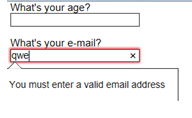
这是完整的html
<html>
<head>
<style>
body {
  font: 1em sans-serif;
  padding: 0;
  margin : 0;
}

form {
  max-width: 200px;
  margin: 0;
  padding: 0 5px;
}

p > label {
  display: block;
}

input[type=text],
input[type=email],
input[type=number],
textarea,
fieldset {
/* required to properly style form
   elements on WebKit based browsers */
  -webkit-appearance: none;

  width : 100%;
  border: 1px solid #333;
  margin: 0;

  font-family: inherit;
  font-size: 90%;

  -moz-box-sizing: border-box;
  box-sizing: border-box;
}

input:invalid {
  box-shadow: 0 0 5px 1px red;
}

input:focus:invalid {
  outline: none;
}
</style>

</head>
<body><form>
<p>
    <label for="t1">What's your age?</label>
    <input type="number" id="t1" name="age">
  </p>
<p>
    <label for="t2">What's your e-mail?</label>
    <input type="email" id="t2" name="email">
  </p>
<p>
    <button>Submit</button>
  </p>
</form>
</body>
</html>回答 5
Stack Overflow用户
回答已采纳
发布于 2016-02-23 06:08:50
更好的解决方案是使用pattern属性,它使用正则表达式来匹配输入:
<input type="text" pattern="\d*" />D是一个数字的正则表达式,*表示它接受多个数字。
Stack Overflow用户
发布于 2021-04-30 17:31:38
<input type="number" required >
<input type="submit" >
这对我来说很管用
Stack Overflow用户
发布于 2016-02-23 05:58:57
由于您已经在使用HTML 5数字文本框,因此不需要手动设置此类工具提示。如果有任何验证错误,那么这个工具提示将自动显示相同的电子邮件。
这是一个数字文本框,所以它不允许您输入任何其他字符,除了数字,因此在这种情况下,您将不会收到任何验证错误。如果您正在设置任何限制,如最小值和最大值,如果验证不为真,则将自动显示工具提示。
您可以通过在textbox上设置一些数字限制来检查工具提示。希望这能帮到你。
页面原文内容由Stack Overflow提供。腾讯云小微IT领域专用引擎提供翻译支持
原文链接:
https://stackoverflow.com/questions/35569904
复制相关文章
相似问题
腾讯云开发者

Copyright © 2013 - 2026 Tencent Cloud. All Rights Reserved. 腾讯云 版权所有
深圳市腾讯计算机系统有限公司 ICP备案/许可证号:粤B2-20090059  粤公网安备44030502008569号
腾讯云计算(北京)有限责任公司 京ICP证150476号 | 京ICP备11018762号