
用照片中的参考物体测量物体的尺寸
我想在照片中计算对象的大小,其中包括目标对象和参考对象。
我想我想做的是这个软件实现了什么(我不知道这个软件有多精确) https://itunes.apple.com/us/app/photo-meter-picture-measuring/id579961082?mt=8
我已经发现,一般来说,它被称为摄影测量,似乎是活跃的研究领域。
How would you find the height of objects given an image? https://physics.stackexchange.com/questions/151121/can-i-calculate-the-size-of-a-real-object-by-just-looking-at-the-picture-taken-b
但是,我找不到
- 用参考物体测量照片中的物体的基本方法是什么?
- 一种实现它的方法或它的标准开放源码。
更新
- 我不能利用物体与摄像机之间的距离。
- 基准和目标在(大约)同一平面上。
回答 2
Stack Overflow用户
发布于 2016-04-03 16:32:30
由于你的假设,参考和目标在(大约)相同的平面上。可以应用中描述的“算法1:平面测量”方法。
. Ed. by Luc Van Gool. Vol. 2449. Lecture Notes in Computer Science. Springer Berlin Heidelberg, 2002, pp. 224-239.
这个方法允许你测量位于同一平面上的两个点之间的距离。
基本上
P=H*p (1)其中,p是图像中以齐次坐标表示的点,P是三维世界平面上的对应点,也是齐次坐标,H是一个3x3矩阵,称为同形矩阵,*是矩阵向量乘法。
    h11 h12 h13
H = h21 h22 h23
h31 h32 h33p的度量单位是像素,因此,例如,如果p是行r和列c的一个点,那么它将表示为[r,c,1]。P的度量单位是你的世界单位,例如米,你可以假设你的三维世界平面是平面Z=0,所以P被表示为齐次向量[X,Y,1]。
所以稍微修改一下“算法1:平面测量”。如下:
- 给出了一幅平面图像,估计了图像到世界的同形矩阵H,假设H的9个元素是无量纲的。
- 在图像中,选择属于引用对象的两点
p1=[r1,c1,1]和p2=[r2,c2,1]。 - 通过(1)将每个图像点反向投影到世界平面上,得到两个世界点
P1和P2。你做矩阵向量乘法,然后除以其第三个分量的结果向量,得到一个齐次向量。例如,P1=[X1,Y1,1]是P1=[(c1*h_12 + h_11*r1 + h_13)/(c1*h_32 + h_31*r1 + h_33),(c1*h_22 + h_21*r1 + h_23)/(c1*h_32 + h_31*r1 + h_33),1]。假设H的九个元素是无量纲的,这意味着X1、Y1、X2、Y2的度量单位是像素。 - 计算
R与P1之间的距离,即R=sqrt(pow(X1-X2,2)+pow(Y1-Y2,2),R仍以像素表示。现在,由于P1和P2位于引用对象上,这意味着您知道它们之间的距离(以米为单位),让我们将其称为米,以米表示,M。 - 计算尺度因子
s为s=M/R,s的维数为每像素米。 - 将
H的每个元素乘以s,并将G称为新的矩阵。现在,G的元素以每像素米表示。 - 现在,在图像中选择属于目标对象的两点
p3和p4。 - 备份项目
p3和p4通过G获得P3和P4。P3=G*p3和P4=G*p4.同样,将每个向量除以其第三个元素。P3=[X3,Y3,1]和P4=[X4,Y4,1]以及现在的X3、Y3、X4和Y4都是以米表示的。 - 计算
P3和P4(即D=sqrt(pow(X3-X4,2)+pow(Y3-Y4,2))之间所需的目标距离(P4)。D现在以米表示。
上述文章的附录解释了如何计算H,或者例如,您可以使用OpenCV cv::findHomography:基本上,您需要在现实世界中的点和图像中的点之间至少有四个对应。
关于如何估计H的另一个信息来源是
, 2006.
如果您还需要估计您的测量的准确性,您可以在
A. Criminisi。精确的视觉计量从单一和多个未标定的图像。杰出论文系列。斯普林格-维拉格伦敦有限公司,2001年9月。ISBN: 1852334681。
在C++和OpenCV中有一个例子:
#include "opencv2/core/core.hpp"
#include "opencv2/imgproc/imgproc.hpp"
#include "opencv2/highgui/highgui.hpp"
#include "opencv2/calib3d/calib3d.hpp"


void to_homogeneous(const std::vector< cv::Point2f >& non_homogeneous, std::vector< cv::Point3f >& homogeneous )
{
    homogeneous.resize(non_homogeneous.size());
    for ( size_t i = 0; i < non_homogeneous.size(); i++ ) {
        homogeneous[i].x = non_homogeneous[i].x;
        homogeneous[i].y = non_homogeneous[i].y;
        homogeneous[i].z = 1.0;
    }
}

void from_homogeneous(const std::vector< cv::Point3f >& homogeneous, std::vector< cv::Point2f >& non_homogeneous )
{
    non_homogeneous.resize(homogeneous.size());
    for ( size_t i = 0; i < non_homogeneous.size(); i++ ) {
        non_homogeneous[i].x = homogeneous[i].x / homogeneous[i].z;
        non_homogeneous[i].y = homogeneous[i].y / homogeneous[i].z;
    }
}

void draw_cross(cv::Mat &img, const cv::Point center, float arm_length, const cv::Scalar &color, int thickness = 5 )
{
    cv::Point N(center - cv::Point(0, arm_length));
    cv::Point S(center + cv::Point(0, arm_length));
    cv::Point E(center + cv::Point(arm_length, 0));
    cv::Point W(center - cv::Point(arm_length, 0));
    cv::line(img, N, S, color, thickness);
    cv::line(img, E, W, color, thickness);
}

double measure_distance(const cv::Point2f& p1, const cv::Point2f& p2, const cv::Matx33f& GG)
{
    std::vector< cv::Point2f > ticks(2);
    ticks[0] = p1;
    ticks[1] = p2;
    std::vector< cv::Point3f > ticks_h;
    to_homogeneous(ticks, ticks_h);

    std::vector< cv::Point3f > world_ticks_h(2);
    for ( size_t i = 0; i < ticks_h.size(); i++ ) {
        world_ticks_h[i] = GG * ticks_h[i];
    }
    std::vector< cv::Point2f > world_ticks_back;
    from_homogeneous(world_ticks_h, world_ticks_back);

    return cv::norm(world_ticks_back[0] - world_ticks_back[1]);
}

int main(int, char**)
{
    cv::Mat img = cv::imread("single-view-metrology.JPG");
    std::vector< cv::Point2f > world_tenth_of_mm;
    std::vector< cv::Point2f > img_px;

    // Here I manually picked the pixels coordinates of the corners of the A4 sheet.
    cv::Point2f TL(711, 64);
    cv::Point2f BL(317, 1429);
    cv::Point2f TR(1970, 175);
    cv::Point2f BR(1863, 1561);

    // This is the standard size of the A4 sheet:
    const int A4_w_mm = 210;
    const int A4_h_mm = 297;
    const int scale = 10;

    // Here I create the correspondences between the world point and the
    // image points.
    img_px.push_back(TL);
    world_tenth_of_mm.push_back(cv::Point2f(0.0, 0.0));

    img_px.push_back(TR);
    world_tenth_of_mm.push_back(cv::Point2f(A4_w_mm * scale, 0.0));

    img_px.push_back(BL);
    world_tenth_of_mm.push_back(cv::Point2f(0.0, A4_h_mm * scale));

    img_px.push_back(BR);
    world_tenth_of_mm.push_back(cv::Point2f(A4_w_mm * scale, A4_h_mm * scale));

    // Here I estimate the homography that brings the world to the image.
    cv::Mat H = cv::findHomography(world_tenth_of_mm, img_px);

    // To back-project the image points into the world I need the inverse of the homography.
    cv::Mat G = H.inv();

    // I can rectify the image.
    cv::Mat warped;
    cv::warpPerspective(img, warped, G, cv::Size(2600, 2200 * 297 / 210));

    {
        // Here I manually picked the pixels coordinates of ticks '0' and '1' in the slide rule,
        // in the world the distance between them is 10mm.
        cv::Point2f tick_0(2017, 1159);
        cv::Point2f tick_1(1949, 1143);
        // I measure the distance and I write it on the image.
        std::ostringstream oss;
        oss << measure_distance(tick_0, tick_1, G) / scale;
        cv::line(img, tick_0, tick_1, CV_RGB(0, 255, 0));
        cv::putText(img, oss.str(), (tick_0 + tick_1) / 2, cv::FONT_HERSHEY_PLAIN, 3, CV_RGB(0, 255, 0), 3);
    }

    {
        // Here I manually picked the pixels coordinates of ticks '11' and '12' in the slide rule,
        // in the world the distance between them is 10mm.
        cv::Point2f tick_11(1277, 988);
        cv::Point2f tick_12(1211, 973);
        // I measure the distance and I write it on the image.
        std::ostringstream oss;
        oss << measure_distance(tick_11, tick_12, G) / scale;
        cv::line(img, tick_11, tick_12, CV_RGB(0, 255, 0));
        cv::putText(img, oss.str(), (tick_11 + tick_12) / 2, cv::FONT_HERSHEY_PLAIN, 3, CV_RGB(0, 255, 0), 3);
    }

    // I draw the points used in the estimate of the homography.
    draw_cross(img, TL, 40, CV_RGB(255, 0, 0));
    draw_cross(img, TR, 40, CV_RGB(255, 0, 0));
    draw_cross(img, BL, 40, CV_RGB(255, 0, 0));
    draw_cross(img, BR, 40, CV_RGB(255, 0, 0));

    cv::namedWindow( "Input image", cv::WINDOW_NORMAL );
    cv::imshow( "Input image", img );
    cv::imwrite("img.png", img);

    cv::namedWindow( "Rectified image", cv::WINDOW_NORMAL );
    cv::imshow( "Rectified image", warped );
    cv::imwrite("warped.png", warped);

    cv::waitKey(0);

    return 0;
}
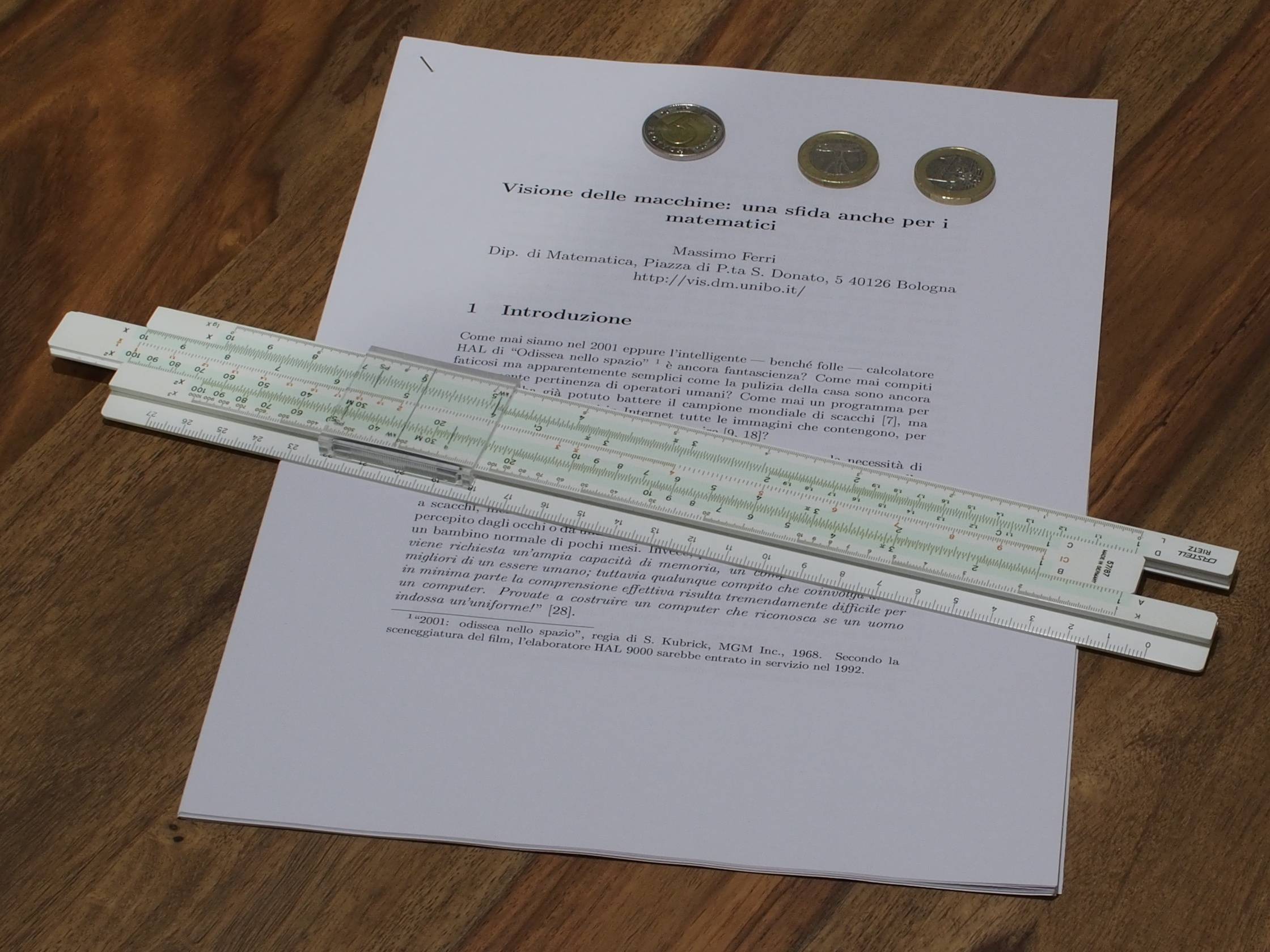
输入图像,在这种情况下,引用对象是A4表,目标对象是幻灯片规则:
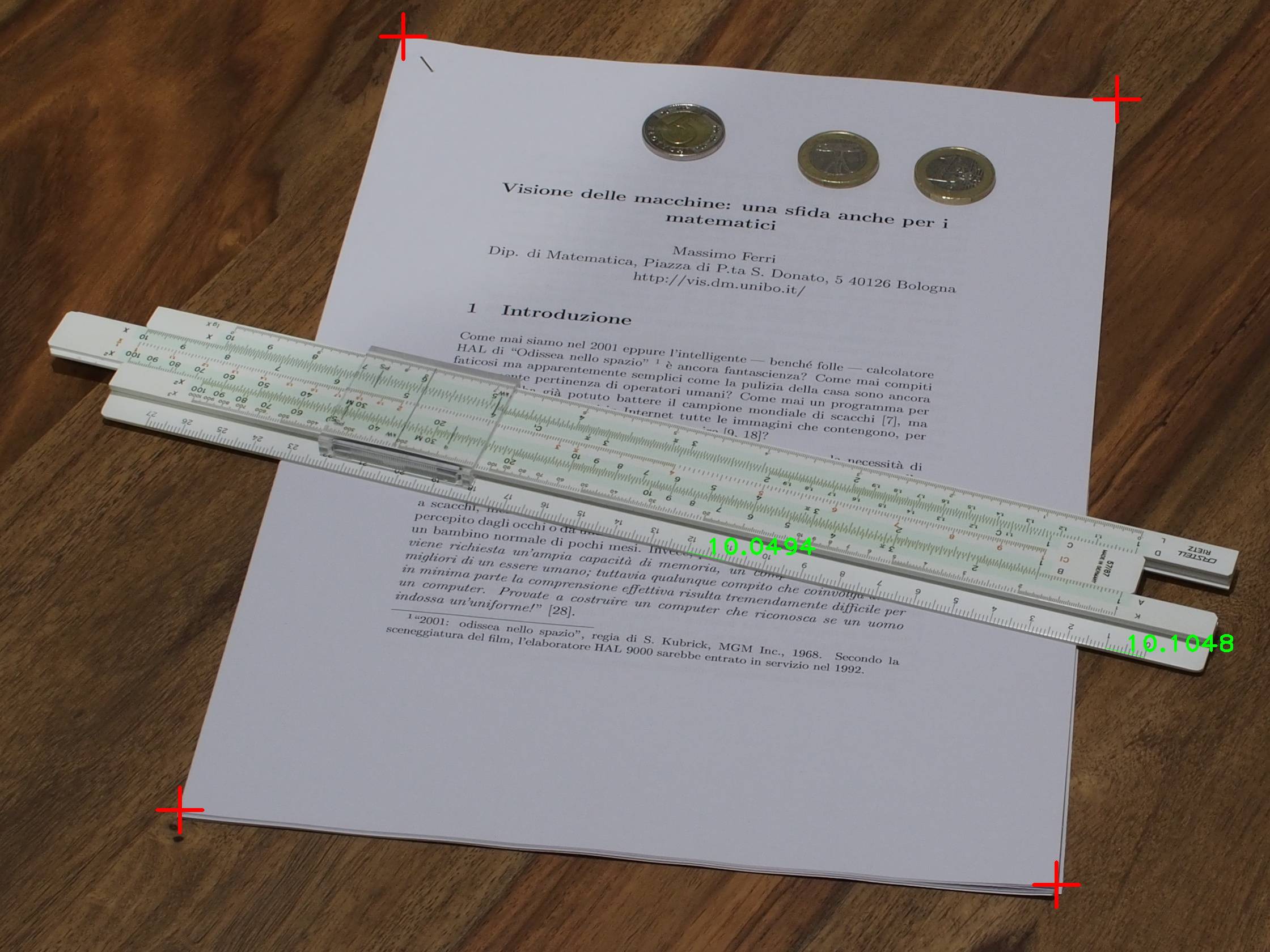
输入带有度量的图像时,使用红色十字来估计其同调性:
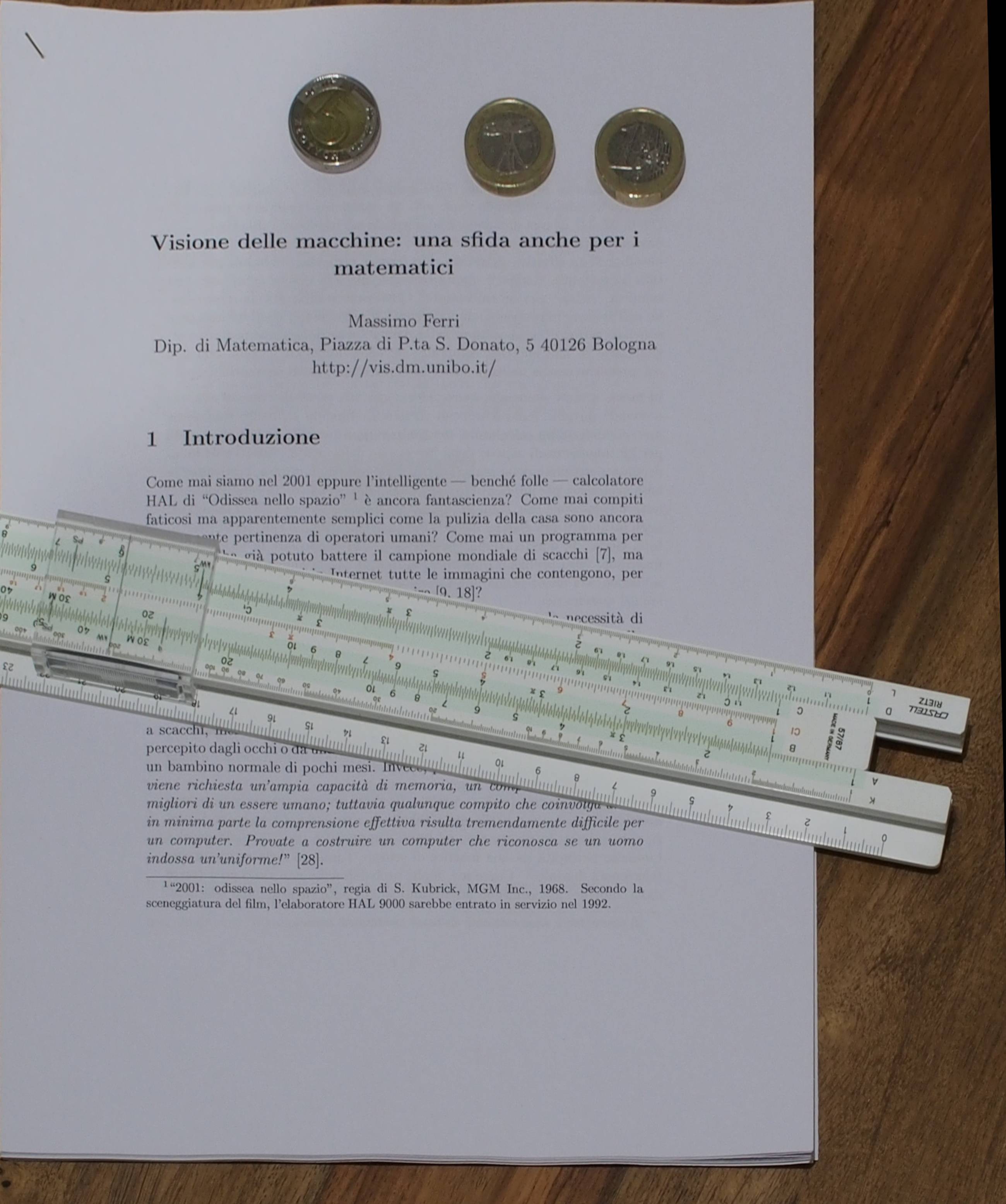
校正后的图像:
Stack Overflow用户
发布于 2016-02-22 16:36:48
最基本的方法是简单地确定参考对象的像素尺寸,并使用度量维来导出mm /像素因子。然后用这个因子乘以你要测量的物体的像素尺寸。只有当两个对象都在与传感器平行的同一平面内时,这才能起作用。
对于其他任何信息,您需要的是距离信息。你既可以测量它们,也可以根据你的准确程度做出一些假设。
实现这些度量的方法取决于您的需求。
https://stackoverflow.com/questions/35555375
复制相似问题
腾讯云开发者

Copyright © 2013 - 2026 Tencent Cloud. All Rights Reserved. 腾讯云 版权所有
深圳市腾讯计算机系统有限公司 ICP备案/许可证号:粤B2-20090059  粤公网安备44030502008569号
腾讯云计算(北京)有限责任公司 京ICP证150476号 | 京ICP备11018762号