
如何从头构建libvirt盒
如何从头构建libvirt盒
提问于 2016-02-19 22:25:53
我正试着从头开始做一个流浪汉的小盒子。
我安装了ubuntu14.04,并使用这教程为流浪者准备了机器,然后我使用命令virsh domblklist test查找我的图像文件,所以我在这里找到了/var/lib/libvirt/images/test.img,然后复制到要打包我的盒的地方。然后,我用qcow2命令将原始图像文件转换为这格式(因为这页面说只有qcow2格式支持)。最后,为了完成任务,我执行了vagrant init test并创建了metadata.json文件
{
  "provider"     : "libvirt",
  "format"       : "qcow2",
  "virtual_size" : 8
}然后,我使用命令tar cvzf vltest.box ./metadata.json ./Vagrantfile ./box.img将所有内容放在一个框中。然后我用vagrant box add test.img test给流浪汉加了一个盒子。
然后我试着用
vagrant init test
vagrant up --provider=libvirt
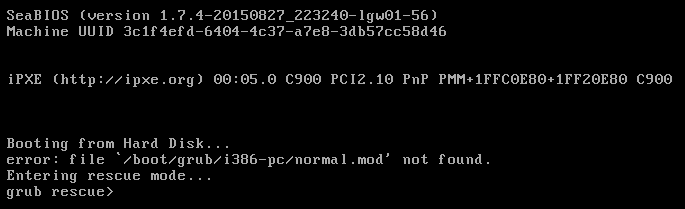
但它被困在这里:
...
==> default:  -- Video VRAM:        9216
==> default:  -- Keymap:            en-us
==> default:  -- INPUT:             type=mouse, bus=ps2
==> default:  -- Command line :
==> default: Creating shared folders metadata...
==> default: Starting domain.
==> default: Waiting for domain to get an IP address...
然后我决定打开机器,这就是我看到的:
这里是原始机器配置:
<domain type='kvm'>
  <name>test</name>
  <uuid>50c605f7-c06c-4288-bd03-f17575345171</uuid>
  <memory unit='KiB'>1048576</memory>
  <currentMemory unit='KiB'>1048576</currentMemory>
  <vcpu placement='static'>1</vcpu>
  <os>
    <type arch='x86_64' machine='pc-i440fx-trusty'>hvm</type>
    <boot dev='hd'/>
  </os>
  <features>
    <acpi/>
    <apic/>
    <pae/>
  </features>
  <clock offset='utc'/>
  <on_poweroff>destroy</on_poweroff>
  <on_reboot>restart</on_reboot>
  <on_crash>restart</on_crash>
  <devices>
    <emulator>/usr/bin/kvm-spice</emulator>
    <disk type='file' device='disk'>
      <driver name='qemu' type='raw'/>
      <source file='/var/lib/libvirt/images/test.img'/>
      <target dev='vda' bus='virtio'/>
      <address type='pci' domain='0x0000' bus='0x00' slot='0x05' function='0x0'/>
    </disk>
    <disk type='block' device='cdrom'>
      <driver name='qemu' type='raw'/>
      <target dev='hdc' bus='ide'/>
      <readonly/>
      <address type='drive' controller='0' bus='1' target='0' unit='0'/>
    </disk>
    <controller type='usb' index='0'>
      <address type='pci' domain='0x0000' bus='0x00' slot='0x01' function='0x2'/>
    </controller>
    <controller type='pci' index='0' model='pci-root'/>
    <controller type='ide' index='0'>
      <address type='pci' domain='0x0000' bus='0x00' slot='0x01' function='0x1'/>
    </controller>
    <interface type='network'>
      <mac address='52:54:00:6c:05:1b'/>
      <source network='default'/>
      <model type='virtio'/>
      <address type='pci' domain='0x0000' bus='0x00' slot='0x03' function='0x0'/>
    </interface>
    <serial type='pty'>
      <target port='0'/>
    </serial>
    <console type='pty'>
      <target type='serial' port='0'/>
    </console>
    <input type='mouse' bus='ps2'/>
    <input type='keyboard' bus='ps2'/>
    <graphics type='vnc' port='-1' autoport='yes'/>
    <sound model='ich6'>
      <address type='pci' domain='0x0000' bus='0x00' slot='0x04' function='0x0'/>
    </sound>
    <video>
      <model type='cirrus' vram='9216' heads='1'/>
      <address type='pci' domain='0x0000' bus='0x00' slot='0x02' function='0x0'/>
    </video>
    <memballoon model='virtio'>
      <address type='pci' domain='0x0000' bus='0x00' slot='0x06' function='0x0'/>
    </memballoon>
  </devices>
</domain>
下面是新生成的流浪框的配置:
<domain type='kvm' id='8'>
  <name>testLibvirt_default</name>
  <uuid>00069068-f4bc-41fa-b316-870e78fbe393</uuid>
  <memory unit='KiB'>524288</memory>
  <currentMemory unit='KiB'>524288</currentMemory>
  <vcpu placement='static'>1</vcpu>
  <resource>
    <partition>/machine</partition>
  </resource>
  <os>
    <type arch='x86_64' machine='pc-i440fx-trusty'>hvm</type>
    <boot dev='hd'/>
  </os>
  <features>
    <acpi/>
    <apic/>
    <pae/>
  </features>
  <cpu mode='host-model'>
    <model fallback='allow'/>
  </cpu>
  <clock offset='utc'/>
  <on_poweroff>destroy</on_poweroff>
  <on_reboot>restart</on_reboot>
  <on_crash>destroy</on_crash>
  <devices>
    <emulator>/usr/bin/kvm-spice</emulator>
    <disk type='file' device='disk'>
      <driver name='qemu' type='qcow2'/>
      <source file='/var/lib/libvirt/images/testLibvirt_default.img'/>
      <target dev='vda' bus='virtio'/>
      <alias name='virtio-disk0'/>
      <address type='pci' domain='0x0000' bus='0x00' slot='0x03' function='0x0'/>
    </disk>
    <controller type='usb' index='0'>
      <alias name='usb0'/>
      <address type='pci' domain='0x0000' bus='0x00' slot='0x01' function='0x2'/>
    </controller>
    <controller type='pci' index='0' model='pci-root'>
      <alias name='pci.0'/>
    </controller>
    <interface type='network'>
      <mac address='52:54:00:91:b2:63'/>
      <source network='vagrant-libvirt'/>
      <target dev='vnet0'/>
      <model type='virtio'/>
      <alias name='net0'/>
      <address type='pci' domain='0x0000' bus='0x00' slot='0x05' function='0x0'/>
    </interface>
    <serial type='pty'>
      <source path='/dev/pts/8'/>
      <target port='0'/>
      <alias name='serial0'/>
    </serial>
    <console type='pty' tty='/dev/pts/8'>
      <source path='/dev/pts/8'/>
      <target type='serial' port='0'/>
      <alias name='serial0'/>
    </console>
    <input type='mouse' bus='ps2'/>
    <input type='keyboard' bus='ps2'/>
    <graphics type='vnc' port='5900' autoport='yes' listen='127.0.0.1' keymap='en-us'>
      <listen type='address' address='127.0.0.1'/>
    </graphics>
    <video>
      <model type='cirrus' vram='9216' heads='1'/>
      <alias name='video0'/>
      <address type='pci' domain='0x0000' bus='0x00' slot='0x02' function='0x0'/>
    </video>
    <memballoon model='virtio'>
      <alias name='balloon0'/>
      <address type='pci' domain='0x0000' bus='0x00' slot='0x04' function='0x0'/>
    </memballoon>
  </devices>
  <seclabel type='dynamic' model='apparmor' relabel='yes'>
    <label>libvirt-00069068-f4bc-41fa-b316-870e78fbe393</label>
    <imagelabel>libvirt-00069068-f4bc-41fa-b316-870e78fbe393</imagelabel>
  </seclabel>
</domain>更新:我也尝试过封隔器,但是当grub出现时会得到相同的错误。这是我的封隔器模板:
{
    "builders":
    [
      {
        "type": "qemu",
        "iso_url": "/home/galiaf95/Downloads/ubuntu-14.04.3-desktop-amd64.iso",
        "iso_checksum": "cab6dd5ee6d649ed1b24e807c877c0ae",
        "iso_checksum_type": "md5",
        "output_directory": "output_centos_tdhtest",
        "shutdown_command": "shutdown -P now",
        "disk_size": 8000,
        "format": "qcow2",
        "headless": false,
        "accelerator": "kvm",
        "http_port_min": 10082,
        "http_port_max": 10089,
        "ssh_host_port_min": 2222,
        "ssh_host_port_max": 2229,
        "ssh_username": "vagrant",
        "ssh_password": "vagrant",
        "ssh_port": 22,
        "ssh_wait_timeout": "7200s",
        "vm_name": "tdhtest",
        "net_device": "virtio-net",
        "disk_interface": "virtio"
      }
    ],
    "post-processors": [
        {
            "keep_input_artifact": false,
            "output": "box/ubuntu-1404-server.box",
            "type": "vagrant"
        }
    ]
}
ISO文件的ubuntu14.04我从ubuntu网站下载。
所以我的问题是:
- 我做错了什么以及如何解决
- 有没有更好的方法从零开始建造流浪的libvirt盒子
回答 1
Stack Overflow用户
发布于 2016-02-20 18:11:16
页面原文内容由Stack Overflow提供。腾讯云小微IT领域专用引擎提供翻译支持
原文链接:
https://stackoverflow.com/questions/35516234
复制相关文章
相似问题
腾讯云开发者

Copyright © 2013 - 2026 Tencent Cloud. All Rights Reserved. 腾讯云 版权所有
深圳市腾讯计算机系统有限公司 ICP备案/许可证号:粤B2-20090059  粤公网安备44030502008569号
腾讯云计算(北京)有限责任公司 京ICP证150476号 | 京ICP备11018762号