
Paytm sdk ios集成打开Paytm支付表单?
集成Paytm SDK2.1在iOS (Xcode 7),并配置为支付。
我有一个表格,其中的金额和其他字段需要填写,然后有一个按钮付款。
下面是我使用的代码:
 //Step 1: Create a default merchant config object
    PGMerchantConfiguration *mc = [PGMerchantConfiguration defaultConfiguration];

    //Step 2: If you have your own checksum generation and validation url set this here. Otherwise use the default Paytm urls
    mc.checksumGenerationURL = @"generate checksum url";
    mc.checksumValidationURL =   @"checksum validation url";


    //Step 3: Create the order with whatever params you want to add. But make sure that you include the merchant mandatory params
    NSMutableDictionary *orderDict = [NSMutableDictionary new];
    //Merchant configuration in the order object
    orderDict[@"MID"] = @"abc1111";
    orderDict[@"CHANNEL_ID"] = @"WAP";
    orderDict[@"INDUSTRY_TYPE_ID"] = @"Education";
    orderDict[@"WEBSITE"] = @"companyname";
    //Order configuration in the order object
    orderDict[@"TXN_AMOUNT"] = @"100";
    orderDict[@"ORDER_ID"] = [Feepayment generateOrderIDWithPrefix:@"111"];
    orderDict[@"REQUEST_TYPE"] = @"DEFAULT";
    orderDict[@"CUST_ID"] = @"abc7777";

    PGOrder *order = [PGOrder orderWithParams:orderDict];

    //Step 4: Choose the PG server. In your production build dont call selectServerDialog. Just create a instance of the
    //PGTransactionViewController and set the serverType to eServerTypeProduction


    [PGServerEnvironment selectServerDialog:self.view completionHandler:^(ServerType type)
     {
         PGTransactionViewController *txnController = [[PGTransactionViewController alloc] initTransactionForOrder:order];

         //show title var
         UIView *mNavBar = [[UIView alloc] initWithFrame:CGRectMake(0, 0, self.view.frame.size.width,44)];
         mNavBar.backgroundColor = [UIColor grayColor];
         txnController.topBar = mNavBar;

         //Cancel button
         UIButton *mCancelButton = [[UIButton alloc] initWithFrame:CGRectMake(5, 2, 70, 40)];
         [mCancelButton setTitle:@"Cancel" forState:UIControlStateNormal];
         mCancelButton.titleLabel.textColor = PURPLE_COLOR;
         [mCancelButton setFont:[UIFont fontWithName:@"Helvetica-Bold" size:15.0]];
         txnController.cancelButton = mCancelButton;


         //add title
         UILabel *mTitleLabel = [[UILabel alloc] initWithFrame:CGRectMake(self.view.frame.size.width/2 - 10, 1, 100, 50)];
         [mTitleLabel setText:@"Payment"];
         [mTitleLabel setFont:[UIFont fontWithName:@"Helvetica-Bold" size:15.0]];
         mTitleLabel.textColor = [UIColor whiteColor];
         [mNavBar addSubview:mTitleLabel];

         if (type!=eServerTypeNone) {
             txnController.serverType = type;
             txnController.merchant = mc;
             txnController.loggingEnabled = YES;
             txnController.sendAllChecksumResponseParamsToPG = YES;
             txnController.delegate = self;
             [self showController:txnController];
         }

     }];

//show controller method
-(void)showController:(PGTransactionViewController *)controller {
    if (self.navigationController != nil)
        [self.navigationController pushViewController:controller animated:YES];
    else
        [self presentViewController:controller animated:YES
                         completion:^{

                         }];
}
//remove controller
-(void)removeController:(PGTransactionViewController *)controller {
    if (self.navigationController != nil)
        [self.navigationController popViewControllerAnimated:YES];
    else
        [controller dismissViewControllerAnimated:YES
                                       completion:^{
                                       }];
}
#pragma mark PGTransactionViewController delegate

- (void)didSucceedTransaction:(PGTransactionViewController *)controller
                     response:(NSDictionary *)response {
    DEBUGLOG(@"ViewController::didSucceedTransactionresponse= %@", response);
    NSString *title = [NSString stringWithFormat:@"Your order  was completed successfully. \n %@", response[@"ORDERID"]];
    [[[UIAlertView alloc] initWithTitle:title message:[response description] delegate:nil cancelButtonTitle:@"OK" otherButtonTitles:nil] show];
    [self removeController:controller];
}

- (void)didFailTransaction:(PGTransactionViewController *)controller error:(NSError *)error response:(NSDictionary *)response {
    DEBUGLOG(@"ViewController::didFailTransaction error = %@ response= %@", error, response);
    if (response)
    {
        [[[UIAlertView alloc] initWithTitle:error.localizedDescription message:[response description] delegate:nil cancelButtonTitle:@"OK" otherButtonTitles:nil] show];
    }
    else if (error)
    {
        [[[UIAlertView alloc] initWithTitle:@"Error" message:error.localizedDescription delegate:nil cancelButtonTitle:@"OK" otherButtonTitles:nil] show];
    }
    [self removeController:controller];
}

- (void)didCancelTransaction:(PGTransactionViewController *)controller error:(NSError*)error response:(NSDictionary *)response {
    DEBUGLOG(@"ViewController::didCancelTransaction error = %@ response= %@", error, response);
    NSString *msg = nil;
    if (!error) msg = [NSString stringWithFormat:@"Successful"];
    else msg = [NSString stringWithFormat:@"UnSuccessful"];

    [[[UIAlertView alloc] initWithTitle:@"Transaction Cancel" message:msg delegate:nil cancelButtonTitle:@"OK" otherButtonTitles:nil] show];
    [self removeController:controller];
}

- (void)didFinishCASTransaction:(PGTransactionViewController *)controller response:(NSDictionary *)response {
    DEBUGLOG(@"ViewController::didFinishCASTransaction:response = %@", response);


}
以下是直接显示此页面的分阶段使用时的屏幕截图:
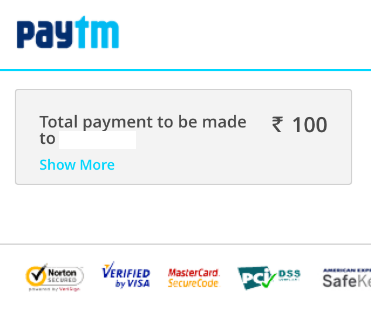
*注:事实上,我是在尝试表演,而不是为了制作。
当我执行,它没有显示Paytm付费表单,而是它显示秩序和数量与交易id肮脏。
当用户在表单中输入付费金额时,如何打开Paytm支付表单,然后使用extraa税计算金额,然后单击支付按钮,就应该打开PAYTM支付表单。
请帮助我解决这个问题(我已经通过PAYTM SDK DOC一步一步,但有能力找到IT )。谢谢。
很重要:**就checksumGenerationURL和checksumValidationURL而言,我们需要创建它。一开始我试着使用Paytm,但是它很有效,所以最终我们的服务器团队做到了,这是集成Paytm的最重要的一点。
回答 2
Stack Overflow用户
发布于 2016-02-22 07:36:41
最后,通过对其在生产上的测试和对其工作性能的测试,解决了该问题。至于分阶段服务器,我想sdk中有硬编码的信息,所以希望在下一个版本的PGSDK中,我们也可以对其进行测试。
谢谢。
@普拉迪普克..。非常感谢你所有宝贵的支持。
Stack Overflow用户
发布于 2016-02-19 06:46:44
您是否正确地填充了mc.checksumGenerationURL和mc.checksumValidationURL?还有一个2.7版本的SDK,您应该使用它。向您的Paytm联系人询问最新的iOS SDK。
现在关于金额,Paytm不计算税收。您必须将它添加到您发送给Paytm的金额中。
https://stackoverflow.com/questions/35498658
复制相似问题
腾讯云开发者

Copyright © 2013 - 2026 Tencent Cloud. All Rights Reserved. 腾讯云 版权所有
深圳市腾讯计算机系统有限公司 ICP备案/许可证号:粤B2-20090059  粤公网安备44030502008569号
腾讯云计算(北京)有限责任公司 京ICP证150476号 | 京ICP备11018762号