
数据的指数拟合(python)
嗨,我试图用多项式或指数函数来拟合我的数据,这两个函数都失败了。我使用的代码如下:
with open('argon.dat','r') as f:
    argon=f.readlines()

eng1 = np.array([float(argon[argon.index(i)].split('\n')[0].split('  ')[0])*1000 for i in argon])
II01 = np.array([1-math.exp(-float(argon[argon.index(i)].split('\n')[0].split('  ')[1])*(1.784e-3*6.35)) for i in argon])

with open('copper.dat','r') as f:
    copper=f.readlines()

eng2 = [float(copper[copper.index(i)].split('\n')[0].split('  ')[0])*1000 for i in copper]
II02 = [math.exp(-float(copper[copper.index(i)].split('\n')[0].split('  ')[1])*(8.128e-2*8.96)) for i in copper]

fig, ax1 = plt.subplots(figsize=(12,10))
ax2 = ax1.twinx()
ax1.set_yscale('log')
ax2.set_yscale('log')

arg = ax2.plot(eng1, II01, 'b--', label='Argon gas absorption at STP (6.35 cm)')
cop = ax1.plot(eng2, II02, 'r', label='Copper wall transp. (0.81 mm)')
plot = arg+cop

labs = [l.get_label() for l in plot]
ax1.legend(plot,labs,loc='lower right', fontsize=14)
ax1.set_ylim(1e-6,1)
ax2.set_ylim(1e-6,1)
ax1.set_xlim(0,160)
ax1.set_ylabel(r'$\displaystyle I/I_0$', fontsize=18)
ax2.set_ylabel(r'$\displaystyle 1-I/I_0$', fontsize=18)
ax1.set_xlabel('Photon Energy [keV]', fontsize=18)
plt.show()
这给了我
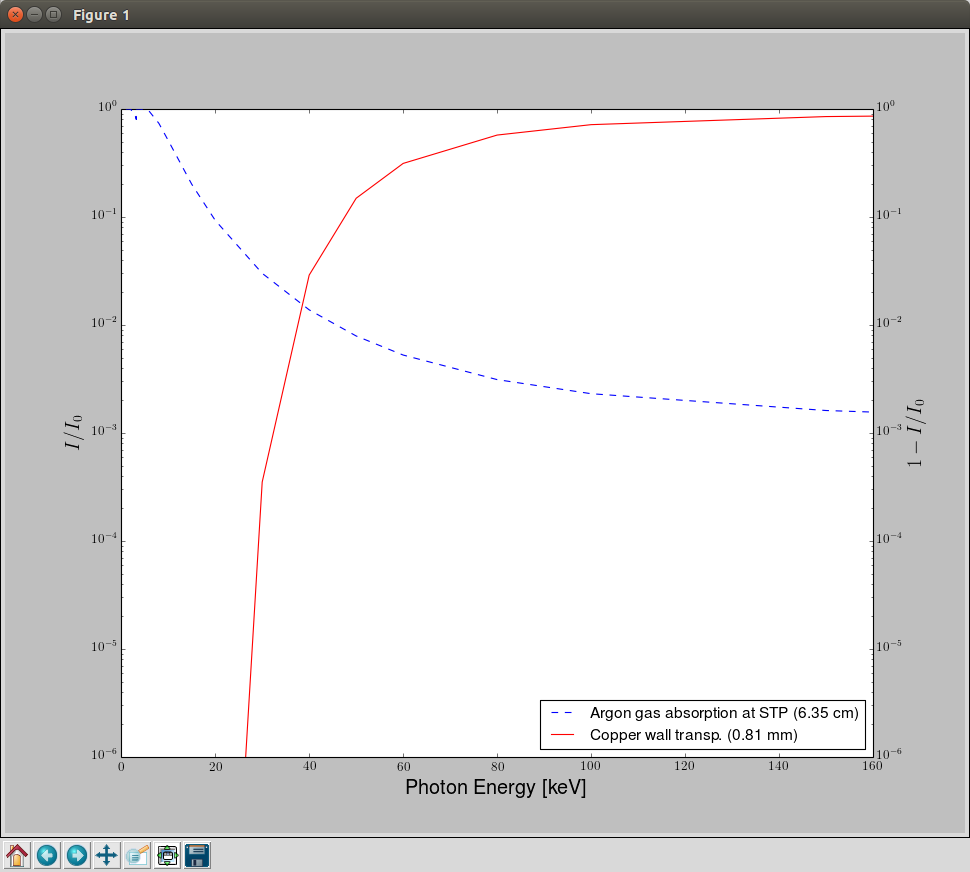
我想要做的不是像这样绘制数据,把它们拟合成指数曲线,然后乘以这些曲线,得到检测器的效率(我试着逐个元素乘以,但我没有足够的数据点来获得光滑的曲线),我尝试使用多重拟合,并且尝试定义一个指数函数来查看它是否工作,但是在这两种情况下,我最后都得到了一条线。
#def func(x, a, c, d):
#    return a*np.exp(-c*x)+d
#
#popt, pcov = curve_fit(func, eng1, II01)
#plt.plot(eng1, func(eng1, *popt), label="Fitted Curve")
和
model = np.polyfit(eng1, II01 ,5)
y = np.poly1d(model)
#splineYs = np.exp(np.polyval(model,eng1)) # also tried this but didnt work
ax2.plot(eng1,y)在需要的情况下,从http://www.nist.gov/pml/data/xraycoef/index.cfm获取的数据也可以在图3:http://scitation.aip.org/content/aapt/journal/ajp/83/8/10.1119/1.4923022中找到类似的工作
“休息”是在“奥利弗”回答后进行的:
我使用已有的数据进行乘法:
i = 0
eff1 = []
while i < len(arg):
    eff1.append(arg[i]*cop[i])
    i += 1
我最终得到的是(红色:铜,虚蓝色:氩,蓝色:乘法)
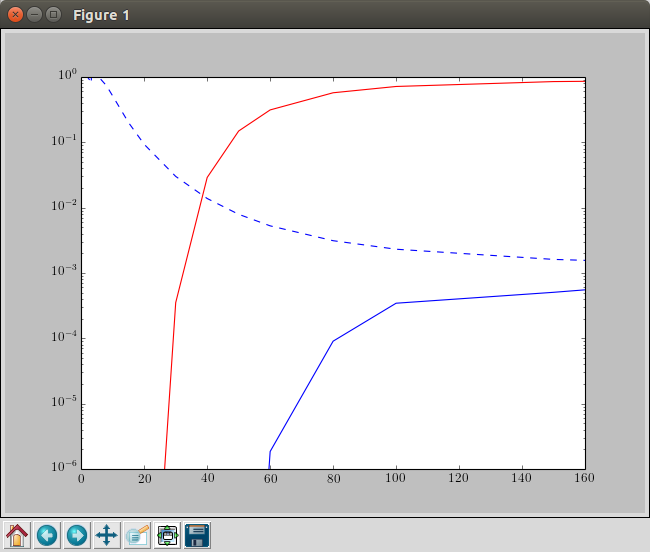
这就是我想要得到的,但通过使用曲线的函数,这将是一条光滑的曲线,我想得到它(在@oliver的回答中,关于哪里是错的或什么被误解了,我已经发表了评论)。
回答 1
Stack Overflow用户
发布于 2016-02-19 01:54:11
curvefit给您一个常量(一条平行线)的原因是,您正在传递一个使用您定义的模型不相关的数据集!
让我首先重新创建您的设置:
argon = np.genfromtxt('argon.dat')
copper = np.genfromtxt('copper.dat')

f1 = 1 - np.exp(-argon[:,1] * 1.784e-3 * 6.35)
f2 = np.exp(-copper[:,1] * 8.128e-2 * 8.96)现在请注意,f1是基于argon.dat文件中数据的第二列。它与第一列无关,尽管没有什么可以阻止您绘制第二列与第一列的修改版本,当然,这就是您在绘图时所做的:
import matplotlib.pyplot as plt
from scipy.optimize import curve_fit

plt.semilogy(copper[:,0]*1000, f2, 'r-')  # <- f2 was not based on the first column of that file, but on the 2nd. Nothing stops you from plotting those together though...
plt.semilogy(argon[:,0]*1000, f1, 'b--')
plt.ylim(1e-6,1)
plt.xlim(0, 160)

def model(x, a, b, offset):
return a*np.exp(-b*x) + offset注意:在您的模型中,有一个名为b的参数是未使用的。这总是一个不好的想法传递给一个适当的算法。把它处理掉。
现在,诀窍是:使用指数模型,基于第二列制作了f1。因此,您应该传递curve_fit,第二列作为自变量(在函数的doc-string中标记为xdata ),然后传递f1作为因变量。如下所示:
popt1, pcov = curve_fit(model, argon[:,1], f1)
popt2, pcov = curve_fit(model, cupper[:,1], f2)
那会很好的。
现在,当您想要绘制这两个图的乘积的光滑版本时,您应该从自变量中的一个公共区间开始。对你来说,这就是光子能量。两个数据文件中的第二列都依赖于这一点:有一个函数(一个用于氩,另一个用于铜),它将μ/ρ与光子能量联系起来。因此,如果您有大量用于能量的数据点,并且您成功地获得了这些函数,那么您将有许多用于μ/ρ的数据点。但是,由于这些函数是未知的,我能做的最好的事情就是简单地插值。但是,数据是对数的,所以需要对数插值,而不是默认的线性插值。
现在,继续获取光子能量的大量数据点。在数据集中,能量点呈指数增长,因此可以使用np.logspace创建一组像样的新点。
indep_var = argon[:,0]*1000
energy = np.logspace(np.log10(indep_var.min()),
                     np.log10(indep_var.max()),
                     512)  # both argon and cupper have the same min and max listed in the "energy" column.
这对我们的优势是,两个数据集中的能量具有相同的最小值和最大能量。否则,您将不得不缩小这个日志空间的范围。
接下来,我们(对数)插值关系energy -> μ/ρ。
interpolated_mu_rho_argon = np.power(10, np.interp(np.log10(energy), np.log10(indep_var), np.log10(argon[:,1]))) # perform logarithmic interpolation
interpolated_mu_rho_copper = np.power(10, np.interp(np.log10(energy), np.log10(copper[:,0]*1000), np.log10(copper[:,1])))
下面是刚才所做工作的可视化表示:
f, ax = plt.subplots(1,2, sharex=True, sharey=True)
ax[0].semilogy(energy, interpolated_mu_rho_argon, 'gs-', lw=1)
ax[0].semilogy(indep_var, argon[:,1], 'bo--', lw=1, ms=10)
ax[1].semilogy(energy, interpolated_mu_rho_copper, 'gs-', lw=1)
ax[1].semilogy(copper[:,0]*1000, copper[:,1], 'bo--', lw=1, ms=10)
ax[0].set_title('argon')
ax[1].set_title('copper')
ax[0].set_xlabel('energy (keV)')
ax[0].set_ylabel(r'$\mu/\rho$ (cm²/g)')
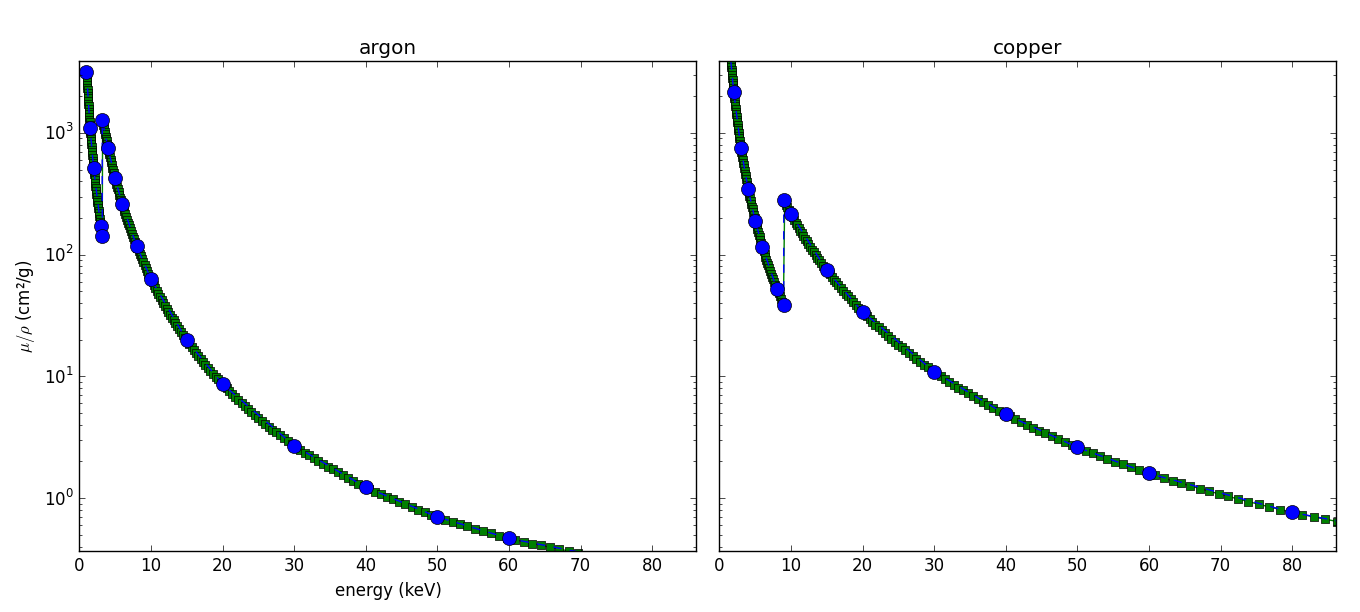
用蓝点标记的原始数据集已被精细内插。
现在,最后的步骤变得容易了。由于已经找到了将μ/ρ映射到某些指数型变量(我已重命名为f1和f2的函数)的模型参数,因此可以使用这些参数生成现有数据的平滑版本,以及这两个函数的乘积:
plt.figure()
plt.semilogy(energy, model(interpolated_mu_rho_argon, *popt1), 'b-', lw=1)
plt.semilogy(argon[:,0]*1000, f1, 'bo ')

plt.semilogy(copper[:,0]*1000, f2, 'ro ',)
plt.semilogy(energy, model(interpolated_mu_rho_copper, *popt2), 'r-', lw=1) # same remark here!

argon_copper_prod = model(interpolated_mu_rho_argon, *popt1)*model(interpolated_mu_rho_copper, *popt2)
plt.semilogy(energy, argon_copper_prod, 'g-')

plt.ylim(1e-6,1)
plt.xlim(0, 160)
plt.xlabel('energy (keV)')
plt.ylabel(r'$\mu/\rho$ (cm²/g)')
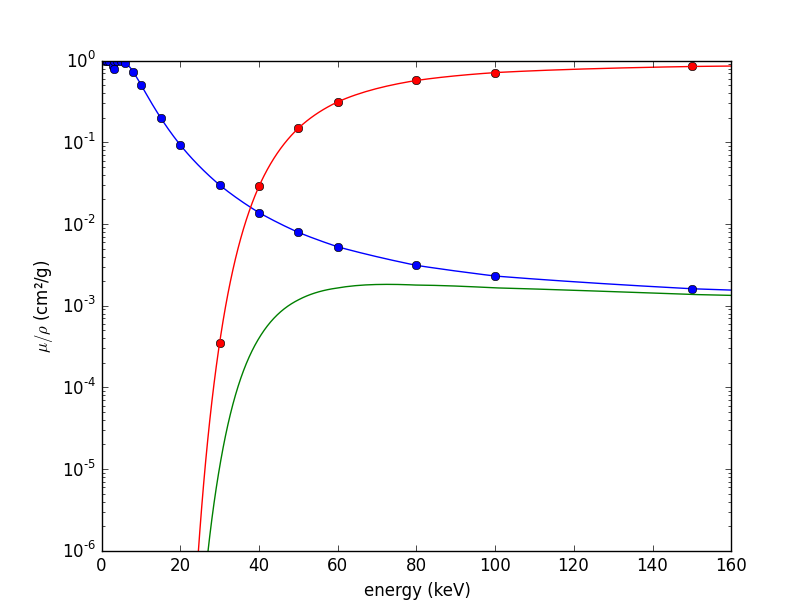
然后就到了。概括地说:
- 生成足够数量的自变量数据点,以获得平滑的结果。
- 插值关系
photon energy -> μ/ρ - 将您的函数映射到插值的
μ/ρ
https://stackoverflow.com/questions/35495045
复制相似问题
腾讯云开发者

Copyright © 2013 - 2026 Tencent Cloud. All Rights Reserved. 腾讯云 版权所有
深圳市腾讯计算机系统有限公司 ICP备案/许可证号:粤B2-20090059  粤公网安备44030502008569号
腾讯云计算(北京)有限责任公司 京ICP证150476号 | 京ICP备11018762号