
使用交替颜色的excel字段中的颜色代码重复项
使用交替颜色的excel字段中的颜色代码重复项
提问于 2016-02-16 16:34:54
我已经从MySQL数据库中提取了一个副本列表到excel表中。此excel显示,我们有副本(~1,900),有时是基于excel单的一个字段的三份一份的条目。
例如:
10019
10019
10048
10048
10060
10060
我怎样才能对重复的对进行着色,这样它们就可以很容易地被想象成每对的一对。基本上,我想用一个交替的颜色填充每个重复的对,这样我就可以很容易地看到它们。
回答 1
Stack Overflow用户
回答已采纳
发布于 2016-02-17 05:20:32
你所说的过程是所谓的“重复条带”。一对Scripting.Dictionary对象应该可以轻松地处理这个问题。
Sub colorDuplicateColor2()
    Dim d As Long, dODDs As Object, dEVNs As Object, vTMPs As Variant
    Dim bOE As Boolean

    Set dODDs = CreateObject("Scripting.Dictionary")
    Set dEVNs = CreateObject("Scripting.Dictionary")
    dODDs.CompareMode = vbTextCompare
    dEVNs.CompareMode = vbTextCompare

    With Worksheets("Sheet7")
        If .AutoFilterMode Then .AutoFilterMode = False

        With .Range(.Cells(1, "C"), .Cells(Rows.Count, "C").End(xlUp))

            With .Columns(1)
                .Cells.Interior.Pattern = xlNone
            End With

            With .Resize(.Rows.Count - 1, 1).Offset(1, 0)
                vTMPs = .Value2
            End With

            For d = LBound(vTMPs, 1) To UBound(vTMPs, 1)
                'the dictionary Items have to be strings to be used as filter criteria
                If Not (dODDs.exists(vTMPs(d, 1)) Or dEVNs.exists(vTMPs(d, 1))) Then
                    If bOE Then
                        dODDs.Item(vTMPs(d, 1)) = CStr(vTMPs(d, 1))
                    Else
                        dEVNs.Item(vTMPs(d, 1)) = CStr(vTMPs(d, 1))
                    End If
                    bOE = Not bOE
                End If
            Next d

            With .Columns(1)
                .AutoFilter Field:=1, Criteria1:=dODDs.Items, Operator:=xlFilterValues
                .SpecialCells(xlCellTypeVisible).Interior.Color = RGB(210, 210, 210)
                'use this to band the entire row
                '.SpecialCells(xlCellTypeVisible).EntireRow.Interior.Color = RGB(210, 210, 210)
                'use this to band the row within the UsedRange
                'Intersect(.Parent.UsedRange, .SpecialCells(xlCellTypeVisible).EntireRow).Interior.Color = RGB(210, 210, 210)
                .AutoFilter
                .AutoFilter Field:=1, Criteria1:=dEVNs.Items, Operator:=xlFilterValues
                .SpecialCells(xlCellTypeVisible).Interior.Color = RGB(255, 200, 200)
                .Cells(1).EntireRow.Interior.Pattern = xlNone
            End With

        End With

        If .AutoFilterMode Then .AutoFilterMode = False
    End With

    dODDs.RemoveAll: Set dODDs = Nothing
    dEVNs.RemoveAll: Set dEVNs = Nothing
    Erase vTMPs

End Sub
当然,数据必须在“重复标准”列上排序。
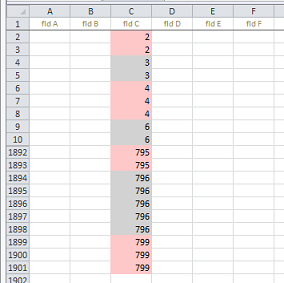
此过程可以很容易地调整为整行或行内数据块分带.
页面原文内容由Stack Overflow提供。腾讯云小微IT领域专用引擎提供翻译支持
原文链接:
https://stackoverflow.com/questions/35437981
复制相关文章
相似问题
腾讯云开发者

Copyright © 2013 - 2026 Tencent Cloud. All Rights Reserved. 腾讯云 版权所有
深圳市腾讯计算机系统有限公司 ICP备案/许可证号:粤B2-20090059  粤公网安备44030502008569号
腾讯云计算(北京)有限责任公司 京ICP证150476号 | 京ICP备11018762号