
像谷歌地球一样重现彩色图标
像谷歌地球一样重现彩色图标
提问于 2016-02-11 21:45:22
KML允许您为图标指定一个<color>。
<?xml version="1.0" encoding="UTF-8"?>
<kml xmlns="http://earth.google.com/kml/2.0">
  <Placemark>
    <name>Pin</name>
    <Point>
      <coordinates>0, 0</coordinates>
    </Point>
    <Style>
      <IconStyle>
        <color>ff8c4800</color>
        <scale>10</scale>
        <Icon>
          <href>http://maps.google.com/mapfiles/kml/pushpin/wht-pushpin.png</href>
        </Icon>
      </IconStyle>
    </Style>
  </Placemark>
</kml>
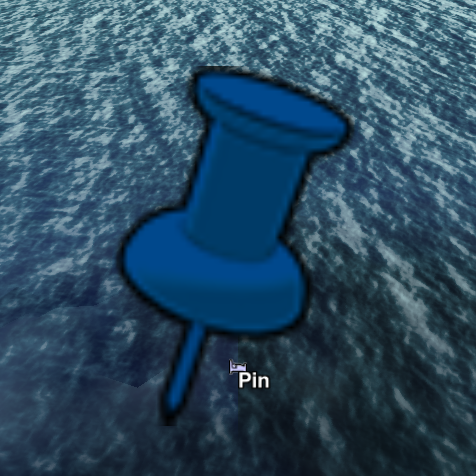
我试图在Go中做同样的事情,使用波特-达夫颜色混合方法。
    // blendColors uses the Porter-Duff over method
    // for combing two colors with alpha channels
    func blendColors(c1 color.Color, c2 color.Color) color.Color {
        r1, g1, b1, a1 := extractComponents(c1)
        r2, g2, b2, a2 := extractComponents(c2)
        var (
            a = a1 + a2*(1.0-a1)
            r = (r1*a1 + r2*a2*(1.0-a1)) / a
            g = (g1*a1 + g2*a2*(1.0-a1)) / a
            b = (b1*a1 + b2*a2*(1.0-a1)) / a
        )
        return color.RGBA{
            R: clampColorValue(int(r)),
            G: clampColorValue(int(g)),
            B: clampColorValue(int(b)),
            A: clampColorValue(int(a * 255)),
        }
}参见完整代码这里
下面是一些不同不透明度级别的输出示例(从0到255)。
- 0

- 100

- 200

- 255

这些都不是令人满意的(由于锯齿状的边缘和褪色的黑色边框),我想知道我应该采取什么样的方法,以获得更类似于谷歌地球的结果。
回答 1
Stack Overflow用户
发布于 2016-02-12 16:01:42
我用两种技巧修复了输出。
- 如果原始像素没有100% alpha,请不要触摸它。这修复了锯齿状的边缘。如果我不想这样做,我想我必须实现某种类型的反混叠。
- 使用原始像素颜色的灰度来确定混合的颜色的alpha值。
这是我修改过的混合代码。
    // blendColors uses the Porter-Duff over method
    // for combing two colors with alpha channels
    func blendColors(c1 color.Color, original color.Color) color.Color {
        r1, g1, b1, _ := extractComponents(c1)
        r2, g2, b2, a2 := extractComponents(original)

        // use the origial color's greyscale value to calculate
        // how much of the new color to use
        a1 := float64(color.GrayModel.Convert(original).(color.Gray).Y) / 255

        // don't do any blending if the original pixels
        // alpha isn't 100%
        if int(a2) == 0 {
            return original
        }

        var (
            a = a1 + a2*(1.0-a1)
            r = (r1*a1 + r2*a2*(1.0-a1)) / a
            g = (g1*a1 + g2*a2*(1.0-a1)) / a
            b = (b1*a1 + b2*a2*(1.0-a1)) / a
        )
        return color.RGBA{
            R: clampColorValue(int(r)),
            G: clampColorValue(int(g)),
            B: clampColorValue(int(b)),
            A: clampColorValue(int(a * 255)),
        }
    }

编辑:要求alpha值为100%并不总是工作正常。最后我使用了alpha < 0.3阈值。
页面原文内容由Stack Overflow提供。腾讯云小微IT领域专用引擎提供翻译支持
原文链接:
https://stackoverflow.com/questions/35350677
复制相关文章
相似问题
腾讯云开发者

Copyright © 2013 - 2026 Tencent Cloud. All Rights Reserved. 腾讯云 版权所有
深圳市腾讯计算机系统有限公司 ICP备案/许可证号:粤B2-20090059  粤公网安备44030502008569号
腾讯云计算(北京)有限责任公司 京ICP证150476号 | 京ICP备11018762号