
使用C#访问私有Google电子表格
我有一个AngularJS + C#.NET OnePage应用网站。目标是从我使用C# (而不是AngularJS)拥有的私有谷歌电子表格中检索JSON。我阅读了各种Google文档和API、OAuth 2.0等,并尝试了一些示例,但它们似乎都不适合我。我看到了从Google电子表格中访问和检索数据的不同方法,尽管如此,它们并不适用于我的情况。有谁可以帮我?谢谢。
编辑:我在Google Console=>Credentials=>Create客户端ID下创建了另一个应用程序类型,从而获得了一个令牌。
using System;
using Google.GData.Client;
using Google.GData.Spreadsheets;

namespace MySpreadsheetIntegration
{
  class Program
  {
    static void Main(string[] args)
    {
      ////////////////////////////////////////////////////////////////////////////
      // STEP 1: Configure how to perform OAuth 2.0
      ////////////////////////////////////////////////////////////////////////////

      // TODO: Update the following information with that obtained from
      // https://code.google.com/apis/console. After registering
      // your application, these will be provided for you.

      string CLIENT_ID = "12345678.apps.googleusercontent.com";

      // This is the OAuth 2.0 Client Secret retrieved
      // above.  Be sure to store this value securely.  Leaking this
      // value would enable others to act on behalf of your application!
      string CLIENT_SECRET = "Gc0230jdsah01jqpowpgff";

      // Space separated list of scopes for which to request access.
      string SCOPE = "https://spreadsheets.google.com/feeds https://docs.google.com/feeds";

      // This is the Redirect URI for installed applications.
      // If you are building a web application, you have to set your
      // Redirect URI at https://code.google.com/apis/console.
      string REDIRECT_URI = "urn:ietf:wg:oauth:2.0:oob";

      ////////////////////////////////////////////////////////////////////////////
      // STEP 2: Set up the OAuth 2.0 object
      ////////////////////////////////////////////////////////////////////////////

      // OAuth2Parameters holds all the parameters related to OAuth 2.0.
      OAuth2Parameters parameters = new OAuth2Parameters();

      // Set your OAuth 2.0 Client Id (which you can register at
      // https://code.google.com/apis/console).
      parameters.ClientId = CLIENT_ID;

      // Set your OAuth 2.0 Client Secret, which can be obtained at
      // https://code.google.com/apis/console.
      parameters.ClientSecret = CLIENT_SECRET;

      // Set your Redirect URI, which can be registered at
      // https://code.google.com/apis/console.
      parameters.RedirectUri = REDIRECT_URI;

      ////////////////////////////////////////////////////////////////////////////
      // STEP 3: Get the Authorization URL
      ////////////////////////////////////////////////////////////////////////////

      // Set the scope for this particular service.
      parameters.Scope = SCOPE;

      // Get the authorization url.  The user of your application must visit
      // this url in order to authorize with Google.  If you are building a
      // browser-based application, you can redirect the user to the authorization
      // url.
      string authorizationUrl = OAuthUtil.CreateOAuth2AuthorizationUrl(parameters);
      Console.WriteLine(authorizationUrl);
      Console.WriteLine("Please visit the URL above to authorize your OAuth "
        + "request token.  Once that is complete, type in your access code to "
        + "continue...");
      parameters.AccessCode = Console.ReadLine();

      ////////////////////////////////////////////////////////////////////////////
      // STEP 4: Get the Access Token
      ////////////////////////////////////////////////////////////////////////////

      // Once the user authorizes with Google, the request token can be exchanged
      // for a long-lived access token.  If you are building a browser-based
      // application, you should parse the incoming request token from the url and
      // set it in OAuthParameters before calling GetAccessToken().
      OAuthUtil.GetAccessToken(parameters);
      string accessToken = parameters.AccessToken;
      Console.WriteLine("OAuth Access Token: " + accessToken);

      ////////////////////////////////////////////////////////////////////////////
      // STEP 5: Make an OAuth authorized request to Google
      ////////////////////////////////////////////////////////////////////////////

      // Initialize the variables needed to make the request
      GOAuth2RequestFactory requestFactory =
          new GOAuth2RequestFactory(null, "MySpreadsheetIntegration-v1", parameters);
      SpreadsheetsService service = new SpreadsheetsService("MySpreadsheetIntegration-v1");
      service.RequestFactory = requestFactory;

      Console.ReadLine();
    }
  }
}
使用这段代码,我必须复制所获得的链接,并将其粘贴到浏览器中,以获得令牌。有没有一种方法可以直接在我的应用程序中获得这个令牌,而不需要手动复制链接呢?
回答 2
Stack Overflow用户
发布于 2016-09-14 13:30:36
我找到了另一个可行的解决方案,您不必打开浏览器窗口,这与上面的p12键解决方案类似。
首先,在Google控制台的Create凭据下创建一个服务帐户键。
然后,您必须选择服务帐户类型,可以选择App默认服务帐户,还可以下载包含私钥的json文件。
使用此文件,您可以以编程方式创建Google凭据(其中“Shees-test.json”是下载的json文件):
var credential = GoogleCredential.FromStream(new FileStream("Sheets-test.json", FileMode.Open)).CreateScoped(Scopes);让服务用户(您可以在client_email字段的json文件中找到它)访问电子表格。
下面是使您能够将值附加到电子表格中的第一个空闲行的完整代码,我修改了谷歌.NET快速启动项目
using System;
using System.Collections.Generic;
using System.IO;
using Google.Apis.Auth.OAuth2;
using Google.Apis.Services;
using Google.Apis.Sheets.v4;
using Google.Apis.Sheets.v4.Data;

namespace SheetApiTest
{
    public class SheetApiWithGoogleCredentials
    {
        static string[] Scopes = { SheetsService.Scope.Spreadsheets };
        static string ApplicationName = "Google Sheets API .NET Quickstart";

        public void AppendData()
        {
            // the downloaded jsonn file with private key
            var credential = GoogleCredential.FromStream(new FileStream("Sheets-test.json", FileMode.Open)).CreateScoped(Scopes);

            var service = new SheetsService(new BaseClientService.Initializer()
            {
                HttpClientInitializer = credential,
                ApplicationName = ApplicationName,
            });

            // spreadsheet id - your own spreadsheet id
            var spreadsheetId = "11AwV7d1pEPq4x-rx9WeZHNwGJa0ehfRhh760";

            var valueRange = new ValueRange { Values = new List<IList<object>> { new List<object>() } };
            valueRange.Values[0].Add(DateTime.Now.ToLongTimeString());

            // insert here the name of your spreadsheet table
            var rangeToWrite = "Tabellenblatt1";

            var appendRequest = service.Spreadsheets.Values.Append(valueRange, spreadsheetId, rangeToWrite);
            appendRequest.ValueInputOption = SpreadsheetsResource.ValuesResource.AppendRequest.ValueInputOptionEnum.USERENTERED;
            var appendReponse = appendRequest.Execute();
        }
    }
}Stack Overflow用户
发布于 2016-04-20 13:22:26
有一种使用证书进行服务器到服务器通信的方法,而不是复制/粘贴Google AccessCode提供的用于建立通信的方法。
首先,您需要从Google控制台获得证书。如果您还没有创建一个项目,请这样做,并给它一个名称。然后:
- 转到“凭据”部分(在左侧菜单中找到)和
- 单击“创建凭据”按钮并选择“服务帐户密钥”
- 选择服务帐户为"App默认服务帐户“和
- 选择"key type“为"p.12”,这是证书类型。
供参考的图像:
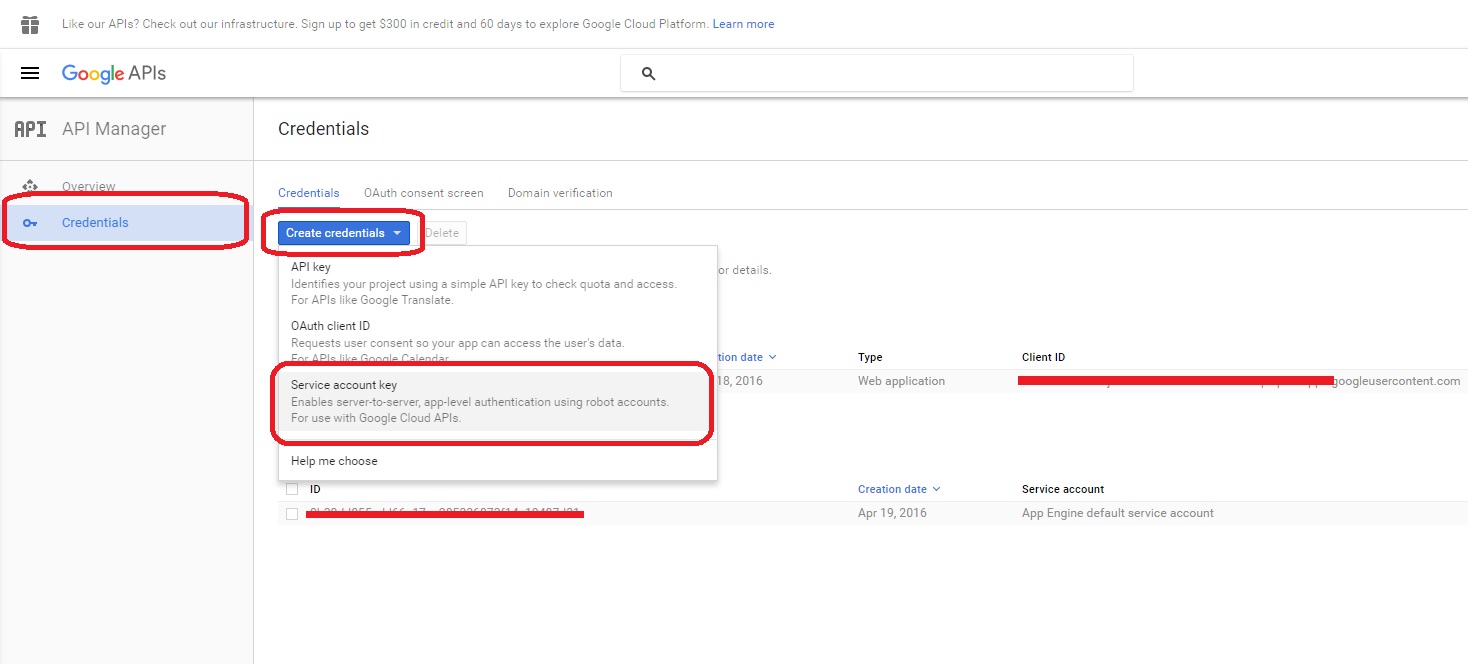
完成这些步骤后,证书将自动下载。将其上传到项目中的某个文件夹中,并使用它,如下所示。
注意:为了简单起见,代码放在控制器中。
    public async Task<ActionResult> ServerAuth()
    {
        ViewBag.Message = "Server to server authentication";
        List<string> records = new List<string>();

        const string ServiceAccountEmail = "your-account@appspot.gserviceaccount.com";
        string fullKeyPath = HttpContext.Server.MapPath("~/Key/MyProjectKey.p12"); // The certificate generated by Google and uploaded in the project.

        var certificate = new X509Certificate2(fullKeyPath, "notasecret", X509KeyStorageFlags.Exportable); // "notasecret" is the password for the certificate

        var serviceAccountCredentialInitializer = new ServiceAccountCredential.Initializer(ServiceAccountEmail)
        {
            Scopes = new[] { "https://spreadsheets.google.com/feeds", "http://spreadsheets.google.com/feeds/spreadsheets/private/full" }
        }.FromCertificate(certificate);

        var credential = new ServiceAccountCredential(serviceAccountCredentialInitializer);

        if (!await credential.RequestAccessTokenAsync(System.Threading.CancellationToken.None))
        {
            throw new InvalidOperationException("Access token request failed.");
        }

        var requestFactory = new GDataRequestFactory(null);
        requestFactory.CustomHeaders.Add("Authorization: Bearer " + credential.Token.AccessToken);

        var service = new SpreadsheetsService(null) { RequestFactory = requestFactory };

        SpreadsheetQuery query = new SpreadsheetQuery();
        query.Title = "Test Sheet"; // The exact name of the sheet you want to read
        query.Exact = true;

        var feed = service.Query(query);

        foreach (SpreadsheetEntry entry in feed.Entries)
        {
            foreach (WorksheetEntry worksheet in entry.Worksheets.Entries.Cast<WorksheetEntry>())
            {
                CellQuery cellQuery = new CellQuery(worksheet.CellFeedLink);
                CellFeed cellFeed = service.Query(cellQuery);

                foreach (CellEntry cell in cellFeed.Entries)
                {
                    records.Add(cell.InputValue);
                }
            }
        }

        return View(records);
}https://stackoverflow.com/questions/35342637
复制相似问题
腾讯云开发者

Copyright © 2013 - 2026 Tencent Cloud. All Rights Reserved. 腾讯云 版权所有
深圳市腾讯计算机系统有限公司 ICP备案/许可证号:粤B2-20090059  粤公网安备44030502008569号
腾讯云计算(北京)有限责任公司 京ICP证150476号 | 京ICP备11018762号