
更换碎片,移除旧碎片
更换碎片,移除旧碎片
提问于 2016-02-08 01:13:44
这是我的主要XML
<?xml version="1.0" encoding="utf-8"?><FrameLayout xmlns:android="http://schemas.android.com/apk/res/android" android:id="@+id/fragment_place" android:layout_width="wrap_content" android:layout_height="fill_parent"/>这是我的主要活动
protected void onCreate(Bundle savedInstanceState)
{
    super.onCreate(savedInstanceState);
    setContentView(R.layout.activity_main);
    FragmentManager fm = getFragmentManager();
    FragmentTransaction fragmentTransaction = fm.beginTransaction();
    fragmentTransaction.add(R.id.fragment_place, new ThirdClass());
    fragmentTransaction.commit();
}
我是ThirdClass
public View onCreateView(LayoutInflater inflater, ViewGroup container, Bundle savedInstanceState) {
    View v = inflater.inflate(R.layout.test_fragment1, container, false);
    FragmentManager fm = getFragmentManager();
    FragmentTransaction fragmentTransaction = fm.beginTransaction();
    fragmentTransaction.add(R.id.fragment_place, new FourthClass());
    fragmentTransaction.commit();
    return v;
}
这是ThirdClass的布局
<?xml version="1.0" encoding="utf-8"?><LinearLayout xmlns:android="http://schemas.android.com/apk/res/android" android:orientation="vertical" android:layout_width="match_parent" android:layout_height="match_parent"><TextView android:layout_width="wrap_content" android:layout_height="wrap_content" android:text="Second Fragment"/></LinearLayout>这是FourthClass
public View onCreateView(LayoutInflater inflater, ViewGroup container, Bundle savedInstanceState) {
    View v = inflater.inflate(R.layout.test_frag, container, false);
    return v;
}
以及布局
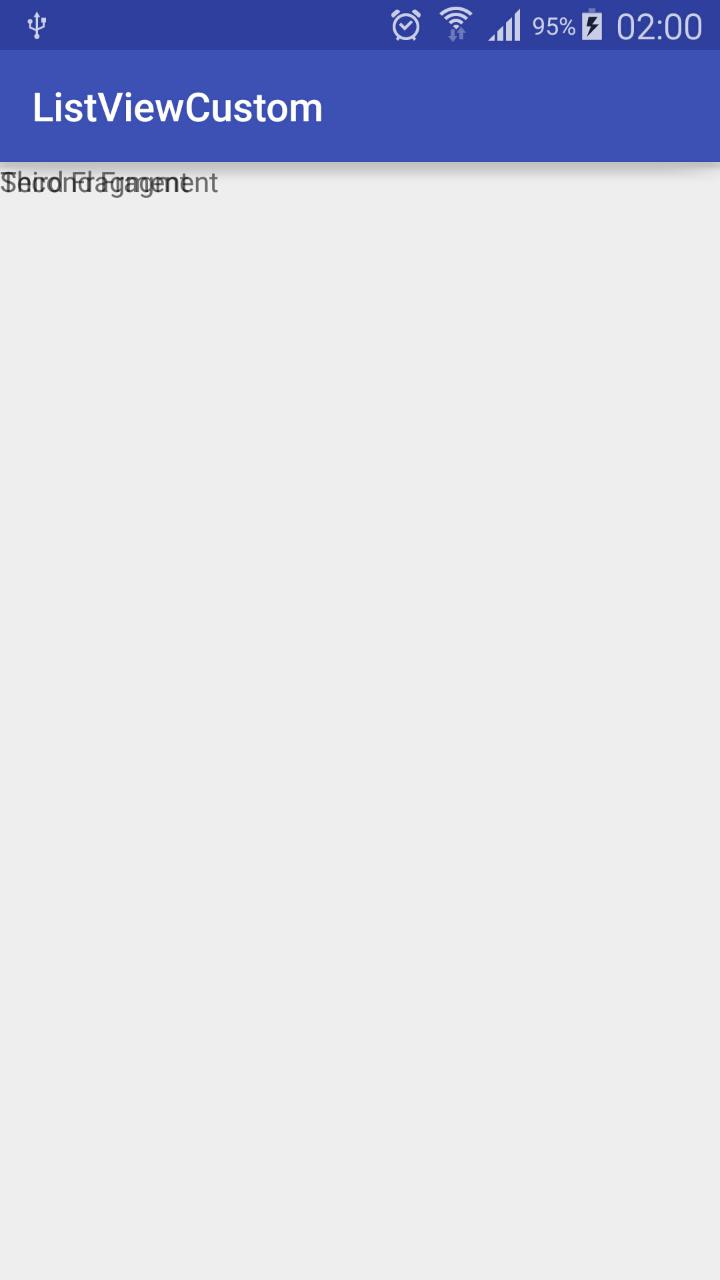
<?xml version="1.0" encoding="utf-8"?><LinearLayout xmlns:android="http://schemas.android.com/apk/res/android" android:orientation="vertical" android:layout_width="match_parent" android:layout_height="match_parent"><TextView android:layout_width=" android:layout_height=" android:text="Third Fragment"/></LinearLayout>我的问题是,这些碎片正在被保存,而不是相互替换,这向我展示了这一点。
回答 1
Stack Overflow用户
回答已采纳
发布于 2016-02-08 01:38:04
使用fragmentTransaction.replace()而不是fragmentTransaction.add()
来自文献资料
替换添加到容器中的现有片段。这在本质上等同于对使用相同containerViewId添加的所有当前添加的片段调用remove(片段),然后用这里给出的相同参数添加(int、片段、字符串)。
页面原文内容由Stack Overflow提供。腾讯云小微IT领域专用引擎提供翻译支持
原文链接:
https://stackoverflow.com/questions/35261185
复制相关文章
相似问题
腾讯云开发者

Copyright © 2013 - 2026 Tencent Cloud. All Rights Reserved. 腾讯云 版权所有
深圳市腾讯计算机系统有限公司 ICP备案/许可证号:粤B2-20090059  粤公网安备44030502008569号
腾讯云计算(北京)有限责任公司 京ICP证150476号 | 京ICP备11018762号