
MKLocalSearchRequest给了我奇怪的结果
因此,我为我的地图应用程序实现了一个searchBar,它给了我一些奇怪的结果。例如,如果我搜索“奥斯陆”,它就会指向这个城市以北一个非常特殊但却很奇怪的地方,然后向内放大。我在这里的代码一定做错了什么。有人能发现这个问题吗?
// When user submits search query
func searchBarSearchButtonClicked(searchBar: UISearchBar){
    // resign first responder and dismiss the searchbar.
    searchBar.resignFirstResponder()
    dismissViewControllerAnimated(true, completion: nil)

    // Create and start search request
    localSearchRequest = MKLocalSearchRequest()
    localSearchRequest.naturalLanguageQuery = searchBar.text
    localSearch = MKLocalSearch(request: localSearchRequest)

    localSearch.startWithCompletionHandler { (localSearchResponse, error) -> Void in

        if localSearchResponse == nil{
            let alertController = UIAlertController(title: nil, message: "Place Not Found", preferredStyle: UIAlertControllerStyle.Alert)
            alertController.addAction(UIAlertAction(title: "Dismiss", style: UIAlertActionStyle.Default, handler: nil))
            self.presentViewController(alertController, animated: true, completion: nil)
            return
        }

        let center = CLLocationCoordinate2D(latitude: localSearchResponse!.boundingRegion.center.latitude, longitude: localSearchResponse!.boundingRegion.center.longitude)
        self.updateCurrentMapRegion(center, distance: 5000)
        NSNotificationCenter.defaultCenter().postNotificationName("LocationUpdate", object: nil, userInfo: ["latitude": center.latitude, "longitude": center.longitude])
    }
}
还有一个问题是,我在得到搜索结果后更新地图区域时,将距离硬编码为5000米。我如何以更动态的方式处理这件事?
在我看来,使用MKLocalSearchRequest()的替代方法是什么?在我看来,在寻找附近的东西时,您应该使用它,而不是城市等较大的实体。
回答 2
Stack Overflow用户
发布于 2016-02-06 19:19:27
第一件事:MKLocalSearch是你要使用的正确的API,尽管它听起来对你正在做的事情有点奇怪!
MKLocalSearch为您提供一个位置列表,然后返回一个环绕位置的边框,以最适合它认为您正在寻找的位置。我试着运行您的代码,并在奥斯陆找到了这个:
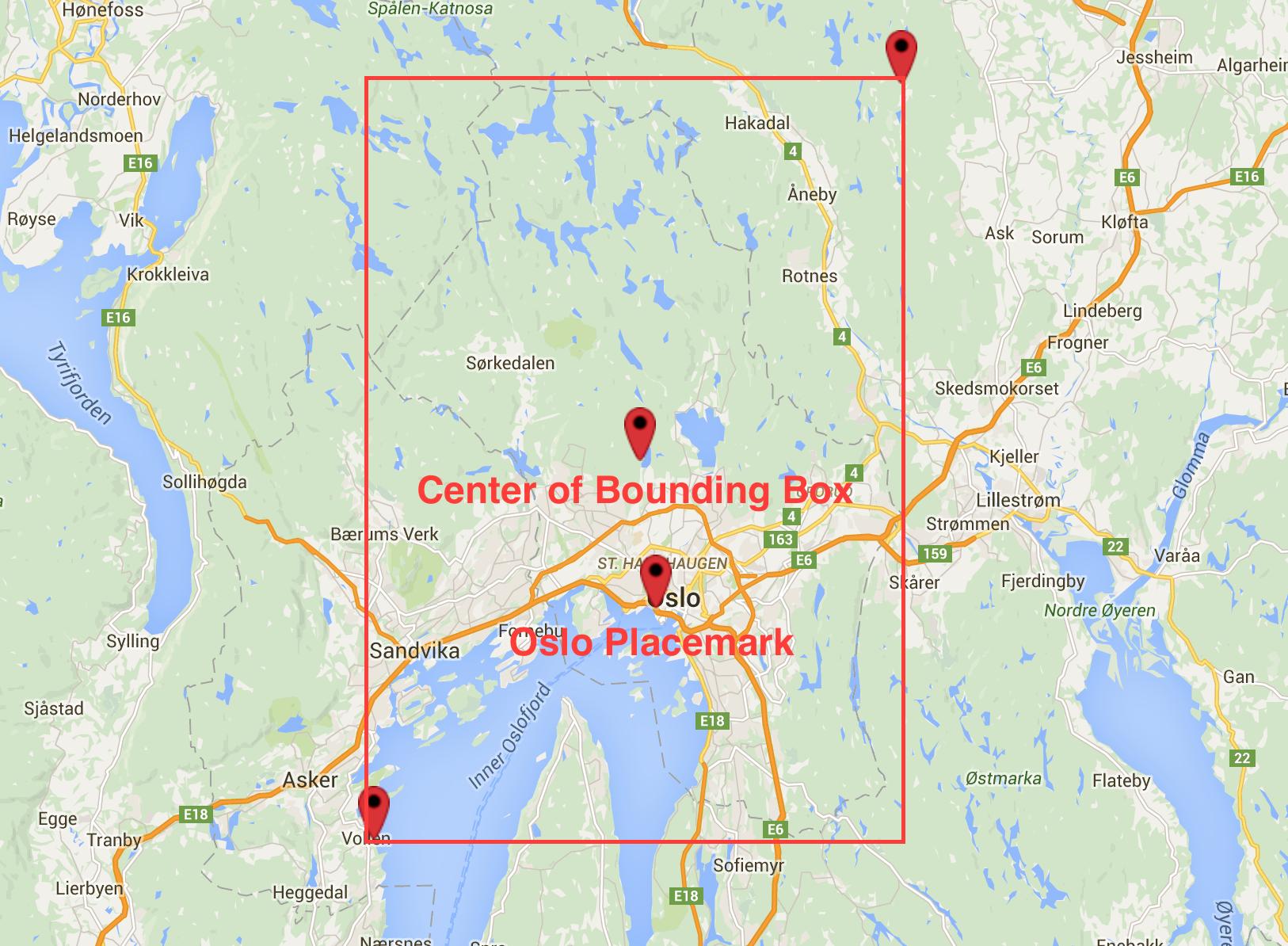
你正在经历的问题是,你使用包围盒的中心作为你的引脚位置,而不是奥斯陆的placemark。
因此,这里的代码行是:
let center = CLLocationCoordinate2D(latitude: localSearchResponse!.boundingRegion.center.latitude,
    longitude: localSearchResponse!.boundingRegion.center.longitude)
你可以使用:
let center = localSearchResponse?.mapItems.first?.placemark.coordinate(这是可选的,但您可以选择如何处理它。我一会儿会给你看我喜欢的方式。)
此外,这解决了你的问题,放大多远。简单地说,您可以使用区域的边界框作为缩放级别。我不确定您的updateCurrentMapRegion:distance方法是如何工作的,但是MKMapView有您可以使用的方便的setRegion:animated方法(如果您有访问权限的话)。
mapView.setRegion(localSearchResponse!.boundingRegion, animated: true)总之,如果您有一个对MapView的引用,您应该能够用它替换您的完成块,并让它工作:
guard let localSearchResponse = localSearchResponse, mapItem = localSearchResponse.mapItems.first else {
    let alertController = UIAlertController(title: nil, message: "Place Not Found", preferredStyle: UIAlertControllerStyle.Alert)
    alertController.addAction(UIAlertAction(title: "Dismiss", style: UIAlertActionStyle.Default, handler: nil))
    self.presentViewController(alertController, animated: true, completion: nil)
    return
}

let center = mapItem.placemark.coordinate
self.mapView.setRegion(localSearchResponse.boundingRegion, animated: true)
NSNotificationCenter.defaultCenter().postNotificationName("LocationUpdate", object: nil, userInfo: ["latitude": center.latitude, "longitude": center.longitude])在这个块中,我还将if语句替换为一个guard来设置这两个值,因此我们不再需要强制展开选项。如果无法在此方法中访问mapView,则可能可以切换updateCurrentMapRegion:center以使其更适合,或者进行一些数学运算,使边界区域适合这些值。
Stack Overflow用户
发布于 2018-12-17 21:24:47
https://stackoverflow.com/questions/35243145
复制相似问题
腾讯云开发者

Copyright © 2013 - 2026 Tencent Cloud. All Rights Reserved. 腾讯云 版权所有
深圳市腾讯计算机系统有限公司 ICP备案/许可证号:粤B2-20090059  粤公网安备44030502008569号
腾讯云计算(北京)有限责任公司 京ICP证150476号 | 京ICP备11018762号