
GridPane不绑定到BorderPane
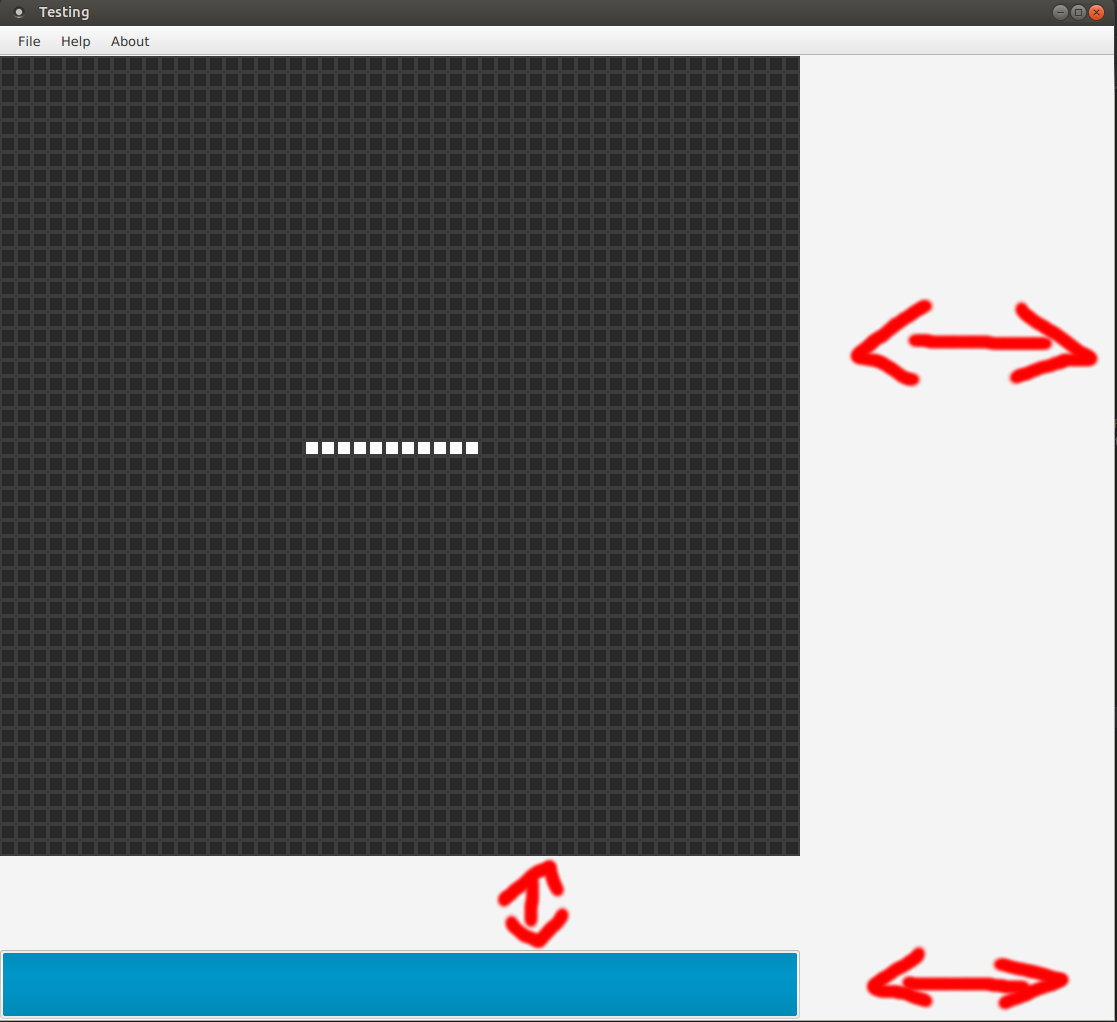
我对JavaFX和FXML相当陌生。我已经编写了一些java swing代码,但这是很久以前的事了。为了学习一些新的东西,我正在创建一个小小的棋盘游戏,但我似乎无法正确地将我的GridPane与它里面的矩形对齐( GridPane在BorderPane中)。我的意思是(我相信)我的GridPane没有被正确地绑定。正如您在我的屏幕截图中看到的,当我调整窗口的大小时,GridPane不会与BorderPane一起移动。
这是我的课程:
Main
public class Main extends Application {

    @Override
    public void start(Stage primaryStage) throws Exception{
        BorderPane root = FXMLLoader.load(getClass().getResource("sample.fxml"));
        Scene scene = new Scene(root, 800, 900);

        primaryStage.setTitle("Testing");
        primaryStage.setScene(scene);
        primaryStage.show();
        primaryStage.toFront();
    }

    public static void main(String[] args) {
        launch(args);
    }
}
主计长:
public class Controller implements Initializable {


    @FXML private GridPane gridBoard;
    @FXML private BorderPane borderPane;


    public void initialize(java.net.URL location,
                       java.util.ResourceBundle resources) {

        gridBoard.prefHeightProperty().bind(borderPane.heightProperty());
        gridBoard.prefWidthProperty().bind(borderPane.widthProperty());

    }

    public void fillBoardEvent(ActionEvent event) {

        for(int i = 0; i < 50; i++) {
            for(int j = 0; j < 50; j++) {
                InitiateCells n;

                // This is for creating the rectangles
                // and to give some specific cells
                // different color
                if(i == 24) {
                    if(j == 19 || j == 20 || j == 21 || j == 22 || j == 23 || j == 24 || j == 25 || j == 26 || j == 27 ||
                        j == 28 || j == 29) {

                        n = new InitiateCells("" + i + "/" + j, 12, 12, i, j, 0);

                    } else {
                        n = new InitiateCells("" + i + "/" + j, 12, 12, i, j);
                    }
                } else {
                    n = new InitiateCells("" + i + "/" + j, 12, 12, i, j);
                }
            }
        }

    }

    public void exitEvent(ActionEvent event) {
        System.exit(0);
    }

    public class InitiateCells extends Rectangle {
        private String name;
        private double width;
        private double height;


        public InitiateCells(String name, double width, double height, int rowIndex, int columnIndex) {
            super(width, height);
            this.name = name;
            this.width = width;
            this.height = height;

            setFill(Color.web("#282828"));
            setStroke(Color.web("#3b3b3b"));
            setStrokeType(StrokeType.OUTSIDE);
            setStrokeWidth(2.0);


            gridBoard.add(this, columnIndex, rowIndex);

    }


        public InitiateCells(String name, double width, double height, int rowIndex, int columnIndex, int value) {
            super(width, height);
            this.name = name;
            this.width = width;
            this.height = height;

            setFill(Color.web("#282828"));
            setStroke(Color.web("#3b3b3b"));
            setStrokeType(StrokeType.OUTSIDE);
            setStrokeWidth(2.0);


            gridBoard.add(this, columnIndex, rowIndex);
    }
Sample.fxml
<BorderPane maxHeight="-Infinity" maxWidth="-Infinity" minHeight="-Infinity" minWidth="-Infinity" prefHeight="800.0"
        prefWidth="800.0" xmlns="http://javafx.com/javafx/8" xmlns:fx="http://javafx.com/fxml/1"
        fx:controller="sample.Controller" fx:id="borderPane">


    <center>
        <GridPane prefHeight="770.0" prefWidth="800.0" BorderPane.alignment="CENTER" fx:id="gridBoard" >
            <children>

            </children>
        </GridPane>
    </center>

    <top>
        <VBox prefHeight="30.0" prefWidth="800.0" BorderPane.alignment="TOP_CENTER">
            <children>
                <MenuBar>
                    <menus>
                        <Menu text="File">
                            <items>
                                <MenuItem text="New Game" onAction="#fillBoardEvent"/>
                                <MenuItem text="Save as GIF"/>
                                <MenuItem text="Export statistics"/>
                                <MenuItem text="Exit" onAction="#exitEvent"/>
                            </items>
                        </Menu>
                        <Menu text="Help">
                            <items>
                                <MenuItem text="Game of Life"/>
                                <MenuItem text="How to play"/>
                                <MenuItem text="Open Javadoc"/>
                            </items>
                        </Menu>
                        <Menu text="About">
                            <MenuItem text="Game of Life"/>
                            <MenuItem text="How to play"/>
                            <MenuItem text="Open Javadoc"/>
                        </Menu>
                    </menus>
                </MenuBar>
            </children>
        </VBox>
    </top>

    <bottom>
        <VBox prefHeight="70.0" prefWidth="800.0" BorderPane.alignment="BOTTOM_CENTER">
            <children>
                <ProgressBar prefHeight="70.0" prefWidth="800.0" progress="50.0" />
            </children>
        </VBox>
    </bottom>
</BorderPane>
这就是问题所在;当我试图调整窗口的大小时,我的GridPane和VBox保持在同一个位置。当我调整窗口的尺寸时,它应该从一个边到另一个边。这就是它的样子:
回答 1
Stack Overflow用户
发布于 2016-02-04 19:25:51
问题不是网格窗格没有调整大小:问题是当网格窗格调整大小时,列和行不会调整大小。因此,网格窗格在列占用的水平空间和行占用的垂直空间之后有大量的空白。(这也解释了为什么它没有出现居中:网格窗格本身在边框窗格中居中,但是行和列出现在网格窗格自身的左上角。)
通过在网格窗格中设置列约束和行约束,您可以很容易地修复这个问题:
public void fillBoardEvent(ActionEvent event) {

    int numRows = 50 ;
    int numColumns = 50 ;

    for (int i = 0 ; i < numRows; i++) {
        RowConstraints row = new RowConstraints();
        row.setVgrow(Priority.ALWAYS);
        gridBoard.getRowConstraints().add(row);
    }

    for (int j = 0 ; j < numColumns; j++) {
        ColumnConstraints col = new ColumnConstraints();
        col.setHgrow(Priority.ALWAYS);
        gridBoard.getColumnConstraints().add(col);
    }

    for(int i = 0; i < numRows; i++) {
        for(int j = 0; j < numColumns; j++) {
            InitiateCells n;

            // code as before...
        }
    }
}
现在,列和行将增长,但它们的内容不会增长。所以你会在细胞之间形成这样的空间:
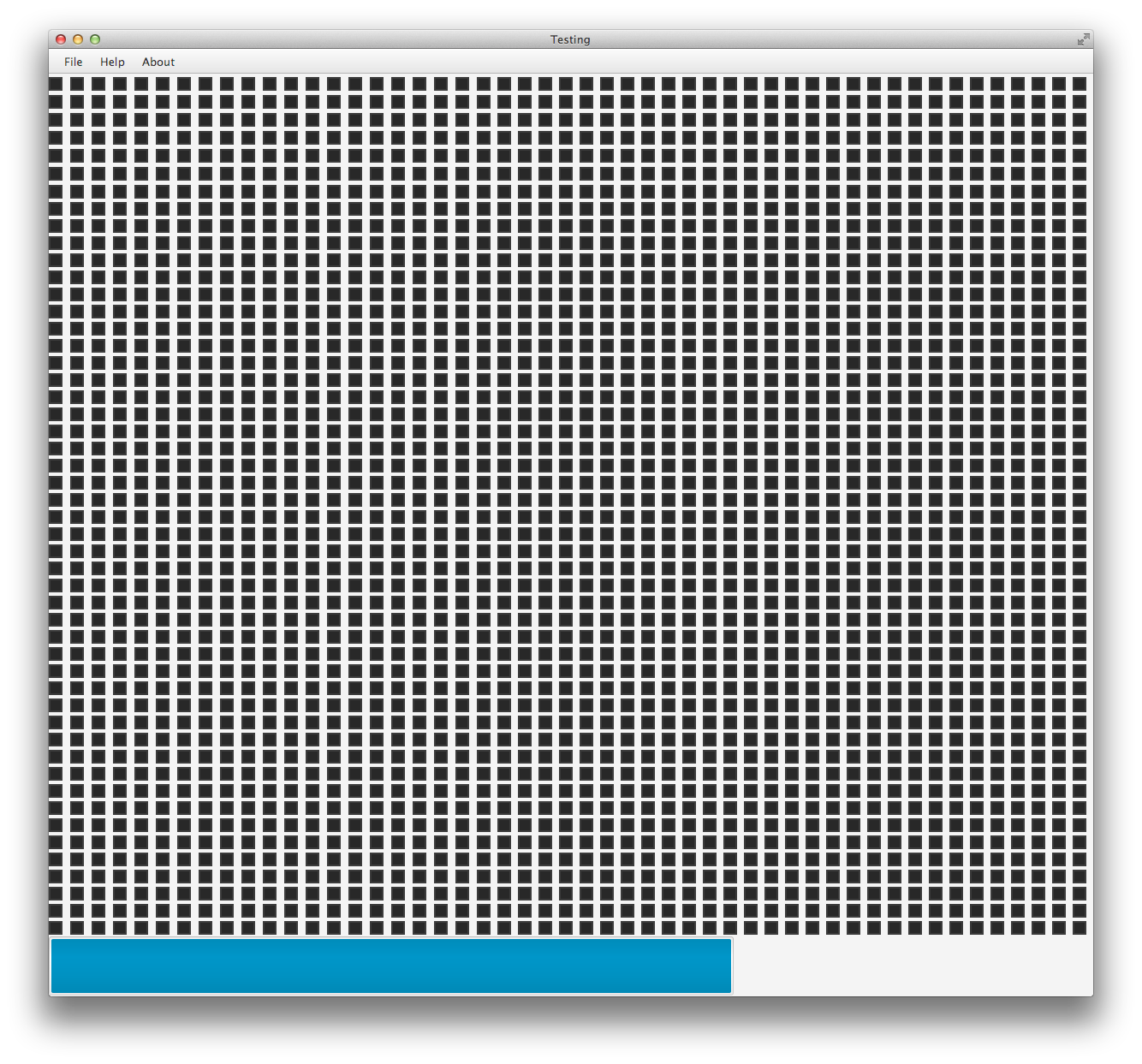
您不能使用Rectangle来轻松地修复这个问题,因为Rectangles是不可调整大小的,因此无论您在网格窗格中放置了什么设置,它都无法为您调整矩形的大小。(您可以在网格窗格的大小与矩形的宽度和高度之间引入绑定,但这会很快变得非常难看。)我将使用Regions而不是Rectangles,因为Regions是可调整大小的。请注意,指定为单元格的宽度和高度的值实际上是首选的宽度和高度,因为您希望它们与窗口一起调整大小。
Region没有fill、stroke等,但它可以通过CSS进行样式设计,所以我会这样做。
public class InitiateCells extends Region {
    private String name;
    private double width;
    private double height;


    public InitiateCells(String name, double width, double height, int rowIndex, int columnIndex) {
        this.name = name;
        this.width = width;
        this.height = height;

        setPrefSize(width, height);
        getStyleClass().add("board-cell");

        gridBoard.add(this, columnIndex, rowIndex);

    }


    public InitiateCells(String name, double width, double height, int rowIndex, int columnIndex, int value) {
        this(name, width, height, rowIndex, columnIndex);
        pseudoClassStateUpdated(PseudoClass.getPseudoClass("on"), true);
    }

}
现在,在主类中添加一个外部样式表:
scene.getStylesheets().add(getClass().getResource("board-style.css").toExternalForm());并添加一个board-style.css文件
.board-cell {
    -fx-background-color: #3b3b3b, #282828 ;
    -fx-background-insets: 0, 2 ;
}

.board-cell:on {
    -fx-background-color: #3b3b3b, white ;
    -fx-background-insets: 0, 2 ;
}https://stackoverflow.com/questions/35208964
复制相似问题
腾讯云开发者

Copyright © 2013 - 2026 Tencent Cloud. All Rights Reserved. 腾讯云 版权所有
深圳市腾讯计算机系统有限公司 ICP备案/许可证号:粤B2-20090059  粤公网安备44030502008569号
腾讯云计算(北京)有限责任公司 京ICP证150476号 | 京ICP备11018762号