
在UITextView中使用NSTextContainer/NSLayoutManager时文本被混淆
在UITextView中使用NSTextContainer/NSLayoutManager时文本被混淆
提问于 2016-02-02 15:14:33
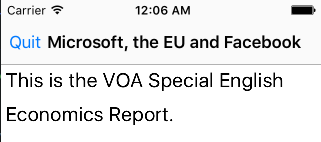
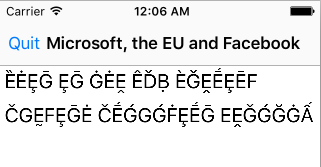
我正在实现分页文本,因此我使用NSLayoutManager和NSTextContainer为每个页面创建UITextViews。分页工作正常,但是文本被混淆了。当在普通的NSTextStorage上设置相同的UITextView时,它看起来是正确的:
// In the class that creates the pages
...
self.textStorage = [[NSTextStorage alloc] initWithString:string attributes:@{}];
self.layoutManager.textStorage = self.textStorage;
....

- (void)createPages{
    // Remove all current text containers
    while (self.layoutManager.textContainers.count > 0){
        [self.layoutManager removeTextContainerAtIndex:0];
    }
    NSMutableArray *textContainers = [NSMutableArray array];
    NSUInteger lastRenderedGlyph = 0;
    while (lastRenderedGlyph < self.layoutManager.numberOfGlyphs){
        NSTextContainer *textContainer = [[NSTextContainer alloc] initWithSize:self.pageSize];
        [self.layoutManager addTextContainer:textContainer];
        [textContainers addObject:textContainer];
        [self addDummyContainersForNewlinesAfterContainer:textContainer];
        NSRange range = [self.layoutManager glyphRangeForTextContainer:textContainer];
        lastRenderedGlyph = NSMaxRange(range);
    }
    self.textContainers = textContainers;
}

// In my ViewController
- (void)addTextViews{
    self.scrollView = [[UIScrollView alloc] initWithFrame:self.view.bounds];
    self.scrollView.autoresizingMask = UIViewAutoresizingFlexibleWidth | UIViewAutoresizingFlexibleHeight;
    self.scrollView.backgroundColor = [UIColor lightGrayColor];
    [self.view addSubview:self.scrollView];
    CGFloat xOffset = 0;
    // Option #1 - This results in garbled text
    for (NSTextContainer *textContainer in self.coordinator.textContainers){
        break;
        CGRect frame = CGRectMake(xOffset, 0, self.coordinator.pageSize.width, self.coordinator.pageSize.height);
        xOffset = CGRectGetMaxX(frame)+1;
        self.scrollView.contentSize = CGSizeMake(xOffset, self.coordinator.pageSize.width);
        UITextView *textView = [[UITextView alloc] initWithFrame:frame textContainer:textContainer];
        textView.attributedText = self.coordinator.textStorage;
        [self.scrollView addSubview:textView];
    }
    // Option #2 - This does not result in garbled text
    UITextView *textView = [[UITextView alloc] initWithFrame:self.view.bounds];
    [self.view addSubview:textView];
    textView.attributedText = self.coordinator.textStorage;
}
回答 1
Stack Overflow用户
回答已采纳
发布于 2016-02-03 01:01:18
原来我忘了补充
[self.textStorage addLayoutManager:self.layoutManager];这就解决了问题。
页面原文内容由Stack Overflow提供。腾讯云小微IT领域专用引擎提供翻译支持
原文链接:
https://stackoverflow.com/questions/35157135
复制相关文章
相似问题
腾讯云开发者

Copyright © 2013 - 2026 Tencent Cloud. All Rights Reserved. 腾讯云 版权所有
深圳市腾讯计算机系统有限公司 ICP备案/许可证号:粤B2-20090059  粤公网安备44030502008569号
腾讯云计算(北京)有限责任公司 京ICP证150476号 | 京ICP备11018762号