
如何在不丢失100%宽度的情况下对齐2个div
如何在不丢失100%宽度的情况下对齐2个div
提问于 2016-02-01 19:25:00
我想做的是并行对齐2个div,第一个div包含一些文本,另一个包含一个html表。
我的问题是,是否有办法将2div并排白化超过容器宽度?
下面是我的html和css代码:
HTML:
<table class="table table-curved">
<thead>
    <tr>
        <th>Mail</th>
        <th>Queued</th>
        <th>Delivered</th>
        <th>Bounced</th>
        <th>Complaints</th>
    </tr>
</thead>
<tbody>
    <tr>
        <td><span class="title">alfa beta</span>
        </td>
        <td>295,063</td>
        <td>201,896</td>
        <td>94,023</td>
        <td>201,896</td>

    </tr>
    <tr>
        <td><span class="title">gama phy</span>
        </td>
        <td>634,235</td>
        <td>500,321</td>
        <td>94,023</td>
        <td>135,456</td>
    </tr>
    <tr>
        <td colspan="15">
            <div style="margin-top:15px">
                <div>|__</div>
                <table class="table table-curved">
                    <thead>
                        <tr>
                            <th>ISP</th>
                            <th>Queued</th>
                            <th>Delivered</th>
                            <th>Bounced</th>
                            <th>Complaints</th>
                        </tr>
                    </thead>
                    <tbody>
                        <tr>
                            <td><span class="title">lookup</span>
                            </td>
                            <td>295,063</td>
                            <td>201,896</td>
                            <td>94,023</td>
                            <td>135,456</td>
                        </tr>
                        <tr>
                            <td><span class="title">deny</span>
                            </td>
                            <td>295,063</td>
                            <td>201,896</td>
                            <td>94,023</td>
                            <td>201,896</td>
                    </tbody>
                </table>
            </div>
        </td>
    </tr>
</tbody>
CSS:
<style>
    .table-curved {
        border-collapse: separate;
        font-size: 11px;
    }
    .table-curved button{
        font-size: 9px;
    }
    .table-curved {
        border: solid #ccc 1px;
        border-radius: 6px;
        border-left:0px;
    }
    .table-curved>thead>tr>th{
        border-bottom: 0!important;
        background-color: #E7F7FF;
    }
    .table-curved td, .table-curved th {
        border-left: 1px solid #ccc;
        border-top: 1px solid #ccc;
        padding: 5px!important;
    }
    .table-curved th {
        border-top: none;
    }
    .table-curved th:first-child {
        border-radius: 6px 0 0 0;
    }
    .table-curved th:last-child {
        border-radius: 0 6px 0 0;
    }
    .table-curved th:only-child{
        border-radius: 6px 6px 0 0;
    }
    .table-curved tr:last-child td:first-child {
        border-radius: 0 0 0 6px;
    }
    .table-curved tr:last-child td:last-child {
        border-radius: 0 0 6px 0;
    }
    .tree{
        display: inline-block; vertical-align: top;
    }
    .nested-table{
        position: relative;
        top: -15px;
        right: 20px;
    }
</style>
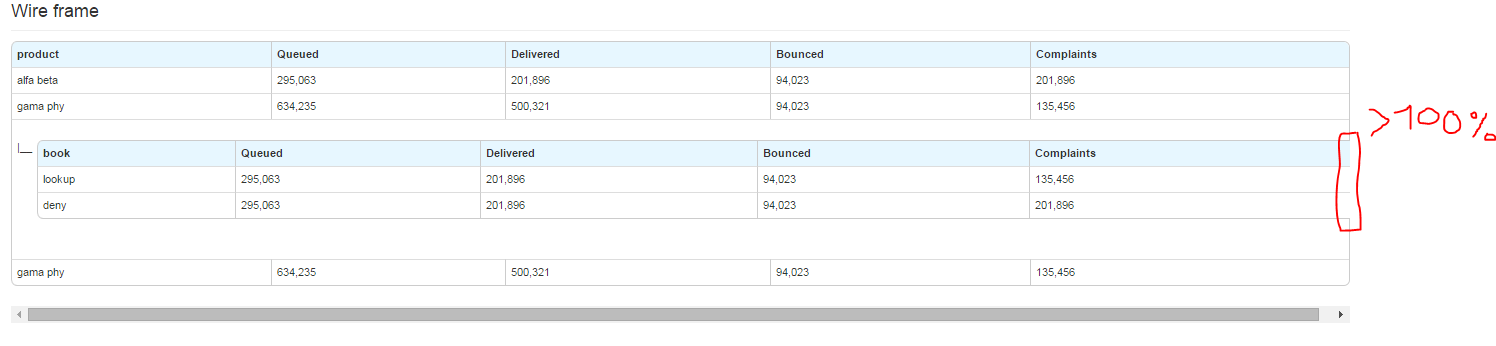
下面的图片显示了问题所在:
回答 1
Stack Overflow用户
回答已采纳
发布于 2016-02-01 20:25:14
是的这是可能的。使用您的代码,我添加了这个CSS:
.box {
  max-width: 400px;
}
.divParent {
  display: table;
  margin-top: 15px;
  width: 100%;
}
.divOne, .divTwo {
  background: lightgreen;
  display: table-cell;
  vertical-align: top;
}
.divTwo {
  background: lightblue;
}
并稍微修改了HTML:
<div class="box">
    <table class="table table-curved">
    <thead>
        <tr>
            <th>Mail</th>
            <th>Queued</th>
            <th>Delivered</th>
            <th>Bounced</th>
            <th>Complaints</th>
        </tr>
    </thead>
    <tbody>
        <tr>
            <td><span class="title">alfa beta</span>
            </td>
            <td>295,063</td>
            <td>201,896</td>
            <td>94,023</td>
            <td>201,896</td>
        </tr>
        <tr>
            <td><span class="title">gama phy</span>
            </td>
            <td>634,235</td>
            <td>500,321</td>
            <td>94,023</td>
            <td>135,456</td>
        </tr>
        <tr>
            <td colspan="15">
                <div class="divParent">
                    <div class="divOne">|_</div>
                    <div class="divTwo">
                        <table class="table table-curved">
                            <thead>
                                <tr>
                                    <th>ISP</th>
                                    <th>Queued</th>
                                    <th>Delivered</th>
                                    <th>Bounced</th>
                                    <th>Complaints</th>
                                </tr>
                            </thead>
                            <tbody>
                                <tr>
                                    <td><span class="title">lookup</span>
                                    </td>
                                    <td>295,063</td>
                                    <td>201,896</td>
                                    <td>94,023</td>
                                    <td>135,456</td>
                                </tr>
                                <tr>
                                    <td><span class="title">deny</span>
                                    </td>
                                    <td>295,063</td>
                                    <td>201,896</td>
                                    <td>94,023</td>
                                    <td>201,896</td>
                            </tbody>
                        </table>
                    </div>
                </div>
            </td>
        </tr>
    </tbody>
    </table>
</div>如您所见,我添加了一个名为.box的父容器,用于封装所有表代码,以便有一个特定的宽度集(可以删除此设置),然后有3个div .divPartent是表,而.divOne和.divTwo是允许内容彼此相邻的table-cells。我做了一个如果您想看到代码不起作用,请使用js.fiddle。希望这能帮助你走上正确的轨道。
页面原文内容由Stack Overflow提供。腾讯云小微IT领域专用引擎提供翻译支持
原文链接:
https://stackoverflow.com/questions/35138604
复制相关文章
相似问题
腾讯云开发者

Copyright © 2013 - 2026 Tencent Cloud. All Rights Reserved. 腾讯云 版权所有
深圳市腾讯计算机系统有限公司 ICP备案/许可证号:粤B2-20090059  粤公网安备44030502008569号
腾讯云计算(北京)有限责任公司 京ICP证150476号 | 京ICP备11018762号