
目标定位关闭
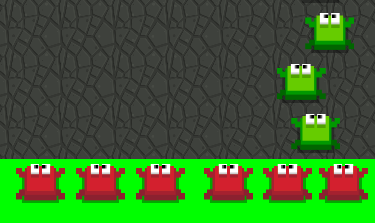
嗨,我试着让一个物体(在这个例子中是绿色青蛙)与玩家精灵(红色青蛙)在一个和场景一样宽的平台上产卵,我的意思是让这个物体产卵,这样当玩家前进时,它不会重叠这个物体。(图为绿色青蛙是如何介于两只红色青蛙之间,而不是与其中一种红色青蛙相一致)
我的对象定位代码如下
obstacle.position = CGPointMake(-(backgroundSprite.size.width / 2) + CGFloat(randomX) + (spacing * CGFloat(i)), 0)这目前产生它的左边,屏幕一半的场景。背景精灵是要添加到其中的对象,其定义如下:
let theSize:CGSize = CGSizeMake(levelUnitWidth, levelUnitHeight)
let tex:SKTexture = SKTexture(imageNamed: imageName)
backgroundSprite = SKSpriteNode(texture: tex, color: SKColor.blackColor(), size: theSize)
随机x也是在背景精灵的x轴上随机产生它们的东西(我也尝试过在没有运气的情况下进行调整)。
let randomX = arc4random_uniform( UInt32 (backgroundSprite.size.height) )最后,间隔是同一级别单元中的对象之间的距离。
let spacing:CGFloat = 250我已经尝试了实现球员的精灵宽度作为一个参考,是没有工作。有人能告诉我我在这里做错了什么吗。
下面是完整的代码,如果您需要查看这些代码的话:
if (theType == LevelType.road) {

for (var i = 0; i < Int(numberOfObjectsInLevel); i++) {

     let obstacle:Object = Object()


     obstacle.theType = LevelType.road


     obstacle.createObject()
     addChild(obstacle)


     let spacing:CGFloat = 250
     obstacle.position = CGPointMake((backgroundSprite.size.width / 4) + CGFloat(randomX) + (spacing * CGFloat(i)), 0)

    }
编辑:
我已经尝试过用我已经拥有的代码来实现您在编辑文章中所做的代码,这就是我得到的。
  if (theType == LevelType.road) {


        let xAxisSpawnLocations: [CGFloat] = {

            var spawnLocations:[CGFloat] = []

            //Create 5 possible spawn locations
            let numberOfNodes = 5

            for i in 0...numberOfNodes - 1 {

                /*
                Spacing between nodes will change if:

                1) number of nodes is changed,
                2) screen width is changed,
                3) node's size is changed.
                */

                var xPosition = (frame.maxX - thePlayer.size.width) / CGFloat((numberOfNodes - 1)) * CGFloat(i)

                //add a half of a player's width because node's anchor point is (0.5, 0.5) by default
                xPosition += thePlayer.size.width/2.0

                spawnLocations.append( xPosition )
            }

            return spawnLocations
        }()

        print(xAxisSpawnLocations)

        let yAxisSpawnLocations: [CGFloat] = [0]

        let obstacle:Object = Object()

        obstacle.theType = LevelType.road


        obstacle.createObject()
        addChild(obstacle)

        let randx = xAxisSpawnLocations[Int(arc4random_uniform(UInt32(xAxisSpawnLocations.count)))]

        obstacle.position = CGPoint(x: randx, y: yAxisSpawnLocations[0] )
        obstacle.zPosition = 200

    }
编辑2:
因此,再次实现代码--这一次是正确的--我得到了以下结果:
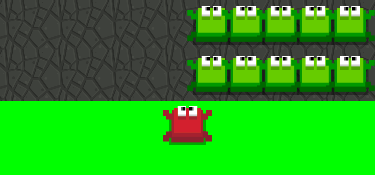
因此,播放器仍然与对象不一致,出于某种原因,它只在屏幕的右侧产生。我认为这是因为我有一个worldNode,可以保存所有的东西。
worldNode保存的播放器在worldNode中的起点为(0,0),它还保存持有对象的级别单元。相机的位置集中在播放器节点上,我不确定这是否是问题所在,但我将提供下面的代码,以便您可以查看它。
let startingPosition:CGPoint = CGPointMake(0, 0)woldNode代码:
let worldNode:SKNode = SKNode()


//creates the world node point to be in the middle of the screen
self.anchorPoint = CGPointMake(0.5, 0.5)
addChild(worldNode)

//adds the player as a child node to the world node
worldNode.addChild(thePlayer)
thePlayer.position = startingPosition
thePlayer.zPosition = 500
相机定位代码:
 override func didSimulatePhysics() {

    self.centerOnNode(thePlayer)
}

//centers the camera on the node world.
func centerOnNode(node:SKNode) {

    let cameraPositionInScene:CGPoint = self.convertPoint(node.position, fromNode: worldNode)
    worldNode.position = CGPoint(x: worldNode.position.x , y:worldNode.position.y - cameraPositionInScene.y  )

}
我很确定这是我的问题但是告诉我你是怎么想的。
回答 1
Stack Overflow用户
发布于 2016-01-30 14:33:54
正如我在注释中所说的,关键是预先定义x(和y)轴的坐标,并在此基础上生成节点。首先,让我们在GameScene类中定义一个播放器:
let player = SKSpriteNode(color: .redColor(), size: CGSize(width: 50, height: 50))现在,预定义产卵位置(x轴和y轴):
let xAxisSpawnLocations: [CGFloat] = [50.0, 125.0, 200.0, 275.0, 350.0, 425.0]
let yAxisSpawnLocations: [CGFloat] = [50.0, 125.0,  200.0, 275.0]
现在,当我们知道可能的位置,让我们的球员首先定位,并将其添加到现场:
player.position = CGPoint(x: xAxisSpawnLocations[0], y: yAxisSpawnLocations[0])
player.zPosition = 10
addChild(player)
你可以根据玩家的宽度、高度和屏幕大小来创建这些位置,但是由于简单,我已经硬编码了所有的东西。
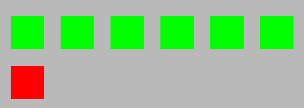
所以,让我们用绿色青蛙填满一排,就在玩家的上方:
for xLocation in xAxisSpawnLocations {

     let greenFrog = SKSpriteNode(color: .greenColor(), size: player.size)
     greenFrog.position = CGPoint(x: xLocation, y: yAxisSpawnLocations[1])
      addChild(greenFrog)
}
结果会是这样的:
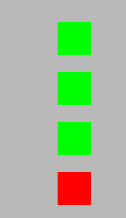
或者,举个例子,把玩家从一个地方移到右边,然后在他的上方做一列绿色青蛙:
player.position = CGPoint(x: xAxisSpawnLocations[1], y: yAxisSpawnLocations[0])


 for yLocation in yAxisSpawnLocations {

      let greenFrog = SKSpriteNode(color: .greenColor(), size: player.size)
       greenFrog.position = CGPoint(x: xAxisSpawnLocations[1], y: yLocation)
      addChild(greenFrog)
  }
应该是这样的:
编辑:
根据您的注释,可以根据节点数量、屏幕宽度和节点大小在屏幕上分发节点:
let xAxisSpawnLocations: [CGFloat] = {

    var spawnLocations:[CGFloat] = []

    //Create 5 possible spawn locations
    let numberOfNodes = 5

    for i in 0...numberOfNodes - 1 {

        /*
            Spacing between nodes will change if:

            1) number of nodes is changed,
            2) screen width is changed,
            3) node's size is changed.
        */

        var xPosition = (frame.maxX - player.size.width) / CGFloat((numberOfNodes - 1)) * CGFloat(i)

        //add a half of a player's width because node's anchor point is (0.5, 0.5) by default
        xPosition += player.size.width/2.0

        spawnLocations.append( xPosition )
    }

    return spawnLocations
}()

print(xAxisSpawnLocations)
当添加太多节点时,或者节点太大时,您应该处理正在发生的事情,但这可以给您提供一个基本的概念,即如何沿着x轴分布节点,并保持它们之间的相同距离。
https://stackoverflow.com/questions/35101219
复制相似问题
腾讯云开发者

Copyright © 2013 - 2026 Tencent Cloud. All Rights Reserved. 腾讯云 版权所有
深圳市腾讯计算机系统有限公司 ICP备案/许可证号:粤B2-20090059  粤公网安备44030502008569号
腾讯云计算(北京)有限责任公司 京ICP证150476号 | 京ICP备11018762号