
Xcode服务器持续集成与git lfs
我在Xcode中创建了一个机器人,用于在我的项目上进行持续集成。
我添加了一个触发器,以便在集成之前运行,在这里我尝试执行一个"git拉“,以便它将大型文件拉到Xcode用于执行构建的临时目录中。
怎样才能让"git拉力“发挥作用,从而使集成成功?
目前,我无法让它成功地下载大型文件。我的脚本如下所示:
#!/bin/bash

changeToRepo() {
    cd ${XCS_SOURCE_DIR}/My-Project-Name
}

changeToRepo
/usr/local/bin/git-lfs pull
但是,没有下载大型文件,当我检查触发脚本的日志时,我会看到以下输出。
Git:(1个文件中的0)0 B/ 139.13 MB Git LFS:(1个文件中的0)0 B/ 139.13 MB 无法签出文件git-lfs/1.1.0 (GitHub;达尔文amd64;git 1.5.1;git 258acf1) Git版本2.5.4 (Apple 61) $ git-lfs拉出无法签出文件 无法写入工作目录文件:打开媒体文件时出错。运行: github.com/github/git-lfs/lfs.Stack(0x0,0x0,0x0) /Users/rick/go/src/github.com/github/git-lfs/lfs/errors.go:557 +0x80 github.com/github/git-lfs/commands.logPanicToWriter(0x89a1e8,0xc82002e018,0x896028,0xc82000e480) /Users/rick/go/src/github.com/github/git-lfs/commands/commands.go:184 +0xf7f github.com/github/git-lfs/commands.logPanic(0x896028,0xc82000e480,0x0,/Users/rick/go/src/github.com/github/git-lfs/commands/commands.go:148 +0x421 github.com/github/git-lfs/commands.handlePanic(0x896028,0xc82000e480,0x0,0x0) /Users/rick/go/src/github.com/github/git-lfs/commands/commands.go:123 +0x4e github.com/github/git-lfs/commands.LoggedError(0x896028,0xc82000e480,0x548060,0x17,0x0,0x0/Users/rick/go/src/github.com/github/git-lfs/commands/commands.go:73 +0x82 github.com/github/git-lfs/commands.checkoutWithChan(0xc82012c4e0) /Users/rick/go/src/github.com/github/git-lfs/commands/command_checkout.go:202 +0x860 github.com/github/git-lfs/commands.checkoutFromFetchChan.func1(0xc82012c4e0,/Users/rick/go/src/github.com/github/git-lfs/commands/command_checkout.go:78 +0x21由github.com/github/git-lfs/commands.checkoutFromFetchChan /Users/rick/go/src/github.com/github/git-lfs/commands/command_checkout.go:80 +0x439创建
回答 2
Stack Overflow用户
发布于 2016-06-01 21:37:22
下面是我如何让git lfs在一个机器人中工作。首先,我编辑了我的bot“”触发器运行脚本,如下所示:
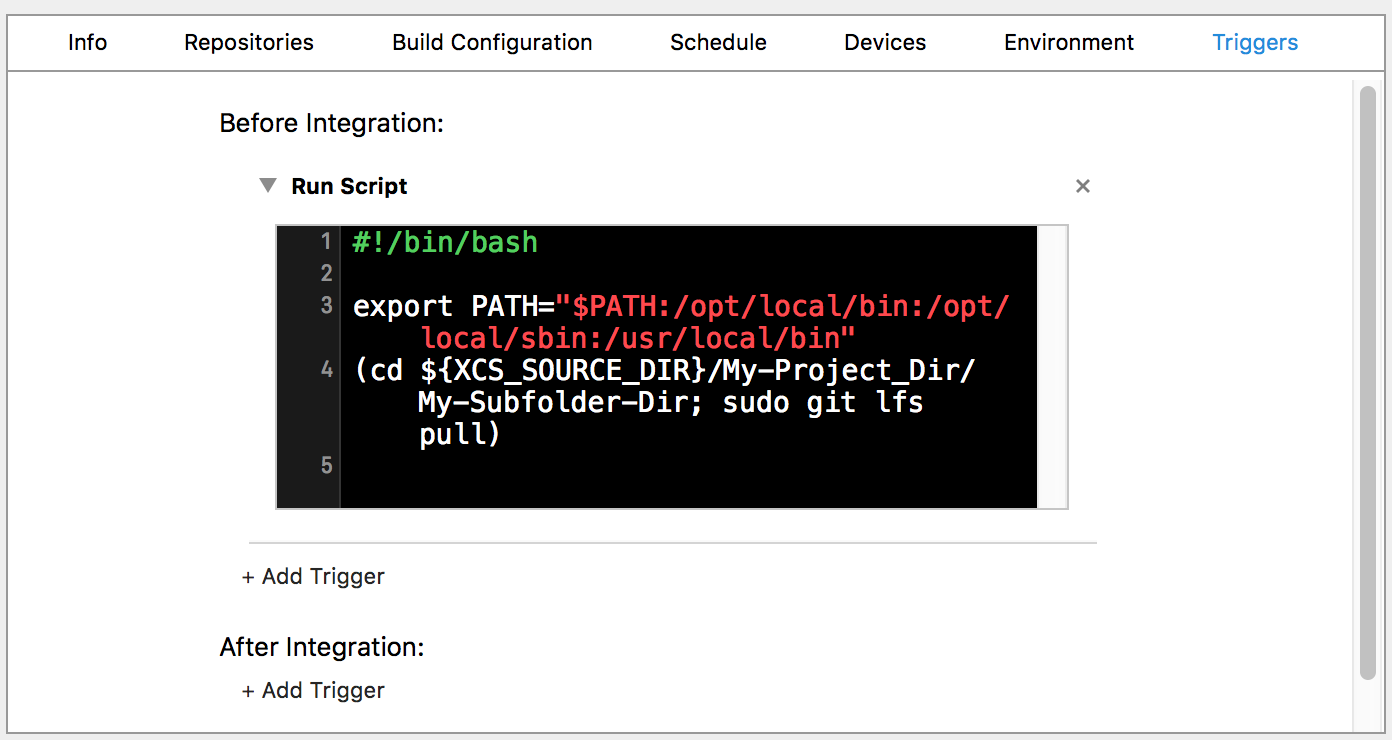
#!/bin/bash
export PATH="$PATH:/opt/local/bin:/opt/local/sbin:/usr/local/bin"
(cd ${XCS_SOURCE_DIR}/My-Project_Dir/My-Subfolder-Dir; sudo git lfs pull)
我们导出路径b/c在用户/本地/bin内部(这些其他位置可能适用于您安装它的方式或您使用的服务器类型)。否则,无法找到git lfs。
/My-子文件夹-Dir目录是项目的位置。Xcode服务器将把我的源代码下载到${XCS_SOURCE_DIR},这是一个临时文件夹,但是与我的大文件有关的.git文件驻留在我的-Project/My子文件夹-Dir中。
注意,cd和git命令都在括号内,这是因为cd命令生成一个子进程。如果我们只有一行cd,下一行有git,目录将不会保持不变,因为在子进程退出后,父进程仍然在初始目录中。除非我们在子进程中按顺序运行命令,否则不会在子进程的新目录中发出git命令。
还要注意,我需要对git使用sudo,否则git没有权限。机器人运行在与我的服务器管理空间不同的用户空间中,用户名为_xcsbuildd。
因此,将_xcsbuildd用户添加到sudoers中。在终端中,使用以下命令:
$ sudo visudo找到行"%admin ALL=(ALL) ALL",按"a“来编辑该文件,并在其下面添加以下行:
_xcsbuildd ALL=(ALL) NOPASSWD: ALL按Esc,然后输入以下内容,然后写并退出:
:wq 检查以确保sudoers是正确的:
$ sudo cat /etc/sudoers | grep _xcsbuildd
_xcsbuildd ALL=(ALL) NOPASSWD: ALL Stack Overflow用户
发布于 2018-01-20 20:40:32
各位,我不确定最初的解决方案是否有问题,但如果您有问题,请尝试如下所示-- Xcode Build Server ( Xcode Build Server)Xcode 9.2 /不需要任何权限/ sure等等。基本上,它是关于通过自制安装git-lfs,然后执行git lfs pull。
#!/bin/sh -ex
pushd "${XCS_SOURCE_DIR:?}"

rm -rf homebrew
mkdir homebrew
curl -L "https://github.com/Homebrew/brew/tarball/master" | tar xz --strip 1 -C homebrew
export PATH="$PATH:$PWD/homebrew/bin"
brew install git-lfs

cd YourCheckedOutRepository
git lfs pull

popdhttps://stackoverflow.com/questions/35068479
复制相似问题
腾讯云开发者

Copyright © 2013 - 2026 Tencent Cloud. All Rights Reserved. 腾讯云 版权所有
深圳市腾讯计算机系统有限公司 ICP备案/许可证号:粤B2-20090059  粤公网安备44030502008569号
腾讯云计算(北京)有限责任公司 京ICP证150476号 | 京ICP备11018762号