
npm安装错误代码128
在重新安装Node和Git之后,尝试运行npm install时,我会收到以下错误
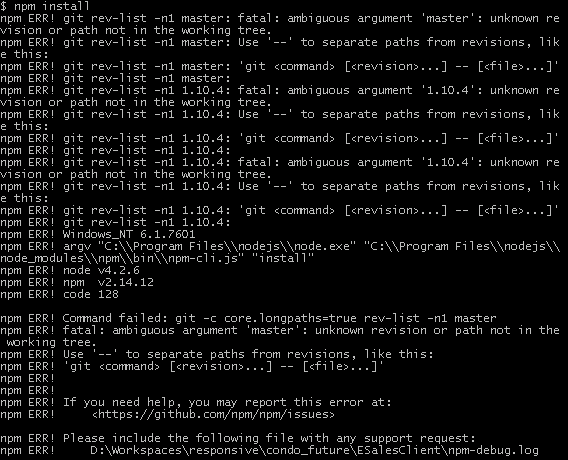
有谁知道是什么原因造成的,该怎么办才能解决?
package.json (删除公司详细信息)
{
    "name": "xxx",
    "version": "1.0.0",
    "description": "xxx",
    "engines": {
        "node": "5.0.0",
        "npm": "3.3.9"
    },
    "repository": "xxx",
    "private": true,
    "license": "UNLICENSED",
    "dependencies": {
        "dijit": "https://github.com/dojo/dijit.git#1.10.4",
        "dojo": "1.10.4",
        "fg-dialog": "0.1.5",
        "politespace": "0.1.4",
        "shoestring": "1.0.3"
    },
    "devDependencies": {
        "body-parser": "^1.14.1",
        "chalk": "^1.1.1",
        "compression": "^1.6.0",
        "del": "^2.0.2",
        "dojo-util": "https://github.com/dojo/util.git#1.10.4",
        "express": "^4.13.3",
        "glob": "^5.0.15",
        "gulp": "^3.9.0",
        "gulp-concat": "^2.6.0",
        "gulp-git": "^1.6.0",
        "gulp-html-minifier": "^0.1.6",
        "gulp-jsbeautifier": "^1.0.1",
        "gulp-jshint": "^1.11.2",
        "gulp-jshint-xml-file-reporter": "^0.5.1",
        "gulp-jsonminify": "^1.0.0",
        "gulp-replace": "^0.5.4",
        "gulp-task-listing": "^1.0.1",
        "gulp-uglify": "^1.4.1",
        "gulp-util": "^3.0.6",
        "gulp-zip": "^3.0.2",
        "intern": "https://github.com/theintern/intern.git",
        "jshint-stylish": "^2.0.1",
        "merge-stream": "^1.0.0",
        "minimist": "^1.2.0",
        "open": "^0.0.5",
        "q": "^1.4.1",
        "request": "^2.65.0",
        "require-dir": "^0.3.0",
        "run-sequence": "^1.1.2",
        "selenium-standalone": "^4.6.3"
    },
    "scripts": {
        "postinstall": "gulp install"
    }
}回答 10
Stack Overflow用户
发布于 2016-01-26 19:19:39
建议的第一步是使用最新的国家预防机制:
npm install -g npm (你可能需要sudo)。您使用的是NPM2.x,最新的是3.5.x。
Stack Overflow用户
发布于 2016-12-07 16:30:47
恢复时的错误点,特别是1.10.4的使用。检查是否使用标记设置了dijit.git和util.git的dijit.git repos。有关版本控制/标记的更多信息,请访问亚特兰蒂斯:https://confluence.atlassian.com/bitbucket/use-repo-tags-321860179.html。
如果您使用的SSH具有保存的密码,则需要使用以下格式通过SSH连接对个人存储库的引用。
git+ssh://git@bitbucket.org/{user}/{repository}.gitStack Overflow用户
发布于 2017-12-21 15:31:50
在我的例子中,我刚刚升级了npm和package-lock.json,试图从不可用的git提交版本中安装该项目的一个包。
删除和允许npm重新创建文件包-lock.json解决了这个问题。
rm package-lock.json注意:看起来像是Packe-lock.json维护了关于node_modules树的更多细节,所以在一个复杂/版本特定的项目中,隔离引起问题的特定行可能很重要,而只删除Packe-lock.json文件就可以了。
https://stackoverflow.com/questions/35021692
复制相似问题
腾讯云开发者

Copyright © 2013 - 2026 Tencent Cloud. All Rights Reserved. 腾讯云 版权所有
深圳市腾讯计算机系统有限公司 ICP备案/许可证号:粤B2-20090059  粤公网安备44030502008569号
腾讯云计算(北京)有限责任公司 京ICP证150476号 | 京ICP备11018762号