
CEF3浏览器显示页面错误
CEF3浏览器显示页面错误
提问于 2016-01-22 19:46:26
我一直在我的无边界win32窗口中显示一个浏览器窗口。到目前为止,已经创建了窗口并加载了浏览器,但是出现了两个问题。
- 消息似乎不会被发送到我的窗口回调(当然,这会导致窗口拖到不起作用)。
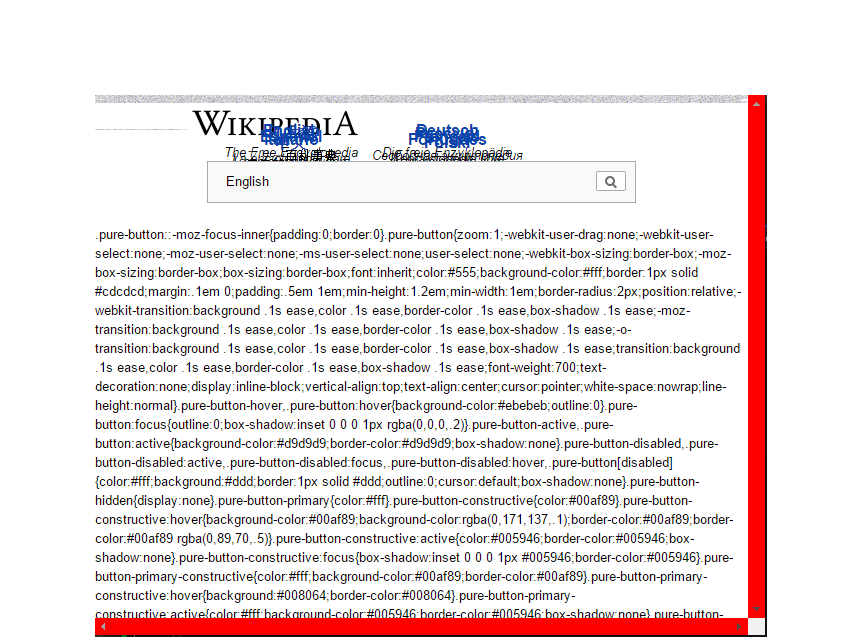
- 浏览器正在扭曲页面(就像只加载了一些css一样)
我认为这是因为我在实现CEF3时犯了一些明显的错误。我所拥有的是从两个示例项目中拼凑而成的,这两个例子都附带了一个CEF3的夜间构建。所以问题是,有人看到我在实现浏览器时犯了什么明显的错误吗?
这是我的Main.cpp
#include <Windows.h>

#include "include/cef_base.h"
#include "include/cef_app.h"
#include "ClientApp.h"
#include "ClientHandler.h"

#pragma comment(lib, "lib/libcef.lib")
#pragma comment(lib, "lib/libcef_dll_wrapper.lib")

// Fix Conflicting Macros
#define GET_X_LPARAM(lp)    ((int)(short)LOWORD(lp))
#define GET_Y_LPARAM(lp)    ((int)(short)HIWORD(lp))

// Window Variables
HINSTANCE g_instance;
HWND g_hwnd;
LPCWSTR g_window_class = L"MyUI";
INT g_window_width = 670;
INT g_window_height = 540;
BOOL g_drag_window = false;
SHORT g_mouse_x, g_mouse_y, g_mouse_x_prev, g_mouse_y_prev;

// CEF Variables
CefRefPtr<ClientApp> g_app;
CefRefPtr<ClientHandler> g_client_handler;

LRESULT CALLBACK WndProc(HWND hWnd, UINT message, WPARAM wParam, LPARAM lParam)
{
    switch (message)
    {
        case WM_DESTROY:
        {
            CefQuitMessageLoop();
            PostQuitMessage(0);
            break;
        }

        case WM_CREATE:
        {
            // Set window attributes
            RECT rect;
            GetClientRect(hWnd, &rect);
            CefWindowInfo info;
            info.SetAsChild(hWnd, rect);

            // Set browser settings
            CefBrowserSettings settings;

            //Create handler
            ::g_client_handler = new ClientHandler();

            // Create browser
            CefBrowserHost::CreateBrowserSync(info, ::g_client_handler.get(),
                "http://wikipedia.com", settings, NULL);

            break;
        }

        case WM_LBUTTONDOWN:
        {
            g_mouse_x = GET_X_LPARAM(lParam);
            g_mouse_y = GET_Y_LPARAM(lParam);
            if (g_mouse_y < 41)
            {
                g_mouse_x_prev = g_mouse_x;
                g_mouse_y_prev = g_mouse_y;
                SetCapture(hWnd);
                g_drag_window = true;
            }
            MessageBox(NULL, L"FLDKSJA", L"", MB_OK);
            break;
        }

        case WM_LBUTTONUP:
        {
            if (g_drag_window)
            {
                g_drag_window = false;
                ReleaseCapture();
            }
            break;
        }

        case WM_MOUSEMOVE:
        {
            if (g_drag_window && (wParam & MK_LBUTTON))
            {
                // code executed when the dialog window is moved around on the screen
                RECT win_rect;
                GetWindowRect(hWnd, &win_rect);
                int x_coord = GET_X_LPARAM(lParam);
                int y_coord = GET_Y_LPARAM(lParam);
                MoveWindow(hWnd,
                    win_rect.left + x_coord - g_mouse_x_prev,
                    win_rect.top + y_coord - g_mouse_y_prev,
                    win_rect.right - win_rect.left,
                    win_rect.bottom - win_rect.top,
                    false
                    );
                return 0;
            }
            break;
        }

        default:
            return DefWindowProc(hWnd, message, wParam, lParam);
    }
}

BOOL InitWindow()
{
    WNDCLASSEX wc;

    // Register window class
    wc.cbSize = sizeof(WNDCLASSEX);
    wc.style = CS_DROPSHADOW;
    wc.lpfnWndProc = WndProc;
    wc.cbClsExtra = 0;
    wc.cbWndExtra = 0;
    wc.hInstance = ::g_instance;
    wc.hIcon = LoadIcon(NULL, IDI_APPLICATION);
    wc.hCursor = LoadCursor(NULL, IDC_ARROW);
    wc.hbrBackground = (HBRUSH)(COLOR_WINDOW + 1);
    wc.lpszMenuName = NULL;
    wc.lpszClassName = ::g_window_class;
    wc.hIconSm = LoadIcon(NULL, IDI_APPLICATION);

    if (!RegisterClassEx(&wc))
    {
        wchar_t msg[100];
        wsprintf(msg, L"Unable to register class!\nError: %i", GetLastError());
        MessageBox(NULL, msg, L"Error!",
            MB_ICONEXCLAMATION | MB_OK);
        return FALSE;
    }

    // Create window
    ::g_hwnd = CreateWindowEx(
        0,                        // Optional window styles.
        ::g_window_class,         // Window class
        L"",                      // Window text
        WS_POPUP,     // Window style

        // Position and size
        CW_USEDEFAULT, CW_USEDEFAULT, ::g_window_width, ::g_window_height,

        NULL,       // Parent window
        NULL,       // Menu
        ::g_instance,  // Instance handle
        NULL        // Additional application data
        );

    if (!::g_hwnd)
    {
        wchar_t msg[100];
        wsprintf(msg, L"Unable to create window!\nError: %i", GetLastError());
        MessageBox(NULL, msg, L"Error!",
            MB_ICONEXCLAMATION | MB_OK);
        return FALSE;
    }

    //Display window
    ShowWindow(::g_hwnd, SW_SHOWNORMAL);
    UpdateWindow(::g_hwnd);

    return TRUE;
}

INT APIENTRY wWinMain(HINSTANCE hInstance, HINSTANCE hPrevInstance, LPTSTR lpCmdLine, INT nCmdShow)
{
    UNREFERENCED_PARAMETER(hPrevInstance);
    UNREFERENCED_PARAMETER(lpCmdLine);

    ::g_instance = hInstance;

    // Provide CEF with command-line arguments.
    CefMainArgs main_args(hInstance);

    // CEF applications have multiple sub-processes (render, plugin, GPU, etc)
    // that share the same executable. This function checks the command-line and,
    // if this is a sub-process, executes the appropriate logic.
    int exit_code = CefExecuteProcess(main_args, NULL, NULL);
    if (exit_code >= 0) {
        // The sub-process has completed so return here.
        return exit_code;
    }

    // Specify CEF global settings here.
    CefSettings settings;
    settings.no_sandbox = true;
    settings.multi_threaded_message_loop = false;
    settings.pack_loading_disabled = true;

    // ClientApp implements application-level callbacks for the browser process.
    ::g_app = new ClientApp();

    // Initialize CEF.
    CefInitialize(main_args, settings, ::g_app.get(), NULL);

    // Create main window.
    if (!InitWindow())
    {
        CefShutdown();
        return 1;
    }

    // Process messages.
    MSG msg;
    while (GetMessage(&msg, NULL, 0, 0))
    {
        TranslateMessage(&msg);
        DispatchMessage(&msg);

        CefDoMessageLoopWork();
    }

    // Shut down CEF.
    CefShutdown();

    return 0;
}
ClientApp.h
#pragma once
#include "include/cef_app.h"

class ClientApp : public CefApp,
                  public CefBrowserProcessHandler,
                  public CefRenderProcessHandler
{
public:
    ClientApp();
    ~ClientApp();

    // CefBase
    IMPLEMENT_REFCOUNTING(ClientApp);

    // CefApp
    virtual CefRefPtr<CefBrowserProcessHandler> GetBrowserProcessHandler()
    {
        return this;
    }

    virtual CefRefPtr<CefRenderProcessHandler> GetRenderProcessHandler()
    {
        return this;
    }

    //Context
    virtual void OnContextCreated(CefRefPtr<CefBrowser> browser,
        CefRefPtr<CefFrame> frame,
        CefRefPtr<CefV8Context> context);
};
ClientHandler.h
#pragma once
#include "include\cef_client.h"

class ClientHandler : public CefClient,
                      public CefLifeSpanHandler,
                      public CefLoadHandler
{
public:
    ClientHandler();
    ~ClientHandler();

    // CefClient
    virtual CefRefPtr<CefLifeSpanHandler> GetLifeSpanHandler()
    {
        return this;
    }
    virtual CefRefPtr<CefLoadHandler> GetLoadHandler()
    {
        return this;
    }


    // CefBase
    IMPLEMENT_REFCOUNTING(ClientHandler);
};
浏览器就是这样显示Wikipedia.com的:
回答 1
Stack Overflow用户
发布于 2016-01-23 06:23:50
以下是单线程和多线程的通用代码。
if (!settings.multi_threaded_message_loop) {
  // Run the CEF message loop. Blocks until recieves a WM_QUIT message.
  CefRunMessageLoop();
} else {
  MSG msg;
  // Run the application message loop.
  while (GetMessage(&msg, NULL, 0, 0)) {
  if (!TranslateAccelerator(msg.hwnd, hAccelTable, &msg)) {
    TranslateMessage(&msg);
    DispatchMessage(&msg);
  }
}
换句话说,单独尝试CefRunMessageLoop()。
页面原文内容由Stack Overflow提供。腾讯云小微IT领域专用引擎提供翻译支持
原文链接:
https://stackoverflow.com/questions/34954709
复制相关文章
相似问题
腾讯云开发者

Copyright © 2013 - 2026 Tencent Cloud. All Rights Reserved. 腾讯云 版权所有
深圳市腾讯计算机系统有限公司 ICP备案/许可证号:粤B2-20090059  粤公网安备44030502008569号
腾讯云计算(北京)有限责任公司 京ICP证150476号 | 京ICP备11018762号