
创建自动排序页面,创建TOC/Index,并将超链接添加回TOC
我在Excel 2010中有几个宏,我希望每个宏都进行如下操作:
在单击+或“创建新工作表”时,我希望为要创建的工作表名称提供提示符.继续到#Sort_Active_Book
Sort_Active_Book
运行一个名为"Sort_Active_Book“的宏,对选项卡进行字母数字排序,将TOC作为第一个选项卡(在左边).继续到#Rebuild_TOC
Rebuild_TOC
使用另一个宏“Rebuild /Index”重新构建TOC/Index。重建TOC将删除该页面,然后在开头创建一个新页面并将其命名为"TOC“。
最好是将它们分开,以便以后我可以单独使用每个宏来扩展功能/多功能性。由于这个工作簿每天都在使用,我需要调用其中一些宏的能力。
我已经为Rebuild_TOC编写的代码是:
Sub Rebuild_TOC()
Dim wbBook As Workbook
Dim wsActive As Worksheet
Dim wsSheet As Worksheet
Dim lnRow As Long
Dim lnPages As Long
Dim lnCount As Long
Set wbBook = ActiveWorkbook

With Application
    .DisplayAlerts = False
    .ScreenUpdating = False
    .EnableEvents = False
End With
'' Calls sub to organize the tabs in alphabetical order while keeping "TOC" as the FIRST tab.'
Application.Run("Sort_Active_Book")
'' Removed calling the Create_Back_Links line because I think It's possible to integrate into the existing code with it
'' already iterating through the worksheets.
' Application.Run("Create_Back_Links")

'' If the TOC sheet already exists, delete it and add a new
'' worksheet as the first in the document.
On Error Resume Next
With wbBook
    .Worksheets("TOC").Delete
    .Worksheets.Add Before:=.Worksheets(1)
End With
On Error GoTo 0
Set wsActive = wbBook.ActiveSheet
With wsActive
    .Name = "TOC"
    With .Range("A1:B1")
        .Value = VBA.Array("Table of Contents", "Sheet #")
        .Font.Bold = True
    End With
End With
lnRow = 2
lnCount = 1
'' Iterate through the worksheets in the workbook and create
'' sheetnames, add hyperlink and count & write the running number
'' of pages to be printed for each sheet on the TOC sheet.
For Each wsSheet In wbBook.Worksheets
    If wsSheet.Name <> wsActive.Name Then
        wsSheet.Activate
        With wsActive
            .Hyperlinks.Add .Cells(lnRow, 1), "", SubAddress:="'" & wsSheet.Name & "'!A1", TextToDisplay:=wsSheet.Name
            .Cells(lnRow, 2).Value = "'" & lnCount
        End With
        .Range("A1").Select
        .Range("A1").ClearContents
         '' Instead of placing text in cell A1 I've decided to use the hyperlink's TextToDisplay instead.
         ' .Range("A1").Value = "Back to TOC"
        .ActiveCell.Hyperlinks.Add Anchor:=("A1"), Address:="", SubAddress:="", TextToDisplay: = "Back to TOC"
        lnRow = lnRow + 1
        lnCount = lnCount + 1
    End If
Next wsSheet
wsActive.Activate
wsActive.Columns("A:B").EntireColumn.AutoFit
With Application
    .DisplayAlerts = True
    .ScreenUpdating = True
    .EnableEvents = True
End With
End Sub
我已经为Sort_Active_Book编写的代码是(我已经知道了):
Sub Sort_Active_Book()
Dim TotalSheets As Integer
Dim p As Integer
Dim iAnswer As VbMsgBoxResult

'
' Move the TOC to the begining of the document.
'
  Sheets("TOC").Move Before:=Sheets(1)
'
' Prompt the user as to which direction they wish to
' sort the worksheets.
'
   iAnswer = MsgBox("Sort Sheets in Ascending Order?" & Chr(10) & "Clicking No will sort in Descending Order", vbYesNoCancel + vbQuestion + vbDefaultButton1, "Sort Worksheets")
   For TotalSheets = 1 To Sheets.Count
      For p = 2 To Sheets.Count - 1
'
' If the answer is Yes, then sort in ascending order.
'
         If iAnswer = vbYes Then
            If UCase$(Sheets(p).Name) = "TOC" Then
               Sheets(p).Move Before:=Sheets(1)
            ElseIf UCase$(Sheets(p).Name) > UCase$(Sheets(p + 1).Name) Then
               Sheets(p).Move After:=Sheets(p + 1)
            End If
'
' If the answer is No, then sort in descending order.
'
         ElseIf iAnswer = vbNo Then
            If UCase$(Sheets(p).Name) = "TOC" Then
                Sheets(p).Move Before:=Sheets(1)
            ElseIf UCase$(Sheets(p).Name) < UCase$(Sheets(p + 1).Name) Then
               Sheets(p).Move After:=Sheets(p + 1)
            End If
         End If
      Next p
   Next TotalSheets
End Sub
我更希望Sort_Active_Book只在手动运行时才询问是否用于升序/降序(可能需要创建不同的宏或将当前代码拆分为另一个宏)。
为了实现我的目标,我被困在该往哪个方向走。
回答 1
Stack Overflow用户
发布于 2016-01-21 22:06:04
您需要使用ThisWorkbook代码模块,在这里可以找到:
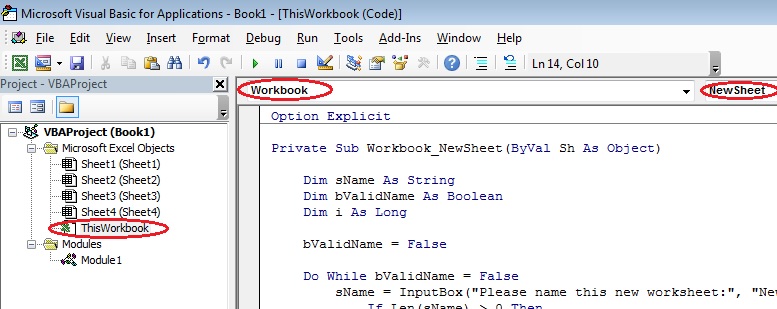
双击该代码模块以显示其模块表。在顶部,使用下拉列表选择Workbook (左手下拉),然后选择NewSheet (右侧下拉),如图像所示。
然后,您应该能够使用这段代码来执行您想要的任务:
Private Sub Workbook_NewSheet(ByVal Sh As Object)

    Dim sName As String
    Dim bValidName As Boolean
    Dim i As Long

    bValidName = False

    Do While bValidName = False
        sName = InputBox("Please name this new worksheet:", "New Sheet Name", Sh.Name)
            If Len(sName) > 0 Then
            For i = 1 To 7
                sName = Replace(sName, Mid(":\/?*[]", i, 1), " ")
            Next i
            sName = Trim(Left(WorksheetFunction.Trim(sName), 31))
            If Not Evaluate("ISREF('" & sName & "'!A1)") Then bValidName = True
        End If
    Loop

    Sh.Name = sName

    Call Sort_Active_Book
    Call Rebuild_TOC

End Subhttps://stackoverflow.com/questions/34934843
复制相似问题
腾讯云开发者

Copyright © 2013 - 2026 Tencent Cloud. All Rights Reserved. 腾讯云 版权所有
深圳市腾讯计算机系统有限公司 ICP备案/许可证号:粤B2-20090059  粤公网安备44030502008569号
腾讯云计算(北京)有限责任公司 京ICP证150476号 | 京ICP备11018762号