
MigLayout面板在MigLayout面板中-将其与底部对齐
MigLayout面板在MigLayout面板中-将其与底部对齐
提问于 2016-01-20 20:49:33
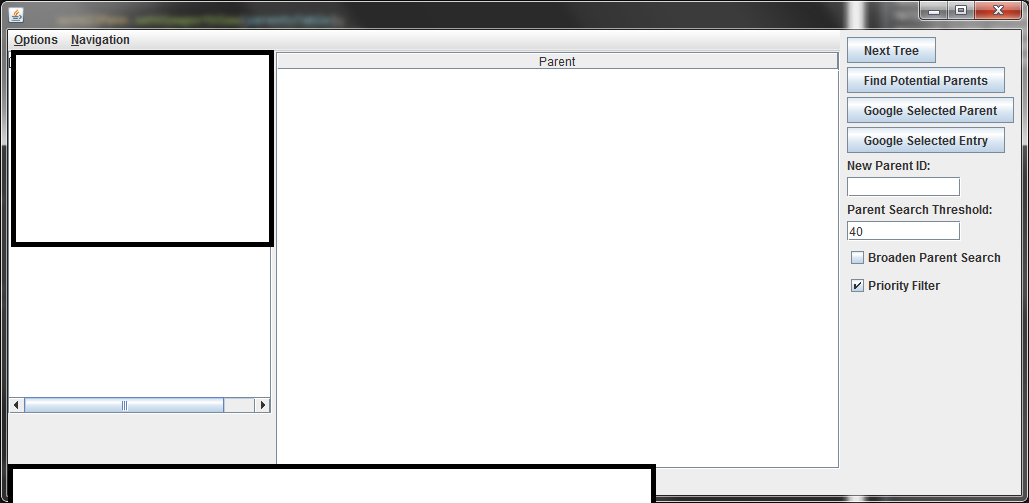
面板右边有所有的按钮,我想对齐到底部。
JPanel easternDock = new JPanel(new MigLayout("", ""));
easternDock.add(button1, "wrap");
....
this.add(easternDock);
我在想,我可以在所有按钮之上添加一个组件,并使它在y维中增长,以填充屏幕,但我不确定我会为此使用什么组件,而且我也找不到任何设计来实现这种功能的组件。
回答 1
Stack Overflow用户
回答已采纳
发布于 2016-01-21 12:57:23
我这样做的方法是在"easternDock“面板中有另一个面板,该面板包含所有组件,并使用push列/Row约束将另一个面板推到底部。
来自MiG备忘单:http://www.miglayout.com/cheatsheet.html
“::push”(或者"push“,如果与默认的间隙大小一起使用)可以添加到间隙大小中,使间隙变得贪婪,并且尽量占用空间,而不使布局比容器大。
下面是一个示例:
public class AlignToBottom {

public static void main(String[] args) {
    JFrame frame = new JFrame();

    // Settings for the Frame
    frame.setSize(400, 400);
    frame.setLayout(new MigLayout(""));
    frame.setDefaultCloseOperation(JFrame.EXIT_ON_CLOSE);

    // Parent panel which contains the panel to be docked east
    JPanel parentPanel = new JPanel(new MigLayout("", "[grow]", "[grow]"));

    // This is the panel which is docked east, it contains the panel (bottomPanel) with all the components
    // debug outlines the component (blue) , the cell (red) and the components within it (blue)
    JPanel easternDock = new JPanel(new MigLayout("debug, insets 0", "", "push[]"));

    // Panel that contains all the components
    JPanel bottomPanel = new JPanel(new MigLayout());


    bottomPanel.add(new JButton("Button 1"), "wrap");
    bottomPanel.add(new JButton("Button 2"), "wrap");
    bottomPanel.add(new JButton("Button 3"), "wrap");

    easternDock.add(bottomPanel, "");

    parentPanel.add(easternDock, "east");

    frame.add(parentPanel, "push, grow");
    frame.setLocationRelativeTo(null);
    frame.setVisible(true);

}

} 页面原文内容由Stack Overflow提供。腾讯云小微IT领域专用引擎提供翻译支持
原文链接:
https://stackoverflow.com/questions/34910246
复制相关文章
相似问题
腾讯云开发者

Copyright © 2013 - 2026 Tencent Cloud. All Rights Reserved. 腾讯云 版权所有
深圳市腾讯计算机系统有限公司 ICP备案/许可证号:粤B2-20090059  粤公网安备44030502008569号
腾讯云计算(北京)有限责任公司 京ICP证150476号 | 京ICP备11018762号