
TinyMCE file_picker_callback从默认浏览器文件选择图像
TinyMCE file_picker_callback从默认浏览器文件选择图像
提问于 2016-01-20 18:30:17
我在项目中使用TinyMCE,并希望用户使用默认的insert映像窗口选择图像并将图像上传到服务器。
我想单击以下按钮:
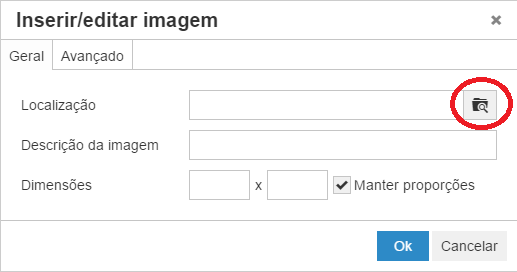
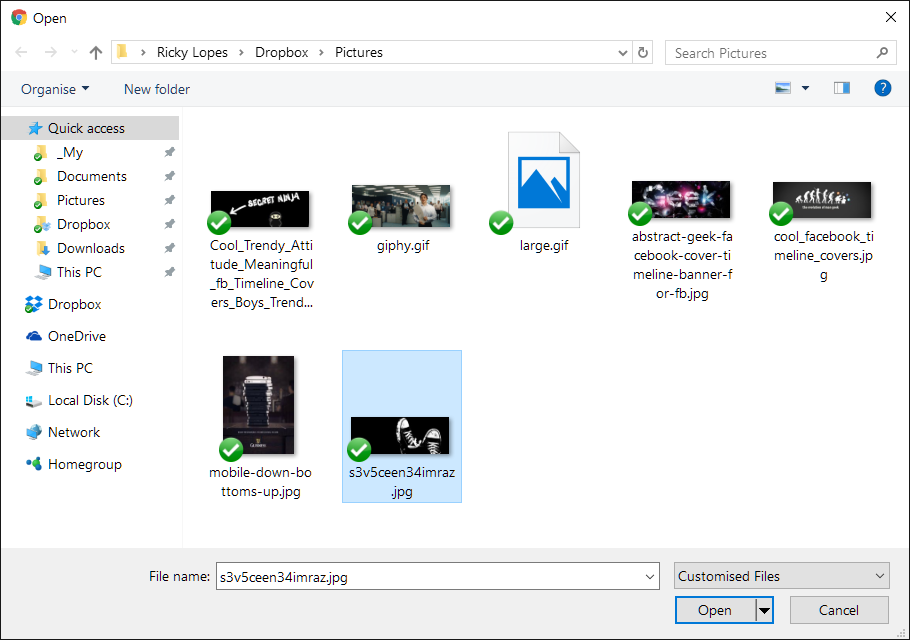
打开浏览器默认文件,选择窗口,并将选定的图像添加到编辑器中:
到目前为止,我的代码如下。
联署材料:
tinymce.init({
        selector: '#html-editor',
        language: 'pt_PT',
        plugins: [
            "bdesk_photo advlist autolink link image lists charmap preview hr anchor pagebreak",
            "searchreplace wordcount visualblocks visualchars code media nonbreaking",
            "table contextmenu directionality paste textcolor colorpicker imagetools"
        ],
        add_unload_trigger: false,
        toolbar: "styleselect | bold italic | alignleft aligncenter alignright alignjustify | bullist numlist outdent indent | link image media preview | forecolor backcolor table",
        image_advtab: true,

        file_picker_callback: function (callback, value, meta)
        {
            $('#html-editor input').click();

            //how to get selected image data and add to editor?
        },

        paste_data_images: true,
        images_upload_handler: function (blobInfo, success, failure)
        {
            // no upload, just return the blobInfo.blob() as base64 data
            success("data:" + blobInfo.blob().type + ";base64," + blobInfo.base64());
        }
    });
HTML:
<div id="html-editor">
    <input name="image" type="file" style="width:0;height:0;overflow:hidden;">
</div>
为了获取所选文件并将其添加到编辑器,必须对file_picker_callback事件进行何种更改?
回答 2
Stack Overflow用户
回答已采纳
发布于 2016-05-23 16:15:41
也有同样的问题。请记住,浏览器必须支持FileReader (否则只需插入您自己的脚本)。
html (将其放在html页面的任何位置):
<input id="my-file" type="file" name="my-file" style="display: none;" onchange="" />js (在tinymce init配置中):
file_picker_callback: function (callback, value, meta) {
    if (meta.filetype == 'image') {
        var input = document.getElementById('my-file');
        input.click();
        input.onchange = function () {
            var file = input.files[0];
            var reader = new FileReader();
            reader.onload = function (e) {
                callback(e.target.result, {
                    alt: file.name
                });
            };
            reader.readAsDataURL(file);
        };
    }
}Stack Overflow用户
发布于 2016-01-21 06:22:54
试一试
var imageFilePicker = function (callback, value, meta) {
    tinymce.activeEditor.windowManager.open({
        title: 'Image Picker',
        url: '/images/getimages',
        width: 650,
        height: 550,
        buttons: [{
            text: 'Insert',
            onclick: function () {
                //.. do some work
                tinymce.activeEditor.windowManager.close();
            }
        }, {
            text: 'Close',
            onclick: 'close'
        }],
    }, {
        oninsert: function (url) {
            callback(url);
            console.log("derp");
        },
    });
};


tinymce.init({
  selector: 'div#html-editor',
  height: 200,
  theme: 'modern',
  plugins: [
    'advlist autolink lists link image charmap print preview hr anchor pagebreak',
    'searchreplace wordcount visualblocks visualchars code fullscreen',
    'insertdatetime media nonbreaking save table contextmenu directionality',
    'emoticons template paste textcolor colorpicker textpattern imagetools'
  ],
  toolbar1: 'insertfile undo redo | styleselect | bold italic | alignleft aligncenter alignright alignjustify | bullist numlist outdent indent | link image',
  toolbar2: 'print preview media | forecolor backcolor emoticons',
  image_advtab: true,
  paste_data_images: true,
  automatic_uploads: true,
  file_picker_callback: function(callback, value, meta) {
    imageFilePicker(callback, value, meta);
  }
});页面原文内容由Stack Overflow提供。腾讯云小微IT领域专用引擎提供翻译支持
原文链接:
https://stackoverflow.com/questions/34907759
复制相关文章
相似问题
腾讯云开发者

Copyright © 2013 - 2026 Tencent Cloud. All Rights Reserved. 腾讯云 版权所有
深圳市腾讯计算机系统有限公司 ICP备案/许可证号:粤B2-20090059  粤公网安备44030502008569号
腾讯云计算(北京)有限责任公司 京ICP证150476号 | 京ICP备11018762号