
WPF FindAncestor性能问题
WPF FindAncestor性能问题
提问于 2016-01-20 07:38:39
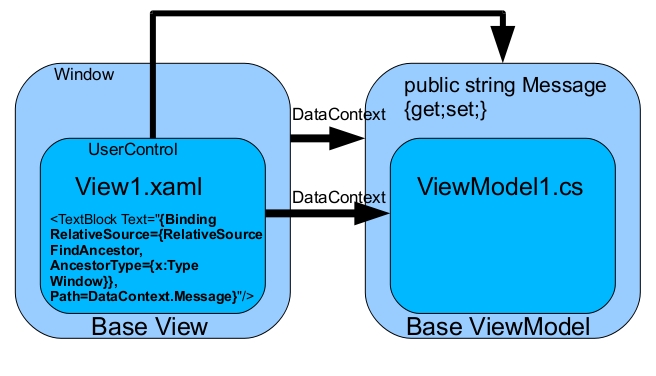
在绑定中使用FindAncestor存在性能问题。
我想在子用户控件或ListBoxItem/ListViewItem中使用Base的DataContext。
这个问题的另一种选择是什么?
回答 2
Stack Overflow用户
发布于 2016-01-20 08:08:43
给父程序一个名称,并使用ElementName=绑定到它。
Stack Overflow用户
发布于 2016-01-20 08:56:18
与使用FindAncestor遍历Visual不同,您可以遍历当前控件的DataContext。要做到这一点,您需要在ViewModels中引用父ViewModel。我通常有一个基类ViewModel,它有一个属性Parent和Root
public abstract class ViewModel : INotifyPropertyChanged
{
    private ViewModel parentViewModel;

    public ViewModel(ViewModel parent)
    {
        parentViewModel = parent;
    }

    /// <summary>
    /// Get the top ViewModel for binding (eg Root.IsEnabled)
    /// </summary>
    public ViewModel Root
    {
        get
        {
            if (parentViewModel != null)
            {
                return parentViewModel.Root;
            }
            else
            {
                return this;
            }
        }
    }
}
在XAML中,您可以替换以下内容:
<ComboBox x:Name="Sector"
                 ItemsSource="{Binding RelativeSource={RelativeSource FindAncestor, AncestorType={x:Type UserControl}}, Path=DataContext.SectorList}"
                 SelectedValuePath="Id"
                 SelectedValue="{Binding SectorId, Mode=TwoWay}" />
通过这一点:
<ComboBox x:Name="Sector"
                 ItemsSource="{Binding Root.SectorList}"
                 SelectedValuePath="Id"
SelectedValue="{Binding SectorId, Mode=TwoWay}" />一个要求是:Root属性总是存在于最顶层的ViewModel上。
页面原文内容由Stack Overflow提供。腾讯云小微IT领域专用引擎提供翻译支持
原文链接:
https://stackoverflow.com/questions/34894112
复制相关文章
相似问题
腾讯云开发者

Copyright © 2013 - 2026 Tencent Cloud. All Rights Reserved. 腾讯云 版权所有
深圳市腾讯计算机系统有限公司 ICP备案/许可证号:粤B2-20090059  粤公网安备44030502008569号
腾讯云计算(北京)有限责任公司 京ICP证150476号 | 京ICP备11018762号