
我在asp.net mvc-5中的自定义asp.net不覆盖内置样式。
我正在开发一个asp.net mvc-5 web应用程序.我的共享_layout视图中有以下内容:
<link id="bs-css" href="~/Content/css/bootstrap-cerulean.css" rel="stylesheet">

<link href="~/Content/css/charisma-app.css" rel="stylesheet">
<link href="~/Content/css/bootstrap-responsive.css" rel="stylesheet">
<link href="~/Content/start/jquery-ui-1.10.3.custom.min.css" rel="stylesheet" />
@Styles.Render("~/Content/templete")因此,我主要是首先引用内置的引导.css文件,然后引用包含我们的site.css的包@Styles.Render("~/Content/templete")。这意味着site.css应该覆盖内置的.css文件,因为我引用的是它们之后的site.css .
现在我面临的问题是,我在我的站点中有以下的风格定义:
.input-validation-error {
    border: 1px solid #ff0000;
    background-color: #ffeeee;
}
如果输入有任何验证错误,则显示红色边框。现在,在我的应用程序中,我将不会出现以下错误行为:-
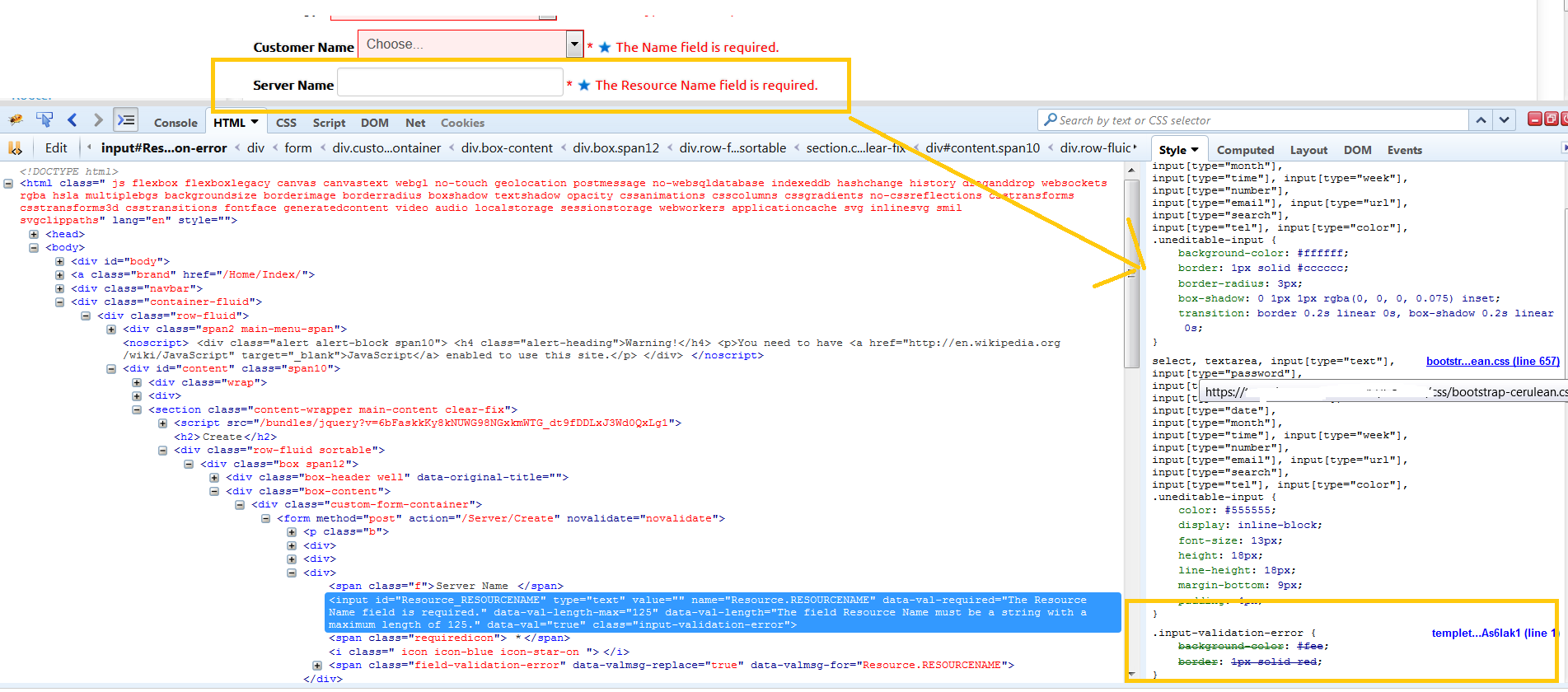
如图片中所示,与下拉字段不同的是,输入字段不会有任何红色边框。现在,如firebug所示,在引导-cerulean.css中定义的下列css规则将覆盖site.css样式(尽管我在引导-cerulean.css之后引用site.css ):
textarea, input[type="text"], input[type="password"], input[type="datetime"], input[type="datetime-local"], input[type="date"], input[type="month"], input[type="time"], input[type="week"], input[type="number"], input[type="email"], input[type="url"], input[type="search"], input[type="tel"], input[type="color"], .uneditable-input {
    background-color: #ffffff;
    border: 1px solid #cccccc;
    border-radius: 3px;
    box-shadow: 0 1px 1px rgba(0, 0, 0, 0.075) inset;
    transition: border 0.2s linear 0s, box-shadow 0.2s linear 0s;
}
select, textarea, input[type="text"], input[type="password"], input[type="datetime"], input[type="datetime-local"], input[type="date"], input[type="month"], input[type="time"], input[type="week"], input[type="number"], input[type="email"], input[type="url"], input[type="search"], input[type="tel"], input[type="color"], .uneditable-input {
    color: #555555;
    display: inline-block;
    font-size: 13px;
    height: 18px;
    line-height: 18px;
    margin-bottom: 9px;
    padding: 4px;
}
那么,有谁能否认我怎样才能强制这种风格,以达到输入字段的预期效果呢?
.input-validation-error {
    border: 1px solid #ff0000;
    background-color: #ffeeee;
}回答 1
Stack Overflow用户
发布于 2016-01-19 16:30:04
属性选择器比类选择器具有更高的特异性。即使您的类选择器稍后在样式表中,它仍然被文件中更高的更具体的属性扇区覆盖。
input[type=text] {
  background: #FFF;
  border: 1px solid #DDD;
}

.error {
  background: rgba(255,0,0,0.3);
  border: 1px solid #F88;
}<input class="error" type="text">
尝试将属性部分添加到错误类中,以提高其特殊性。
input[type=text] {
  background: #FFF;
  border: 1px solid #DDD;
}

input[type=text].error {
  background: rgba(255,0,0,0.3);
  border: 1px solid #F88;
}<input class="error" type="text">
我还没看过,但这篇文章看上去很不错:https://css-tricks.com/specifics-on-css-specificity/
https://stackoverflow.com/questions/34881828
复制相似问题
腾讯云开发者

Copyright © 2013 - 2026 Tencent Cloud. All Rights Reserved. 腾讯云 版权所有
深圳市腾讯计算机系统有限公司 ICP备案/许可证号:粤B2-20090059  粤公网安备44030502008569号
腾讯云计算(北京)有限责任公司 京ICP证150476号 | 京ICP备11018762号