
我如何与CoreGraphics画一条线,它的踪迹将在一定长度内开始消失?
我所说的从1:04开始就可以在这里看到。在5-10秒之后,你就会明白我所说的“踪迹将开始消失”是什么意思。
我现在的应用程序画了一条淡薄的线,是用户在屏幕周围移动的。但是,这条线一直保持到-touchesEnded:withEvent:,当我设置imageView.image = nil时。
我想要实现的是一条正在积极绘制的线,当你画这条线时,最古老的部分将变得更加透明,直到它最终消失。线条绘制可以是基于时间的,也可以是基于当前的线条长度。
我怎样才能做到这一点?
回答 1
Stack Overflow用户
发布于 2016-01-19 15:38:23
我不知道你现在是怎么做的,但我就是这么做的.
- 创建一个自定义对象来存储线索的一小部分,以及一个
alpha和delay**.**。 touchesMoved:中的计算用户触摸位置的变化,并在此基础上生成新的子路径,然后将其包装到自定义对象.中。- 使用给定的alpha.绘制方法中的所有子路径。
CADisplayLink设置了一个来更新子路径的alphas和延迟。
所以首先,让我们定义我们的定制对象..。
/// Represents a small portion of a trail.
@interface trailSubPath : NSObject

/// The subpath of the trail.
@property (nonatomic) CGPathRef path;

/// The alpha of this section.
@property (nonatomic) CGFloat alpha;

/// The delay before the subpath fades
@property (nonatomic) CGFloat delay;

@end
让我们也给它一个方便的首字母,使它看起来光滑以后..。
@implementation trailSubPath

+(instancetype) subPathWithPath:(CGPathRef)path alpha:(CGFloat)alpha delay:(CGFloat)delay {
    trailSubPath* subpath = [[self alloc] init];
    subpath.path = path;
    subpath.alpha = alpha;
    subpath.delay = delay;
    return subpath;
}

@end让我们在您的UIView 顶部定义一些常量(如果您还没有创建一个子类,我们将使用进行绘图)
/// How long before a subpath starts to fade.
static CGFloat const pathFadeDelay = 5.0;

/// How long the fading of the subpath goes on for.
static CGFloat const pathFadeDuration = 1.0;

/// The stroke width of the path.
static CGFloat const pathStrokeWidth = 3.0;在您的UIView中,您将希望存储trailSubPath对象的NSMutableArray以及我们稍后需要的一些其他变量。
我决定使用CADisplayLink来处理trailSubPath对象的更新。这样,代码将在所有设备上以相同的速度运行(在较慢的设备上以较低的FPS为代价)。
@implementation view {

    UIColor* trailColor; // The stroke color of the trail
    NSMutableArray* trailSubPaths; // The array of trailSubPaths

    CGPoint lastPoint; // Last point the user touched
    BOOL touchedDown; // Whether the user is touching the screen

    CADisplayLink* displayLink; // A display link in order to allow the code to run at the same speed on different devices
}在-initWithFrame:方法中,我们要做一些基本的设置.
-(instancetype) initWithFrame:(CGRect)frame {
    if (self = [super initWithFrame:frame]) {

        trailSubPaths = [NSMutableArray array];
        trailColor = [UIColor redColor];

        self.backgroundColor = [UIColor whiteColor];
    }
    return self;
}现在让我们设置UIResponder触摸方法..。
-(void) touchesBegan:(NSSet<UITouch *> *)touches withEvent:(UIEvent *)event {
    lastPoint = [[[event allTouches] anyObject] locationInView:self];
    touchedDown = YES;

    [displayLink invalidate]; // In case it's already running.
    displayLink = [CADisplayLink displayLinkWithTarget:self selector:@selector(displayLinkDidFire)];
    [displayLink addToRunLoop:[NSRunLoop mainRunLoop] forMode:NSRunLoopCommonModes];
}

-(void) touchesMoved:(NSSet<UITouch *> *)touches withEvent:(UIEvent *)event {
    if (touchedDown) {

        CGPoint p = [[[event allTouches] anyObject] locationInView:self];

        CGMutablePathRef mutablePath = CGPathCreateMutable(); // Create a new subpath
        CGPathMoveToPoint(mutablePath, nil, lastPoint.x, lastPoint.y);
        CGPathAddLineToPoint(mutablePath, nil, p.x, p.y);

        // Create new subpath object
        [trailSubPaths addObject:[trailSubPath subPathWithPath:CGPathCreateCopy(mutablePath) alpha:1.0 delay:pathFadeDelay]];

        CGPathRelease(mutablePath);

        lastPoint = p;
    }
}

-(void) touchesEnded:(NSSet<UITouch *> *)touches withEvent:(UIEvent *)event {
    touchedDown = NO;
}

-(void) touchesCancelled:(NSSet<UITouch *> *)touches withEvent:(UIEvent *)event {
    [self touchesEnded:touches withEvent:event];
}没有太复杂的地方,它只是计算在-touchesMoved:上触摸位置的变化,并在此基础上生成一条新的直线子路径。然后将其包装在我们的trailSubPath中并添加到数组中。
现在,我们需要在CADisplayLink更新方法中设置逻辑。这将只计算子路径的alphas和延迟的变化,并删除已经消失的任何子路径:
-(void) displayLinkDidFire {

    // Calculate change in alphas and delays.
    CGFloat deltaAlpha = displayLink.duration/pathFadeDuration;
    CGFloat deltaDelay = displayLink.duration;

    NSMutableArray* subpathsToRemove = [NSMutableArray array];

    for (trailSubPath* subpath in trailSubPaths) {

        if (subpath.delay > 0) subpath.delay -= deltaDelay;
        else subpath.alpha -= deltaAlpha;

        if (subpath.alpha < 0) { // Remove subpath
            [subpathsToRemove addObject:subpath];
            CGPathRelease(subpath.path);
        }
    }

    [trailSubPaths removeObjectsInArray:subpathsToRemove];

    // Cancel running if nothing else to do.
    if (([trailSubPaths count] == 0) && !touchedDown) [displayLink invalidate];
    else [self setNeedsDisplay];
}最后,我们只想重写drawRect:方法,以便在Core中绘制所有trailSubPath对象:
- (void)drawRect:(CGRect)rect {

    CGContextRef ctx = UIGraphicsGetCurrentContext();
    CGContextSetStrokeColorWithColor(ctx, trailColor.CGColor);
    CGContextSetLineWidth(ctx, pathStrokeWidth);

    for (trailSubPath* subpath in trailSubPaths) {
        CGContextAddPath(ctx, subpath.path);
        CGContextSetAlpha(ctx, subpath.alpha);
        CGContextStrokePath(ctx);
    }

}
它看起来像很多的代码,但我相信你已经有一半的设置,以划清你的底线在此刻!
setNeedsDisplay只需注意,根据长度进行试用淡出的一种简单方法是将对 CADisplayLink 更新方法中的 -touchesMoved: 的调用移到-touchesMoved:方法,并使 -touchesEnded:**.**上的显示链接失效。
呼。结束了..。我做过的最长的答案。
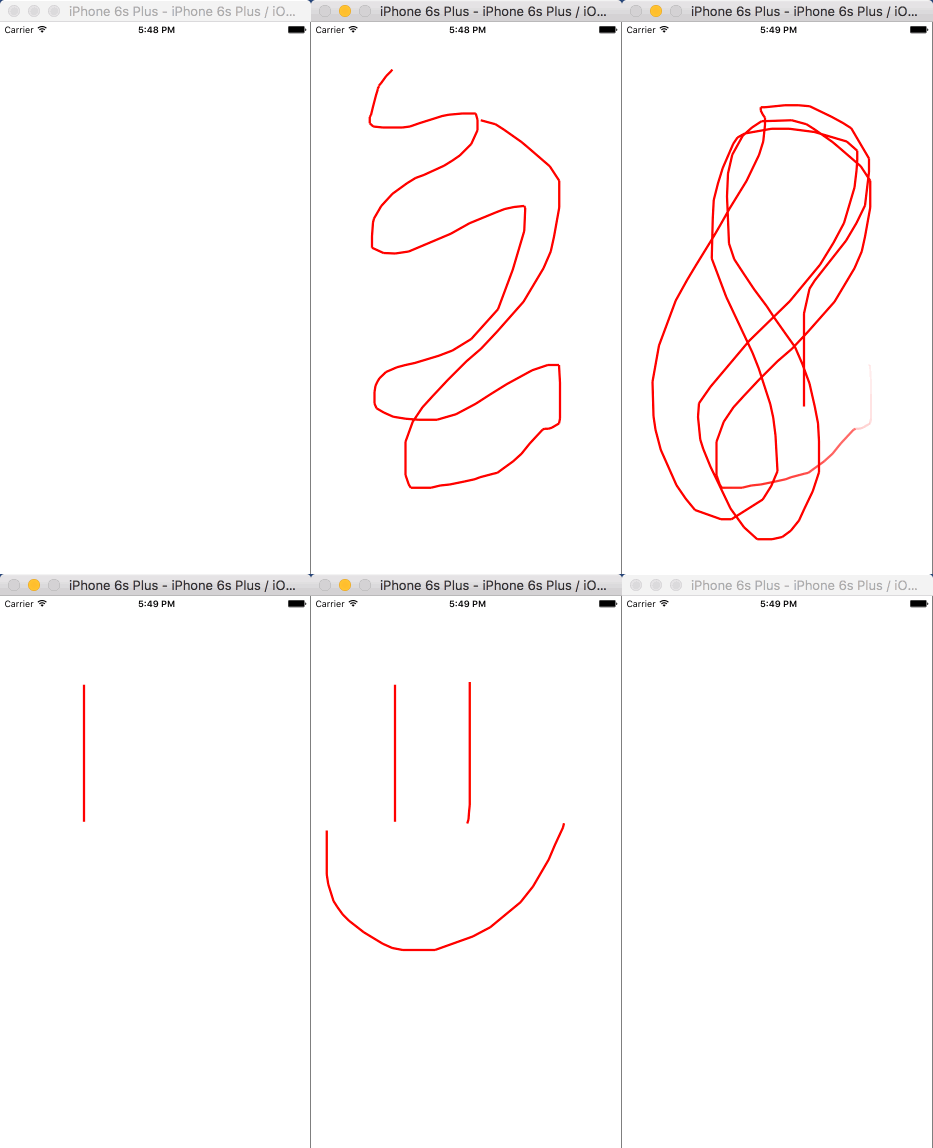
完成结果
https://stackoverflow.com/questions/34876538
复制相似问题
腾讯云开发者

Copyright © 2013 - 2026 Tencent Cloud. All Rights Reserved. 腾讯云 版权所有
深圳市腾讯计算机系统有限公司 ICP备案/许可证号:粤B2-20090059  粤公网安备44030502008569号
腾讯云计算(北京)有限责任公司 京ICP证150476号 | 京ICP备11018762号