
如何连接到我刚刚安装在笔记本电脑上的Oracle 11g?
Microsoft Windows [Version 6.1.7601]
Copyright (c) 2009 Microsoft Corporation.  All rights reserved.

C:\Users\my_laptop_name>lsnrctl status

LSNRCTL for 32-bit Windows: Version 11.2.0.1.0 - Production on 19-JAN-2016 02:57
:19

Copyright (c) 1991, 2010, Oracle.  All rights reserved.

Connecting to (ADDRESS=(PROTOCOL=tcp)(HOST=)(PORT=1521))
STATUS of the LISTENER
------------------------
Alias                     LISTENER
Version                   TNSLSNR for 32-bit Windows: Version 11.2.0.1.0 - Produ
ction
Start Date                19-JAN-2016 02:35:39
Uptime                    0 days 0 hr. 21 min. 41 sec
Trace Level               off
Security                  ON: Local OS Authentication
SNMP                      OFF
Listener Log File         g:\app\my_laptop_name\diag\tnslsnr\my_laptop_name-laptop\listener\
alert\log.xml
Listening Endpoints Summary...
  (DESCRIPTION=(ADDRESS=(PROTOCOL=tcp)(HOST=my_laptop_name-laptop)(PORT=1521)))
Services Summary...
Service "orcl.2.12.151" has 1 instance(s).
  Instance "orcl", status READY, has 1 handler(s) for this service...
Service "orclXDB.2.12.151" has 1 instance(s).
  Instance "orcl", status READY, has 1 handler(s) for this service...
The command completed successfully

C:\Users\my_laptop_name>
现在,我的问题是,我应该在SqlDeveloper的对话框中写些什么?
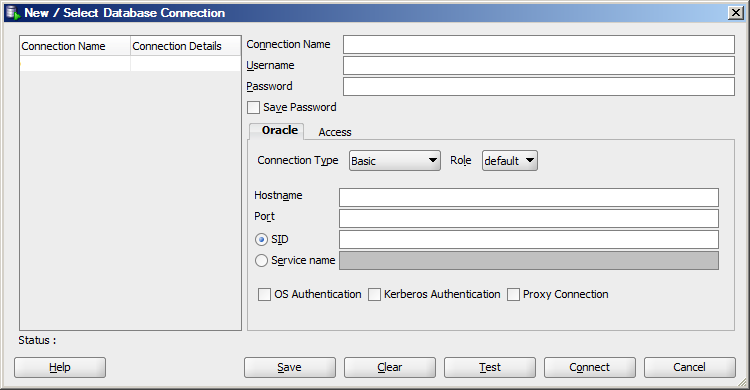
而且,看起来我忘了我的用户名了。
回答 3
Stack Overflow用户
发布于 2016-01-19 02:17:39
您应输入以下内容:
hostname: localhost
Port: 1521
SID: orcl

Username: whatever user you activated. Did you activate hr?
Password: password you supplied
如果您到目前为止还没有激活任何用户,并且希望以sys身份登录,那么
username: sys as sysdba password: specify password you selected for sys一旦您作为sys登录,就可以激活其他用户。
Stack Overflow用户
发布于 2016-01-19 02:18:45
因此,连接名称是您想要“书签”连接的任何东西;对于用户名和密码,您应该尝试谷歌"oracle11g default user and password“,或者在安装oracle11g时选择它;主机名:所以如果您在同一台机器上运行,它是localhost;e 110端口<代码>E 211是用日志文本编写的;E 112SIDSID:老实说,我不知道它是什么,但我会让它在这一台机器上很容易,它是。
下一次尝试给谷歌一个尝试。干杯
Stack Overflow用户
发布于 2016-01-19 10:15:35
不想听起来很粗鲁,但是你可以在你的第一次谷歌搜索中找到一个很好的链接:)
我和你们分享同样的链接。为了得到完全的理解,请通过同样的步骤-
http://www.oracle.com/technetwork/issue-archive/2008/08-may/o38sql-102034.html
https://stackoverflow.com/questions/34867393
复制相似问题
腾讯云开发者

Copyright © 2013 - 2026 Tencent Cloud. All Rights Reserved. 腾讯云 版权所有
深圳市腾讯计算机系统有限公司 ICP备案/许可证号:粤B2-20090059  粤公网安备44030502008569号
腾讯云计算(北京)有限责任公司 京ICP证150476号 | 京ICP备11018762号