
reloadData后moveRowAtIndexPath
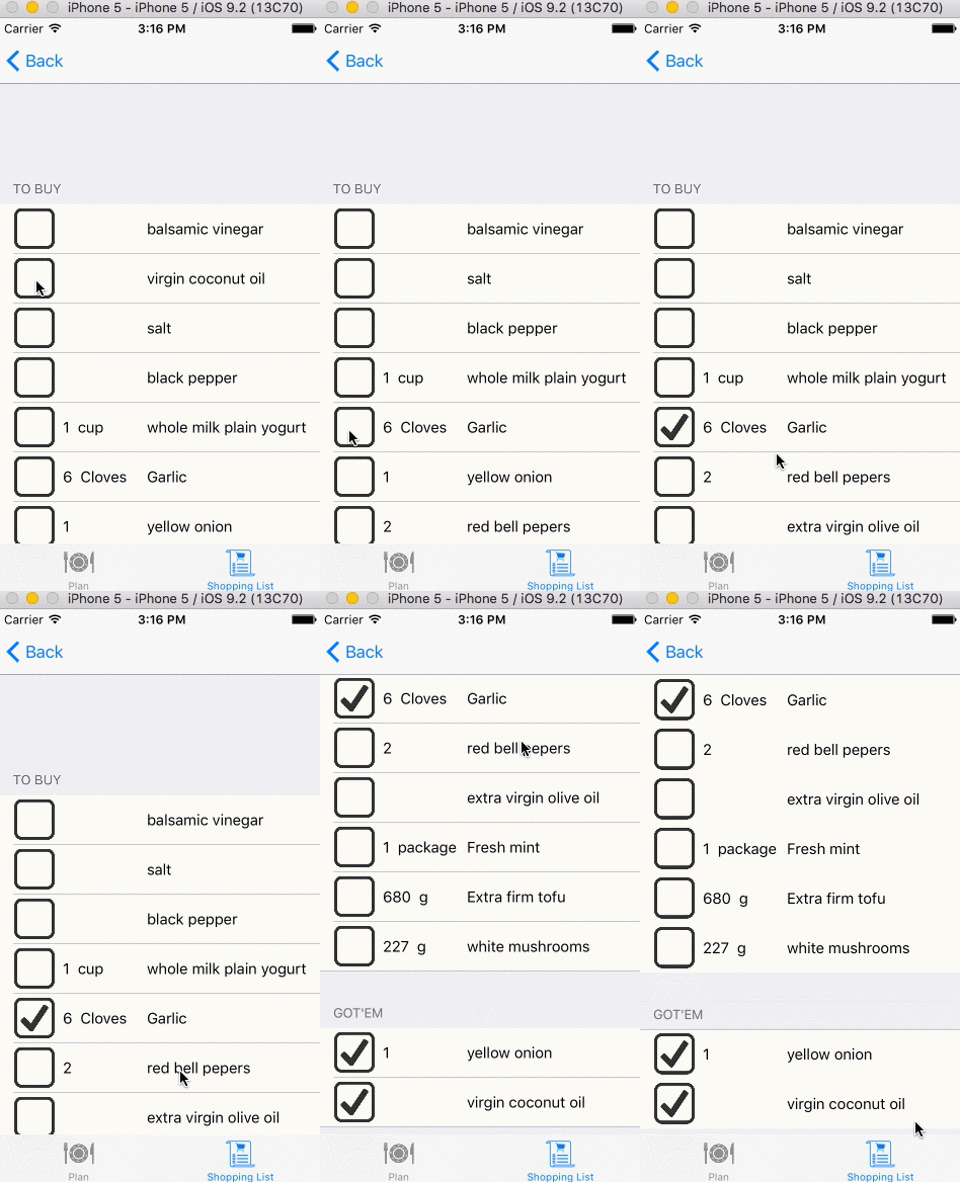
我有一个tableview,有两个部分:要购买的成分和用户已经拥有的成分。所以,基本上,当购物时,他/她会把一种配料从一张单子传递到另一张。
这是tableView:cellForRowAtIndexPath
func tableView(tableView: UITableView, cellForRowAtIndexPath indexPath: NSIndexPath) -> UITableViewCell {
   let cell = tableView.dequeueReusableCellWithIdentifier("IngredientCell", forIndexPath: indexPath) as! IngredientCell
   cell.checkbox.checkboxDelegate = self
   cell.checkbox.checkboxIndex = indexPath
   ...
}
我将这个称为:(我包括了stateOfCheckbox -每个桌面视图单元格都包含一个带有checkbox角色的自定义按钮--基本上这个按钮给了我从/到我要做的移动的方向)。
 func doChange(stateOfCheckbox: Bool, row: Int){
   let fromSection = stateOfCheckbox ? 0 : 1
   let toSection = stateOfCheckbox ? 1 : 0

   let fromIndexPath = NSIndexPath(forRow: row, inSection: fromSection)
   let toIndexPath = NSIndexPath(forRow: 0, inSection: toSection)

   let dataPiece = ingredients[fromIndexPath.section][fromIndexPath.row]
   ingredients[toIndexPath.section].insert(dataPiece, atIndex: toIndexPath.row)
   ingredients[fromIndexPath.section].removeAtIndex(fromIndexPath.row)

   ingredientsTableView.moveRowAtIndexPath(fromIndexPath, toIndexPath: toIndexPath)
   ingredientsTableView.reloadData()
}我不想调用reloadData,但是当不调用时,表索引就被混淆了。有必要吗?还是有别的办法?
如果不存在reloadData,这就是is的行为方式。我不想重新装填所有的东西再重新油漆。什么是最佳做法?
回答 2
Stack Overflow用户
发布于 2016-01-14 12:01:50
我很确定问题不在你在问题中发布的代码中。根据我在“Gif”中看到的情况,情况必须如下:
如果您检查一个,然后检查下面的一个,索引将被移动一个。实际情况是:它仍然使用第一个索引检查之前的旧索引。这些指数要么需要刷新,要么--或者--我更喜欢--在你实际使用它的时候决定。
Stack Overflow用户
发布于 2016-01-13 11:38:57
您可以使用UITableView的方法:tableview.beginUpdates()和tableview.endUpdates()
func doChange(stateOfCheckbox: Bool, row: Int){
   let fromSection = stateOfCheckbox ? 0 : 1
   let toSection = stateOfCheckbox ? 1 : 0

   let fromIndexPath = NSIndexPath(forRow: row, inSection: fromSection)
   let toIndexPath = NSIndexPath(forRow: 0, inSection: toSection)

   let dataPiece = ingredients[fromIndexPath.section][fromIndexPath.row]
   ingredients[toIndexPath.section].insert(dataPiece, atIndex: toIndexPath.row)
   ingredients[fromIndexPath.section].removeAtIndex(fromIndexPath.row)

   tableview.beginUpdates()
   ingredientsTableView.moveRowAtIndexPath(fromIndexPath, toIndexPath: toIndexPath)
   tableview.endUpdates()

}https://stackoverflow.com/questions/34765330
复制相似问题
腾讯云开发者

Copyright © 2013 - 2026 Tencent Cloud. All Rights Reserved. 腾讯云 版权所有
深圳市腾讯计算机系统有限公司 ICP备案/许可证号:粤B2-20090059  粤公网安备44030502008569号
腾讯云计算(北京)有限责任公司 京ICP证150476号 | 京ICP备11018762号