
PhpStorm:源文件下的组/嵌套*.map文件(以及*.css文件)
PhpStorm:源文件下的组/嵌套*.map文件(以及*.css文件)
提问于 2016-01-12 21:51:57
当前,在配置文件监视程序时,PhpStorm将生成的*.css文件嵌套在*.less文件下。
有什么方法可以让*.map文件也在下面吗?
示例:
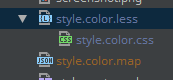
这是less.jar > plugin.xml文件中的这些设置之一吗?
<idea-plugin version="2">
  <name>LESS support</name>
  <id>org.jetbrains.plugins.less</id>
  <category>HTML/JavaScript Development</category>
  <vendor>JetBrains</vendor>
  <description>
      <![CDATA[
      This plugin supports <a href="http://lesscss.org/">LESS</a> dialect of CSS that extends it with dynamic behavior such as variables, mixins, operators and functions.
      The following features are available:
        <ul>
        <li>Dedicated file type.</li>
        <li>LESS page under the Code Style node of the Settings/Preferences dialog.</li>
        <li>Syntax and error highlighting.</li>
        <li>Code formatting and folding.</li>
        <li>Code completion.</li>
        </ul>
      ]]>
   </description>
  <depends>com.intellij.css</depends>
  <depends>com.intellij.modules.lang</depends>
  <depends optional="true" config-file="less-watcher.xml">com.intellij.plugins.watcher</depends>
  <depends optional="true" config-file="less-copyright.xml">com.intellij.copyright</depends>

  <extensions defaultExtensionNs="com.intellij">
    <completion.contributor language="CSS" implementationClass="org.jetbrains.plugins.less.completion.LessCompletionContributor"/>
    <completion.contributor language="CSS" implementationClass="org.jetbrains.plugins.less.completion.LessDumbAwareCompletionContributor"/>
    <lang.implementationTextSelectioner language="LESS" implementationClass="com.intellij.psi.css.CSSImplementationTextSelectioner"/>
    <css.structureViewChildrenProvider implementation="org.jetbrains.plugins.less.fileStructure.LessStructureViewElementsProvider"/>

    <errorHandler implementation="com.intellij.diagnostic.ITNReporter"/>
    <lang.braceMatcher language="LESS" implementationClass="org.jetbrains.plugins.less.editor.LessBraceMatcher"/>
    <typedHandler implementation="org.jetbrains.plugins.less.editor.LessBraceInterpolationTypedHandler" id="lessInterpolationTypedHandler"/>
    <typedHandler implementation="org.jetbrains.plugins.less.editor.LessTypedHandler"/>
    <gotoSymbolContributor implementation="org.jetbrains.plugins.less.LessGotoSymbolContributor"/>
    <annotator language="LESS" implementationClass="org.jetbrains.plugins.less.annotator.LessColorAnnotator"/>
    <fileTypeFactory implementation="org.jetbrains.plugins.less.LESSFileTypeFactory"/>
    <lang.parserDefinition language="LESS" implementationClass="org.jetbrains.plugins.less.parser.LESSParserDefinition"/>
    <lang.syntaxHighlighterFactory language="LESS" implementationClass="org.jetbrains.plugins.less.highlighting.LessSyntaxHighlighterFactory"/>
    <lang.ast.factory language="LESS" implementationClass="org.jetbrains.plugins.less.psi.impl.LESSTreeElementFactory"/>
    <lang.commenter language="LESS" implementationClass="org.jetbrains.plugins.less.LESSCommenter"/>
    <psi.referenceContributor implementation="org.jetbrains.plugins.less.references.LESSReferenceContributor"/>
    <lang.findUsagesProvider language="LESS" implementationClass="org.jetbrains.plugins.less.usages.LESSFindUsagesProvider"/>
    <renameInputValidator implementation="org.jetbrains.plugins.less.rename.LESSRenameInputValidator"/>
    <extendWordSelectionHandler implementation="org.jetbrains.plugins.less.editor.LessExtendWordSelectionHandler"/>
    <colorSettingsPage implementation="org.jetbrains.plugins.less.highlighting.LESSColorsPage"/>
    <lang.braceMatcher language="LESS" implementationClass="com.intellij.psi.css.impl.util.editor.CssBraceMatcher"/>
    <lang.foldingBuilder language="LESS" implementationClass="com.intellij.psi.css.impl.util.editor.CssFoldingBuilder"/>
    <codeInsight.parameterInfo language="LESS" implementationClass="com.intellij.psi.css.parameterinfo.CssParameterInfoHandler"/>
    <enterHandlerDelegate implementation="org.jetbrains.plugins.less.editor.LESSEnterHandler" order="after EnterBetweenBracesHandler"/>
    <quoteHandler fileType="LESS" className="com.intellij.psi.css.impl.util.editor.CssQuoteHandler"/>
    <css.elementDescriptorProvider implementation="org.jetbrains.plugins.less.descriptors.LessElementDescriptorProvider"
                                   order="last, before cssElementDescriptorProvider"/>
    <codeStyleSettingsProvider implementation="org.jetbrains.plugins.less.settings.LESSCodeStyleSettingsProvider"/>
    <langCodeStyleSettingsProvider implementation="org.jetbrains.plugins.less.settings.LESSLanguageCodeStyleSettingsProvider"/>
    <lang.formatter language="LESS" implementationClass="org.jetbrains.plugins.less.formatter.LessFormattingModelBuilder"/>
    <spellchecker.support language="LESS" implementationClass="org.jetbrains.plugins.less.spellchecking.LessSpellcheckingStrategy"/>
    <spellchecker.bundledDictionaryProvider implementation="org.jetbrains.plugins.less.spellchecking.LessBundledDictionaryProvider"/>
    <usageTypeProvider implementation="org.jetbrains.plugins.less.usages.LessUsageTypeProvider"/>
    <problemFileHighlightFilter implementation="org.jetbrains.plugins.less.highlighting.LessProblemFileHighlightFilter"/>
    <breadcrumbsInfoProvider implementation="org.jetbrains.plugins.less.editor.LessBreadcrumbsInfoProvider"/>
    <previewHintProvider implementation="org.jetbrains.plugins.less.editor.LessPreviewHintProvider"/>
    <embeddedTokenTypesProvider implementation="org.jetbrains.plugins.less.LessTokenTypesProvider"/>
    <include.provider implementation="org.jetbrains.plugins.less.include.LessFileIncludeProvider"/>
    <internalFileTemplate name="Less File"/>

    <stubIndex implementation="org.jetbrains.plugins.less.psi.stubs.LessMixinIndex"/>
    <stubIndex implementation="org.jetbrains.plugins.less.psi.stubs.LessVariableIndex"/>
    <stubElementTypeHolder class="org.jetbrains.plugins.less.LESSElementTypes"/>

    <lang.inspectionSuppressor language="LESS" implementationClass="org.jetbrains.plugins.less.inspections.suppress.LessInspectionSuppressor"/>
    <annotator language="LESS" implementationClass="org.jetbrains.plugins.less.annotator.LessErrorsAnnotator"/>
    <annotator language="CSS" implementationClass="org.jetbrains.plugins.less.annotator.LessErrorsAnnotator"/>
    <localInspection language="LESS" bundle="org.jetbrains.plugins.less.LESSBundle"
                     key="inspections.unresolved.variable.name"
                     groupKey="inspections.group.name" enabledByDefault="true" level="WARNING"
                     implementationClass="org.jetbrains.plugins.less.inspections.LessUnresolvedVariableInspection"/>
    <localInspection language="LESS" bundle="org.jetbrains.plugins.less.LESSBundle"
                     key="inspections.unresolved.mixin.name"
                     groupKey="inspections.group.name" enabledByDefault="true" level="WARNING"
                     implementationClass="org.jetbrains.plugins.less.inspections.LessUnresolvedMixinInspection"/>
    <localInspection language="LESS" bundle="org.jetbrains.plugins.less.LESSBundle"
                     key="inspections.resolved.without.imports.name"
                     groupKey="inspections.group.name" enabledByDefault="true" level="WEAK WARNING"
                     implementationClass="org.jetbrains.plugins.less.inspections.LessResolvedByNameOnlyInspection"/>
  </extensions>

  <extensions defaultExtensionNs="com.intellij.css">
    <supportedFileTypesProvider implementation="org.jetbrains.plugins.less.index.LessSupportedFileTypesProvider"/>
    <cssInspectionFilter language="LESS" implementationClass="org.jetbrains.plugins.less.inspections.LessCssInspectionFilter"/>
  </extensions>
</idea-plugin>回答 3
Stack Overflow用户
回答已采纳
发布于 2016-01-14 17:12:14
不,它与更少的插件描述符无关。当然,这是可能的。您只需要确保.map文件的模式是在文件观察者的“Output paths to refresh”字段中指定的。喜欢
$FileNameWithoutExtension$.css:$FileNameWithoutExtension$.mapStack Overflow用户
发布于 2016-04-23 18:51:30
根据我的经验,Iena建议的配置不能正常工作,为了生成文件.map,我以这种方式配置了文件监视程序的设置:
参数:
--no-color $FileName$
--source map=$FileNameWithoutExtension$.css.map
-source-map-url=$FileNameWithoutExtension$.css.map 要刷新的输出路径:
$FileNameWithoutExtension$.css:$FileNameWithoutExtension$.css.map地图文件名以这种方式包含.css路径是很重要的:
filename.css.map--source-map=filename命令生成.map文件,并将其链接到生成的.map文件中。
在这里,我的文件观察者的配置:
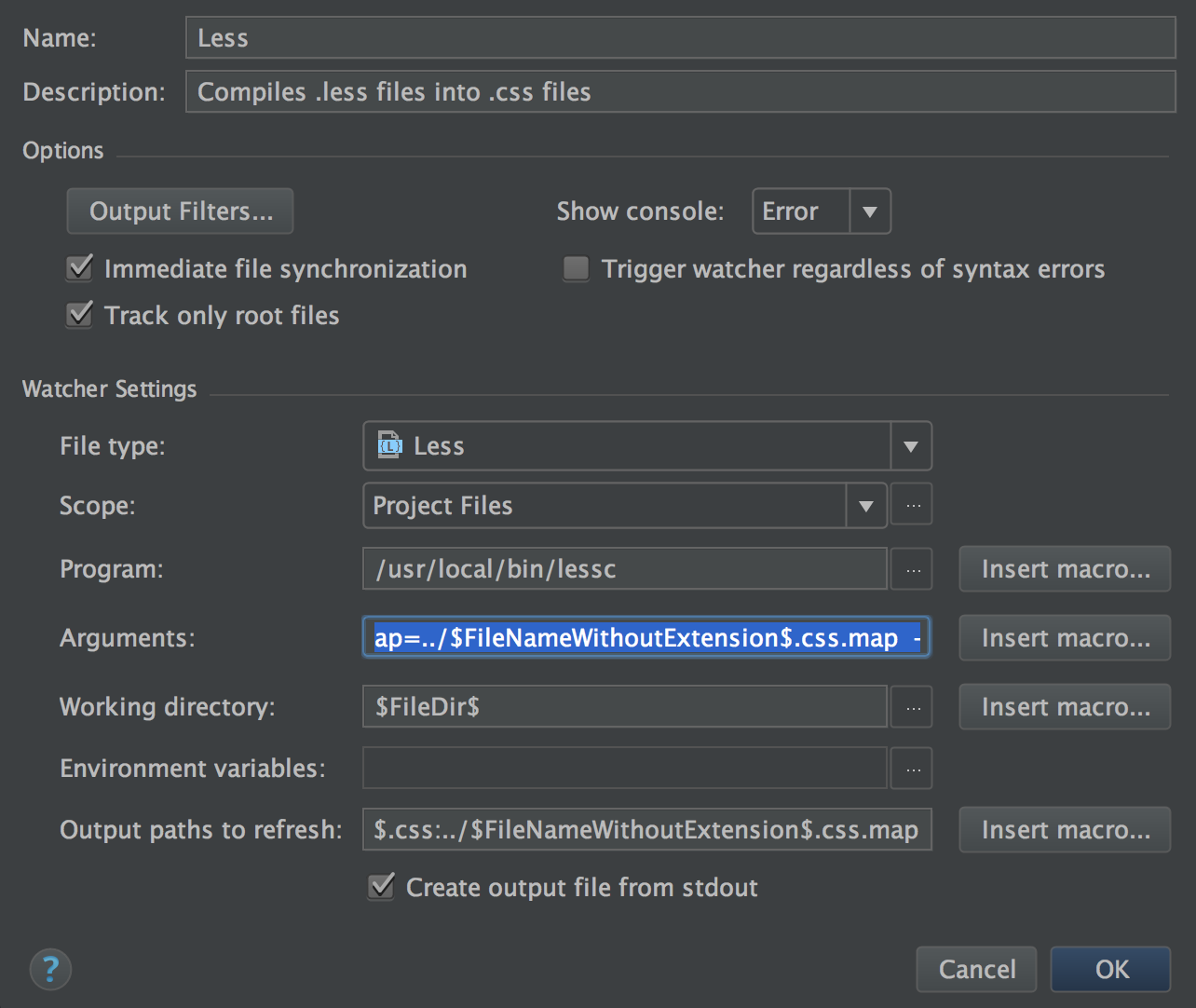
我希望能有用。
好代码
D。
Stack Overflow用户
发布于 2016-08-15 09:19:04
快速解决方案:在参数中使用标志
-源-地图-少内联-源-地图-地图-内联
它将把地图存储在css文件中。
无论如何更好的解决方案使用咕噜/吞咽建设者..。
页面原文内容由Stack Overflow提供。腾讯云小微IT领域专用引擎提供翻译支持
原文链接:
https://stackoverflow.com/questions/34754435
复制相关文章
相似问题
腾讯云开发者

Copyright © 2013 - 2026 Tencent Cloud. All Rights Reserved. 腾讯云 版权所有
深圳市腾讯计算机系统有限公司 ICP备案/许可证号:粤B2-20090059  粤公网安备44030502008569号
腾讯云计算(北京)有限责任公司 京ICP证150476号 | 京ICP备11018762号