
如何添加音乐开关功能按钮?
如何添加音乐开关功能按钮?
提问于 2016-01-12 17:37:34
如何在除已完成页外的所有向导页的左下角包含“音乐打开/关闭功能”按钮。而且,只有在用户点击Finish按钮后,激活的音乐才会停止。
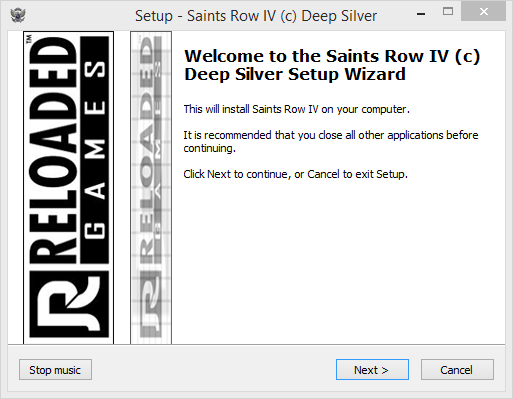
    procedure InitializeWizard();
begin
  // Welcome page
  // Hide the labels
  WizardForm.WelcomeLabel1.Visible := False;
  WizardForm.WelcomeLabel2.Visible := False;
  // Stretch image over whole page
  WizardForm.WizardBitmapImage.Width := WizardForm.WizardBitmapImage2.Parent.Width;

  begin with WizardForm.WizardSmallBitmapImage do SetBounds(Parent.Left, Parent.Top, Parent.Width, Parent.Height);
  WizardForm.PageDescriptionLabel.Visible := False;
  WizardForm.PageNameLabel.Visible := False; end;

  // Finished page
  // Hide the labels
  WizardForm.FinishedLabel.Visible := False;
  WizardForm.FinishedHeadingLabel.Visible := False;
  // Stretch image over whole page
  WizardForm.WizardBitmapImage2.Width := WizardForm.WizardBitmapImage2.Parent.Width;
end;

procedure AboutButtonOnClick(Sender: TObject);
begin
  MsgBox('This is the about message!', mbInformation, mb_Ok);
end;

procedure InitializeWizard();
  AboutButton : TNewButton;
begin
  // create an instance of the button and assign it to the local variable AboutButton
  AboutButton := TNewButton.Create(WizardForm);
  // set the parent to the just created button control
  AboutButton.Parent := WizardForm;
  // adjust the position to the created button control; it gets the horizontal indent
  // by the right indent of the Cancel button; the vertical position as well as width
  // and height are the same as the Cancel button has
  AboutButton.Left := WizardForm.ClientWidth - WizardForm.CancelButton.Left -
    WizardForm.CancelButton.Width;
  AboutButton.Top := WizardForm.CancelButton.Top;
  AboutButton.Width := WizardForm.CancelButton.Width;
  AboutButton.Height := WizardForm.CancelButton.Height;
  // set its caption
  AboutButton.Caption := '&About';
  // and assign the AboutButtonOnClick method to the OnClick event of the button
  AboutButton.OnClick := @AboutButtonOnClick;
end;

procedure AboutButtonOnClick(Sender: TObject);
begin
  MsgBox('This is the about message!', mbInformation, mb_Ok);
end;

const
  BASS_SAMPLE_LOOP = 4;
  BASS_UNICODE = $80000000;
  BASS_CONFIG_GVOL_STREAM = 5;
const
  #ifndef UNICODE
    EncodingFlag = 0;
  #else
    EncodingFlag = BASS_UNICODE;
  #endif
type
  HSTREAM = DWORD;

function BASS_Init(device: LongInt; freq, flags: DWORD;
  win: HWND; clsid: Cardinal): BOOL;
  external 'BASS_Init@files:bass.dll stdcall';
function BASS_StreamCreateFile(mem: BOOL; f: string; offset1: DWORD;
  offset2: DWORD; length1: DWORD; length2: DWORD; flags: DWORD): HSTREAM;
  external 'BASS_StreamCreateFile@files:bass.dll stdcall';
function BASS_ChannelPlay(handle: DWORD; restart: BOOL): BOOL;
  external 'BASS_ChannelPlay@files:bass.dll stdcall';
function BASS_SetConfig(option: DWORD; value: DWORD ): BOOL;
  external 'BASS_SetConfig@files:bass.dll stdcall';
function BASS_Free: BOOL;
  external 'BASS_Free@files:bass.dll stdcall';

procedure InitializeWizard;
var
  StreamHandle: HSTREAM;
begin
  ExtractTemporaryFile('AudioFile.mp3');
  if BASS_Init(-1, 44100, 0, 0, 0) then
  begin
    StreamHandle := BASS_StreamCreateFile(False,
      ExpandConstant('{tmp}\AudioFile.mp3'), 0, 0, 0, 0,
      EncodingFlag or BASS_SAMPLE_LOOP);
    BASS_SetConfig(BASS_CONFIG_GVOL_STREAM, 2500);
    BASS_ChannelPlay(StreamHandle, False);
  end;
end;

procedure DeinitializeSetup;
begin
  BASS_Free;
end;

procedure AboutButtonOnClick(Sender: TObject);
begin
  DSStopMediaPlay;
end;

var
  // Global variable
  AboutButton: TNewButton;

procedure InitializeWizard;
begin
  // create an instance of the button and assign it to the global variable AboutButton
  Music ON\OFF  := TNewButton.Create(WizardForm);
  ...
end;

procedure CurPageChanged(CurPageID: Integer);
begin
  // Hide button on Finished page
  if CurPageID = wpFinished then
  begin
    AboutButton.Visible := False;
end;回答 1
Stack Overflow用户
回答已采纳
发布于 2016-01-12 18:25:23
若要在底部面板上创建按钮,请参见:
How to create new About button in Inno Setup?
有关背景音乐,请参阅:
Playing sound during an Inno Setup install
若要在单击按钮上停止音乐播放,只需从DSStopMediaPlay处理程序调用OnClick (Inno )即可。
procedure AboutButtonOnClick(Sender: TObject);
begin
  DSStopMediaPlay;
end;若要隐藏已完成页上的按钮,需要保存对全局变量的按钮引用,并在.Visible = false中设置CurPageChanged(wpFinished)。
[Code]

var
  { Global variable }
  AboutButton: TNewButton;

procedure InitializeWizard;
begin
  { create an instance of the button and assign it to the global variable AboutButton }
  AboutButton := TNewButton.Create(WizardForm);
  ...
end;

procedure CurPageChanged(CurPageID: Integer);
begin
  { Hide button on Finished page }
  if CurPageID = wpFinished then
  begin
    AboutButton.Visible := False;
  end;
end;当然,您希望将变量命名为StopButton,而不是AboutButton。
页面原文内容由Stack Overflow提供。腾讯云小微IT领域专用引擎提供翻译支持
原文链接:
https://stackoverflow.com/questions/34750290
复制相关文章
相似问题
腾讯云开发者

Copyright © 2013 - 2026 Tencent Cloud. All Rights Reserved. 腾讯云 版权所有
深圳市腾讯计算机系统有限公司 ICP备案/许可证号:粤B2-20090059  粤公网安备44030502008569号
腾讯云计算(北京)有限责任公司 京ICP证150476号 | 京ICP备11018762号