
UISearchController for TableView
UISearchController for TableView
提问于 2016-01-08 15:44:28
这就是我的表视图的样子。每个单元格串一个来自.txt的文本
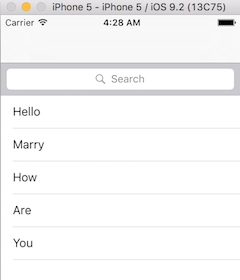
搜索过滤器工作正常。但是当我选择其中一个结果的时候。“如何”打印"Hello“的内容。
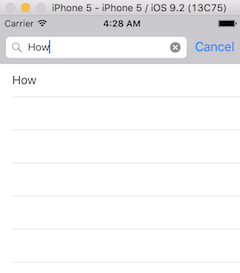
我认为这可能是因为"Hello“被编程为第一个字符串,所以当单击第一个单元时,它将始终是第一个单元格的结果。我需要帮助弄清楚搜索结果是如何链接到它自己的内容。如果这有意义的话?
下面是代码。当搜索文本文件时,代码从.txt文件中读取。单击时的结果不匹配。
导入UIKit
class title_ViewController: UITableViewController, UISearchResultsUpdating {
var SongTitle = [String]()
var SongLyrics = [LText]()
var filteredSongs = [String]()
var resultSearchController = UISearchController()

override func viewDidLoad() {
    super.viewDidLoad()

    self.resultSearchController = UISearchController(searchResultsController:     nil)
    self.resultSearchController.searchResultsUpdater = self

    self.resultSearchController.dimsBackgroundDuringPresentation = false
    self.resultSearchController.searchBar.sizeToFit()

    self.tableView.tableHeaderView = self.resultSearchController.searchBar

    self.tableView.reloadData()

    if let path = NSBundle.mainBundle().pathForResource("DataBase", ofType:     "txt"){
        do {
            let stringFromFile = try String(contentsOfFile:path, encoding:     NSUTF8StringEncoding)
            var Title: [String] =     stringFromFile.componentsSeparatedByString("@")
            Title.removeAtIndex(0)
            //Seperates the Title from the Lyrics
            var t1 = Array(Title[0].componentsSeparatedByString("^"))
            t1.removeAtIndex(0)

            SongTitle = Title
            SongLyrics = [LText(LyricsText: t1)]

        }catch{
            print(error)
        }
    }
}

override func didReceiveMemoryWarning() {
    super.didReceiveMemoryWarning()
    // Dispose of any resources that can be recreated.
}

override func tableView(tableView: UITableView, numberOfRowsInSection section: Int) -> Int {

    if self.resultSearchController.active{
        return self.filteredSongs.count
    }else{
        return self.SongTitle.count
    }
}

override func tableView(tableView: UITableView, cellForRowAtIndexPath indexPath: NSIndexPath) -> UITableViewCell {
    let Cell: AnyObject = self.tableView.dequeueReusableCellWithIdentifier("Cell", forIndexPath: indexPath)
    Cell.textLabel?!.text = SongTitle[indexPath.row]


    if self.resultSearchController.active{
        Cell.textLabel?!.text = self.filteredSongs[indexPath.row]
    }else{
        Cell.textLabel?!.text = self.SongTitle[indexPath.row]
    }


    return Cell as! UITableViewCell

}

func updateSearchResultsForSearchController(searchController: UISearchController) {
    self.filteredSongs.removeAll(keepCapacity: false)
    let searchPredicate = NSPredicate(format: "SELF CONTAINS[c]%@", searchController.searchBar.text!)

    let array = (self.SongTitle as NSArray).filteredArrayUsingPredicate(searchPredicate)
    self.filteredSongs = array as! [String]
    self.tableView.reloadData()
}


override func prepareForSegue(segue: UIStoryboardSegue, sender: AnyObject?) {
    let indexPath: NSIndexPath = self.tableView.indexPathForSelectedRow!
    let DestViewController = segue.destinationViewController as! ViewController

    DestViewController.LyricString = SongTitle[indexPath.row]
}
}
欢迎任何帮助,谢谢。
回答 2
Stack Overflow用户
回答已采纳
发布于 2016-01-08 16:15:24
问题在于你的prepareForSegue。您需要修改它以测试searchController是否处于活动状态。如果是这样的话,您应该使用filteredSongs来确定要传递给目标VC的歌曲,而不是SongTitle。
override func prepareForSegue(segue: UIStoryboardSegue, sender: AnyObject?) {
    let indexPath: NSIndexPath = self.tableView.indexPathForSelectedRow!
    let DestViewController = segue.destinationViewController as! ViewController

    if self.resultSearchController.active {
        DestViewController.LyricString = self.filteredSongs[indexPath.row]
    }else{
        DestViewController.LyricString = self.SongTitle[indexPath.row]
    }
}
(顺便说一句,按照惯例,变量名应该以小写字母开头-- songTitle而不是SongTitle等等)
Stack Overflow用户
发布于 2016-01-08 16:54:12
您可以通过从数组中搜索所选字符串的位置,在didSelectRowAtIndexPath中手动执行segue,然后可以得到正确的位置-
例子-
func tableView(tableView: UITableView, didDeselectRowAtIndexPath indexPath: NSIndexPath) {

    let Cell: AnyObject = self.tableView.dequeueReusableCellWithIdentifier("Cell", forIndexPath: indexPath)

    let str: String=  Cell.textLabel.text
    // now find str in array and then get position
    int pos = getPositionOfStringInArray(str)

    // now perform segue for pos
    //code...

}页面原文内容由Stack Overflow提供。腾讯云小微IT领域专用引擎提供翻译支持
原文链接:
https://stackoverflow.com/questions/34680811
复制相关文章
相似问题
腾讯云开发者

Copyright © 2013 - 2026 Tencent Cloud. All Rights Reserved. 腾讯云 版权所有
深圳市腾讯计算机系统有限公司 ICP备案/许可证号:粤B2-20090059  粤公网安备44030502008569号
腾讯云计算(北京)有限责任公司 京ICP证150476号 | 京ICP备11018762号