
谷歌地图SDK -路径不准确
谷歌地图SDK -路径不准确
提问于 2016-01-08 05:49:08
我试图显示两个位置之间的路径,但这是不准确的。
if(center.latitude != 0 && center.longitude != 0)
            {
            NSString *urlString = [NSString stringWithFormat:
                                   @"%@?origin=%f,%f&destination=%f,%f&sensor=true&key=%@",
                                   @"https://maps.googleapis.com/maps/api/directions/json",
                                   center.latitude,
                                   center.longitude,
                                   center1.latitude,
                                   center1.longitude,
                                   KGoogleMapServerKey];

            NSError *error;
                NSDictionary *json =[NSJSONSerialization JSONObjectWithData:[NSData dataWithContentsOfURL:[NSURL URLWithString:urlString] options:NSDataReadingUncached error:&error] options:NSJSONReadingMutableContainers error:&error];
            if(json[@"routes"] != nil && [json[@"routes"] count] > 0)
            {
                GMSPath *path =[GMSPath pathFromEncodedPath:json[@"routes"][0][@"overview_polyline"][@"points"]];
                GMSPolyline *singleLine = [GMSPolyline polylineWithPath:path];
                singleLine.strokeWidth = 7;
                singleLine.strokeColor = [UIColor colorWithRed:56.0/255.0 green:163.0/255.0 blue:249.0/255.0 alpha:1.0];
                singleLine.map = mapViewGoogle;
            }
这就是我要走的路:
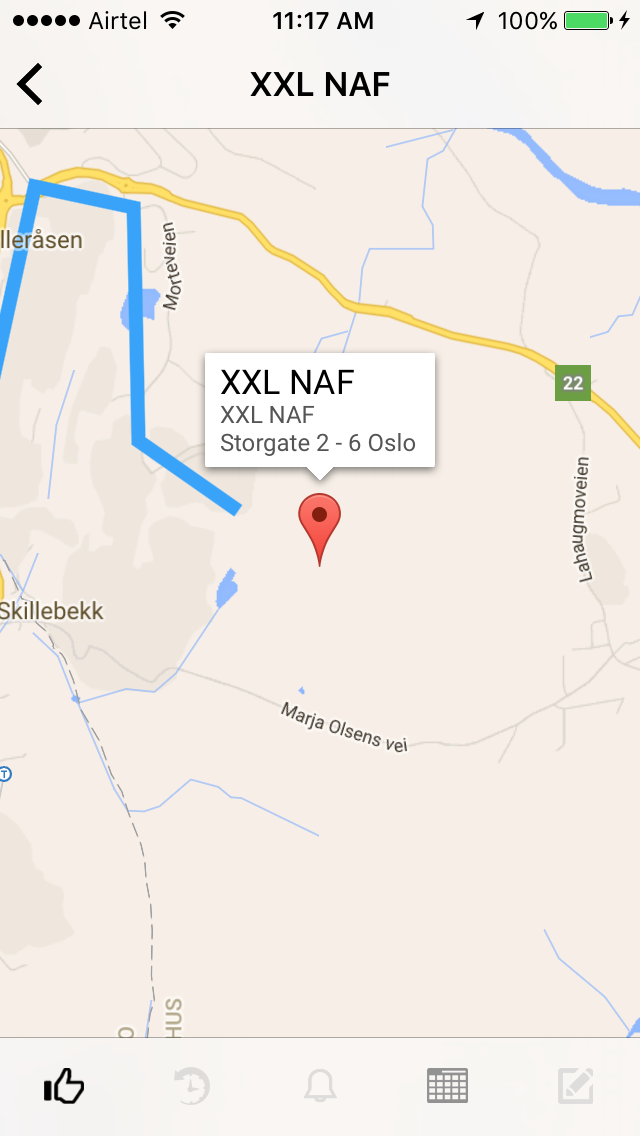
如您所见,蓝线(路径)不会到达目的地。
怎么解决这个问题?
回答 2
Stack Overflow用户
回答已采纳
发布于 2016-01-14 05:07:46
你的路线太长了。在来自Google方向的每个响应中,API的点数是有限的。在您的示例中,您收到了N个点,用它们绘制了路线,并将mapView放大到只有4个点的区域。
要显示始终准确的路线,您应该在每次地图缩放后重新计算路线(包括中点以保持路线不变)。
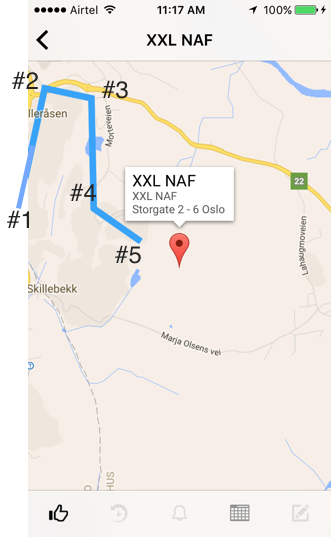
例如,屏幕上的全路由有50分。你正在缩放地图,所以只显示了4个点(你的截图)。现在以#1作为起点,#5作为完成,#2 #3 #4作为中间点,然后发送新的请求来查找这些点的路由。你将得到新的50分,与他们,你可以更准确地绘制这部分路线。
Stack Overflow用户
发布于 2016-01-14 02:59:42
这样做的要点是,没有到达目的地的路线,正如您在这里看到的:你的例子的Gmap
我想您最好的选择是使用Gmap已经使用的方法,我的意思是使用虚线/虚线,从最后一点到实际点。
您可以在这里找到几个实现您的polyline类型的out示例:
页面原文内容由Stack Overflow提供。腾讯云小微IT领域专用引擎提供翻译支持
原文链接:
https://stackoverflow.com/questions/34670329
复制相关文章
相似问题
腾讯云开发者

Copyright © 2013 - 2026 Tencent Cloud. All Rights Reserved. 腾讯云 版权所有
深圳市腾讯计算机系统有限公司 ICP备案/许可证号:粤B2-20090059  粤公网安备44030502008569号
腾讯云计算(北京)有限责任公司 京ICP证150476号 | 京ICP备11018762号