
Urwid:使光标不可见
我正在使用urwid,它是一个Python“框架”,用于设计ncurses中的终端用户界面。不过,有一件事我在urwid中做不到,那就是很容易被诅咒--让光标看不见。就像现在一样,在选择按钮时光标是可见的,它看起来很难看。有办法让它失效吗?
回答 4
Stack Overflow用户
发布于 2016-01-08 02:22:24
乌维德使用设置函数,但不将其公开为类方法。有人可以修改urwid以允许使用此方法,否则就没有可靠的方法。
您可以将其报告为问题。
Stack Overflow用户
发布于 2017-04-16 17:15:51
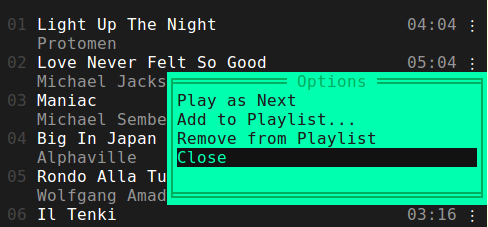
我同意urwid.Button上的闪烁光标看起来有点蹩脚,所以我想出了一个解决方案来隐藏它。在urwid中,Button类只是WidgetWrap的一个子类,包含一个SelectableIcon和两个文本小部件(包含"<“和">")。默认情况下,是SelectableIcon类将光标位置设置为标签的第一个字符。通过子类SelectableIcon,修改光标位置,然后将其封装到urwid.WidgetWrap子类中,您可以创建自己的自定义按钮,该按钮可以完成内置Button或更多的操作。
这是我的项目里的样子。
import urwid

class ButtonLabel(urwid.SelectableIcon):
    def __init__(self, text):
        """
        Here's the trick:
        we move the cursor out to the right of the label/text, so it doesn't show
        """
        curs_pos = len(text) + 1
urwid.SelectableIcon.__init__(self, text, cursor_position=curs_pos)接下来,您可以将ButtonLabel对象和任何其他对象包装到一个WidgetWrap子类中,该子类将是您的自定义按钮类。
class FixedButton(urwid.WidgetWrap):
    _selectable = True
    signals = ["click"]
    def __init__(self, label):
        self.label = ButtonLabel(label)
        # you could combine the ButtonLabel object with other widgets here
        display_widget = self.label
        urwid.WidgetWrap.__init__(self, urwid.AttrMap(display_widget, None, focus_map="button_reversed"))

    def keypress(self, size, key):
        """
        catch all the keys you want to handle here
        and emit the click signal along with any data
        """
        pass

    def set_label(self, new_label):
        # we can set the label at run time, if necessary
        self.label.set_text(str(new_label))

    def mouse_event(self, size, event, button, col, row, focus):
        """
        handle any mouse events here
        and emit the click signal along with any data
        """
pass在这段代码中,实际上FixedButton WidgetWrap子类中并没有太多的小部件组合,但是您可以在按钮的边缘添加一个"[“和"]”,并将其包装到LineBox中,等等。如果这一切都是多余的,您只需将事件处理函数移动到ButtonLabel类中,并使其在被单击时发出信号。
若要使按钮在用户移动时倒转,请将其包装到AttrMap中,并将focus_map设置为某个调色板条目(在我的示例中为“button_reversed”)。
Stack Overflow用户
发布于 2019-06-25 17:18:43
基于醉酒大师的回答,我已经尽可能地清理了解决方案。
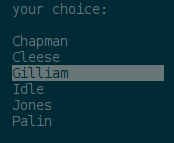
urwid.SelectableIcon基本上是一个具有这种难看的闪烁光标的urwid.Text字段。因此,与其重写urwid.SelectableIcon并将其打包到urwid.WidgetWrap中,不如直接使用urwid.Text并使其具有可选性,并对按钮/鼠标的激活做出反应(来自urwid的简单菜单教程的灵感):
import urwid

choices = u'Chapman Cleese Gilliam Idle Jones Palin'.split()

class ListEntry(urwid.Text):
    _selectable = True

    signals = ["click"]

    def keypress(self, size, key):
        """
        Send 'click' signal on 'activate' command.
        """
        if self._command_map[key] != urwid.ACTIVATE:
            return key

        self._emit('click')

    def mouse_event(self, size, event, button, x, y, focus):
        """
        Send 'click' signal on button 1 press.
        """
        if button != 1 or not urwid.util.is_mouse_press(event):
            return False

        self._emit('click')
        return True

def menu(title, choices):
    body = [urwid.Text(title), urwid.Divider()]
    for c in choices:
        button = ListEntry(c)
        urwid.connect_signal(button, 'click', item_chosen, c)
        body.append(urwid.AttrMap(button, None, focus_map='reversed'))
    return urwid.ListBox(urwid.SimpleFocusListWalker(body))

def item_chosen(button, choice):
    response = urwid.Text([u'You chose ', choice, u'\n'])
    done = ListEntry(u'Ok')
    urwid.connect_signal(done, 'click', exit_program)
    main.original_widget = urwid.Filler(urwid.Pile([response,
                                                    urwid.AttrMap(done, None, focus_map='reversed')]))

def exit_program(button):
    raise urwid.ExitMainLoop()

main = urwid.Padding(menu(u'Pythons', choices), left=2, right=2)
top = urwid.Overlay(main, urwid.SolidFill(u'\N{MEDIUM SHADE}'),
                    align='center', width=('relative', 60),
                    valign='middle', height=('relative', 60),
                    min_width=20, min_height=9)
urwid.MainLoop(top, palette=[('reversed', 'standout', '')]).run()
就像一种魅力:
https://stackoverflow.com/questions/34633447
复制相似问题
腾讯云开发者

Copyright © 2013 - 2026 Tencent Cloud. All Rights Reserved. 腾讯云 版权所有
深圳市腾讯计算机系统有限公司 ICP备案/许可证号:粤B2-20090059  粤公网安备44030502008569号
腾讯云计算(北京)有限责任公司 京ICP证150476号 | 京ICP备11018762号