
如何制作带条纹的按钮
如何制作带条纹的按钮
提问于 2016-01-05 13:38:43
我希望能够在运行时创建一个定制的条形按钮。我可以创建按钮和设置背景颜色。该按钮是一个具有许多属性的自定义控件。这不起作用,按钮没有条纹:
    Private Sub EventButton_Paint(sender As Object, e As PaintEventArgs) Handles Me.Paint
    If isStripy Then

      e.Graphics.FillRectangle(New Drawing2D.HatchBrush(Drawing2D.HatchStyle.BackwardDiagonal, Color.WhiteSmoke, Me.BackColor), Me.Bounds)

    End If
End Sub
如有任何建议或指导,
谢谢
回答 1
Stack Overflow用户
回答已采纳
发布于 2016-01-05 15:34:47
要做到这一点,您不应该使用Me.Bounds,而是使用e.ClipRectangle。Bounds将给出相对于父控件的绑定位置。
然后,您需要在Button Paint event中完成两件事来完成任务;
- 绘制
ButtonBackColor 暗画笔为Drawing2D.HatchBrush =新的Drawing2D.HatchBrush Color.Brown,btn.BackColor) e.Graphics.FillRectangle(画笔,e.ClipRectangle()‘绘制背景 - 通过重绘
String重新绘制删除的BackColorDim stringSize As SizeF = e.Graphics.MeasureString(btn.Text,btn.Font)‘需要将文本Dim textX重新绘制为单字= (e.ClipRectangle().Width - stringSize.Width) /2’,假设中间的Dim textY为Single = (e.ClipRectangle().Height - stringSize.Height) /2‘,假设在中间的e.Graphics.DrawString(btn.Text,btn.Font,New SolidBrush(btn.Text,btn.Font),New SolidBrush(btn.Text),)’重新绘制文本。
例如,您的代码应该是这样的:
Imports System.Windows.Forms

Public Class Form1
    Private Sub MyButton1_Paint(sender As Object, e As PaintEventArgs) Handles MyButton1.Paint
        Dim btn As MyButton = TryCast(sender, MyButton)
        If btn.IsStripy Then
            Dim brush As Drawing2D.HatchBrush = New Drawing2D.HatchBrush(Drawing2D.HatchStyle.BackwardDiagonal, Color.Brown, btn.BackColor)
            e.Graphics.FillRectangle(brush, e.ClipRectangle()) 'Draw the background
            Dim stringSize As SizeF = e.Graphics.MeasureString(btn.Text, btn.Font) 'Needed to redraw the text
            Dim textX As Single = (e.ClipRectangle().Width - stringSize.Width) / 2 'Assuming in the centre
            Dim textY As Single = (e.ClipRectangle().Height - stringSize.Height) / 2 'Assuming in the centre
            e.Graphics.DrawString(btn.Text, btn.Font, New SolidBrush(btn.ForeColor), textX, textY) 'Redraw the text
        End If
    End Sub
End Class

Public Class MyButton
    Inherits Button
    Public IsStripy As Boolean = True
End Class
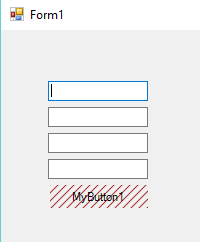
并且您应该得到以下结果(请注意,按钮已被删除)
页面原文内容由Stack Overflow提供。腾讯云小微IT领域专用引擎提供翻译支持
原文链接:
https://stackoverflow.com/questions/34613095
复制相关文章
相似问题
腾讯云开发者

Copyright © 2013 - 2026 Tencent Cloud. All Rights Reserved. 腾讯云 版权所有
深圳市腾讯计算机系统有限公司 ICP备案/许可证号:粤B2-20090059  粤公网安备44030502008569号
腾讯云计算(北京)有限责任公司 京ICP证150476号 | 京ICP备11018762号