
用PIL粘贴的图像会产生伪影
用PIL粘贴的图像会产生伪影
提问于 2016-01-03 14:28:14
我有一堆图片,我需要把文字覆盖在上面。我用GIMP (具有透明度的PNG)创建了覆盖,并尝试将其粘贴到其他图像之上:
from PIL import Image

background = Image.open("hahn_echo_1.png")
foreground = Image.open("overlay_step_3.png")

background.paste(foreground, (0, 0), foreground)
background.save("abc.png")
然而,与其在顶部显示一个漂亮的黑色文本,我还得到了以下内容:
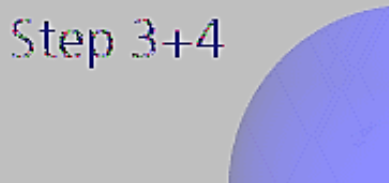
在Gimp中,overlay.png看起来是这样的:
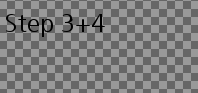
所以我会期待一些漂亮和黑色的文字,而不是这五颜六色的混乱。
有什么想法吗?我错过了一些PIL选项?
回答 1
Stack Overflow用户
回答已采纳
发布于 2016-01-03 15:03:04
正如vrs在上面指出的那样,使用类似于以下答案的alpha_composite:How to merge a transparent png image with another image using PIL
就能做到这一点。确保图像处于正确的模式(RGBA)。
完整解决方案:
from PIL import Image

background = Image.open("hahn_echo_1.png").convert("RGBA")
foreground = Image.open("overlay_step_3.png").convert("RGBA")
print(background.mode)
print(foreground.mode)

Image.alpha_composite(background, foreground).save("abc.png")
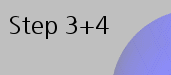
结果:
页面原文内容由Stack Overflow提供。腾讯云小微IT领域专用引擎提供翻译支持
原文链接:
https://stackoverflow.com/questions/34577598
复制相关文章
相似问题
腾讯云开发者

Copyright © 2013 - 2026 Tencent Cloud. All Rights Reserved. 腾讯云 版权所有
深圳市腾讯计算机系统有限公司 ICP备案/许可证号:粤B2-20090059  粤公网安备44030502008569号
腾讯云计算(北京)有限责任公司 京ICP证150476号 | 京ICP备11018762号