
VS 2015 + Cordova + Android模拟器=“无法部署”错误
使用VS2015更新1中的默认空白Cordova项目,我尝试将(Debug > Android > Device)发布到Android仿真程序(Tools > Visual Studio Emulator for Android),并得到以下错误:

Severity    Code    Description Project File    Line    Suppression State
Error Unable to deploy to Android device, no attached device was found. If you recently attached a device, you may need to wait a few seconds before it is recognized. BlankCordovaApp2 当我在弹出部署错误窗口中单击Yes时,也会得到以下错误:
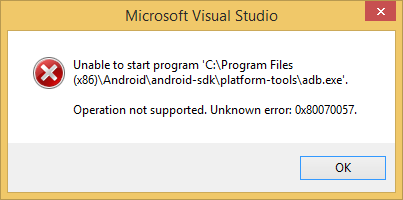
Operation not supported. Unknown error:0x80070057
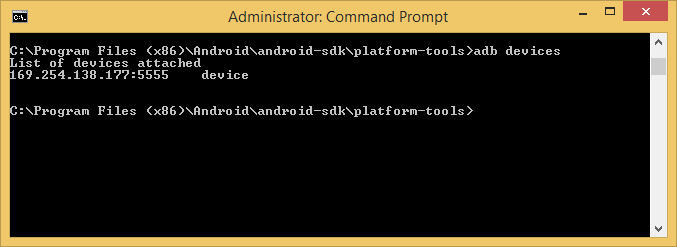
以下是亚行的设备列表,确认正在检测到VM。
以下几点都没有进展。
- 我重新安装了
Android SDK Manager并更新了文件。 - 我删除并重新安装了VS2015社区。
- 我可以使用adb.exe来检查仿真器设备,它可以看到该设备。
- android仿真器看起来工作正常,显示正常。
HKEY_LOCAL_MACHINE\SOFTWARE\Wow6432Node\Android SDK指向正确的位置- 改名为CoreCon
- 运行依赖检查器(Tools > Options > Tools for Apache )
- 我可以使用adb安装.apk在Android模拟器上部署folder\location\xxx.apk包。
有什么想法吗?
回答 6
Stack Overflow用户
发布于 2016-08-21 17:06:43
我所要做的就是在我的手机上启用Android USB调试。
- 转到Configuration > System > About电话(我的手机是葡萄牙语,所以菜单选项可能有点不同)。
- 滚动到底部,点击“版本号”大约10次。
- 一个名为"Developer“的新选项将在Configuration > System下提供。打开它
- 启用USB调试
- 重新部署应用程序
Stack Overflow用户
发布于 2016-10-27 12:26:29
Windows 10,VS 2015,Cordova 6.3.1,使用Andriod 23
我处理了一些与不同的adb.exe错误有关的问题,并修复了所有这些错误。也许这张清单会有帮助。(已经提到了一些事情,但^^她是我的清单):
- 确保您的设备连接到您的笔记本电脑。使用控制台命令"adb设备“(您必须在adb.exe所在的目录中)检查此命令。
如果您看到多个模拟器正在运行,如果您没有看到其他usb电缆,请杀死他(重新启动pc)。
- 将应用程序从手机中删除,例如,如果您更改了开发机器。
- 安装时,您可以首先取消所有检查,然后只检查Javascript->Cordova。安装程序将完成剩下的工作。但是安装node.js和andriod-sdk (只有sdk,而不是wohle开发工作室.(不需要)
- 使用Andriod Manager确保您只安装了"Andriod构建工具“.对我来说..。还有Extras->"Andriod超级仓库“,我有这样的想法:


5.确保在电话上激活了开发者选项,并启用了USB调试。在启动时,请确保您允许从机器(例如笔记本电脑)访问设备(如电话)。提示应该出现在您的设备上。
cya
Stack Overflow用户
发布于 2016-11-19 11:15:14
我遇到了一个类似的问题。解决方案:1)在android设备中打开开发工具并撤销USB调试授权2)然后重新启动USB调试
https://stackoverflow.com/questions/34560487
复制相似问题
腾讯云开发者

Copyright © 2013 - 2026 Tencent Cloud. All Rights Reserved. 腾讯云 版权所有
深圳市腾讯计算机系统有限公司 ICP备案/许可证号:粤B2-20090059  粤公网安备44030502008569号
腾讯云计算(北京)有限责任公司 京ICP证150476号 | 京ICP备11018762号