
UIAlertController与UICollectionViewFlowLayout的冲突
嘿,新年快乐!

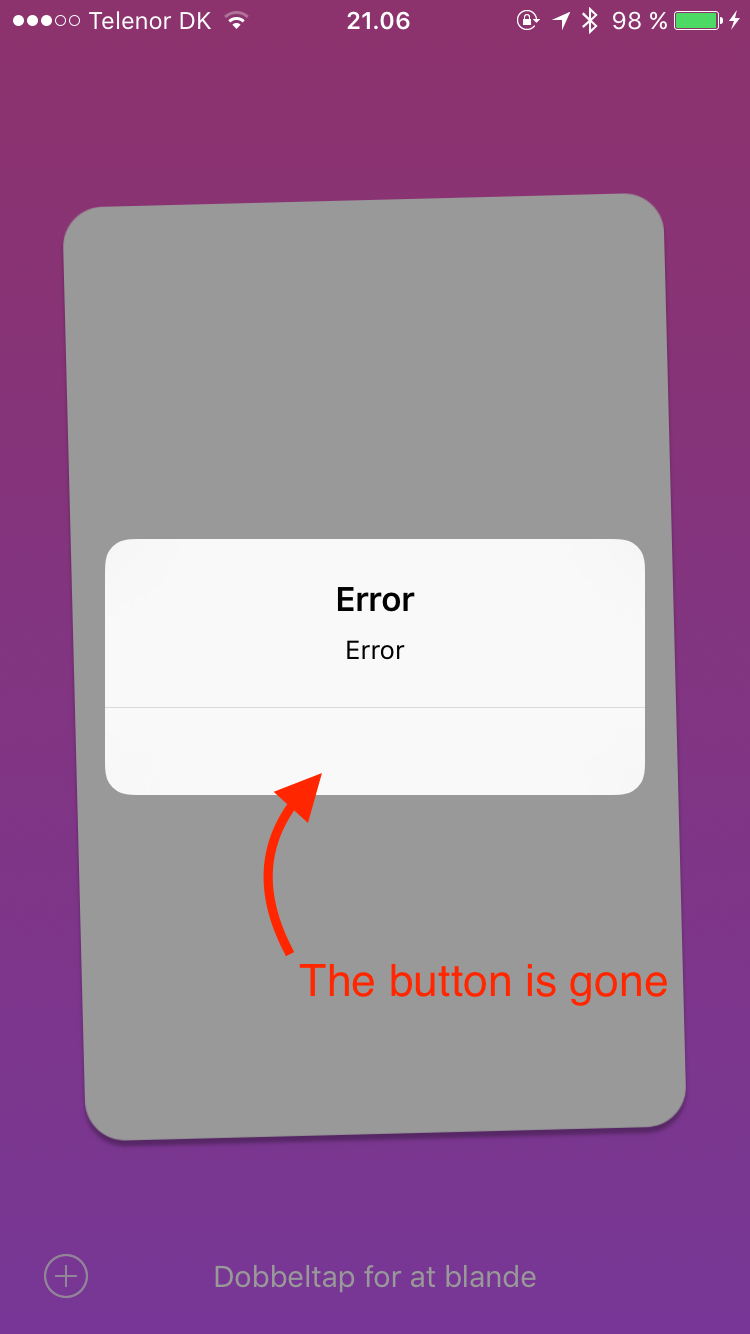
我有一个奇怪的问题,我的UICollectionViewFlowLayout扩展与UIAlertController冲突,并移除它的按钮。
我的应用程序有一个带有分页功能的uicollectionviewcontroller控制器,我的uicollectionviewflowlayout布局扩展确保单个单元格填充整个屏幕。
// Extension to make a UICollectionViewCell fill the whole screen
extension UICollectionViewFlowLayout {
  public override func prepareLayout() {
    let ratio : CGFloat = 5.6 / 8.7

    let cardHeight = collectionView!.frame.height * 0.7
    let cardWidth = cardHeight * ratio
    let spacing = (collectionView!.frame.height - cardHeight) / 2

    itemSize = CGSize(width: cardWidth, height: cardHeight)
    minimumLineSpacing = spacing*2
    sectionInset = UIEdgeInsets(top: spacing, left: 0, bottom: spacing, right: 0)
  }
}
每当我打电话给UIAlertController
let alertController = UIAlertController(title: "Error", message: "Error", preferredStyle: .Alert)
alertController.addAction(UIAlertAction(title: "OK", style: .Cancel) { (action) in })
self.presentViewController(alertController, animated: true) {}
我在控制台中得到以下消息
2016-01-01 21:04:48.924 Jeg Har Aldrig[10912:3649777] Unable to simultaneously satisfy constraints.
    Probably at least one of the constraints in the following list is one you don't want.
    Try this:
        (1) look at each constraint and try to figure out which you don't expect;
        (2) find the code that added the unwanted constraint or constraints and fix it.
    (Note: If you're seeing NSAutoresizingMaskLayoutConstraints that you don't understand, refer to the documentation for the UIView property translatesAutoresizingMaskIntoConstraints)
(
    "<NSAutoresizingMaskLayoutConstraint:0x15f6c4e80 h=--& v=--& H:[_UIAlertControllerActionView:0x15f53d9e0(19.8253)]>",
    "<NSLayoutConstraint:0x15f67b370 H:|-(>=12)-[UIView:0x15f53e0c0]   (Names: '|':_UIAlertControllerActionView:0x15f53d9e0 )>",
    "<NSLayoutConstraint:0x15f67b3c0 UIView:0x15f53e0c0.trailing <= _UIAlertControllerActionView:0x15f53d9e0.trailing - 12>"
)

Will attempt to recover by breaking constraint
<NSLayoutConstraint:0x15f67b3c0 UIView:0x15f53e0c0.trailing <= _UIAlertControllerActionView:0x15f53d9e0.trailing - 12>

Make a symbolic breakpoint at UIViewAlertForUnsatisfiableConstraints to catch this in the debugger.
The methods in the UIConstraintBasedLayoutDebugging category on UIView listed in <UIKit/UIView.h> may also be helpful.
2016-01-01 21:04:48.926 Jeg Har Aldrig[10912:3649777] Unable to simultaneously satisfy constraints.
    Probably at least one of the constraints in the following list is one you don't want.
    Try this:
        (1) look at each constraint and try to figure out which you don't expect;
        (2) find the code that added the unwanted constraint or constraints and fix it.
    (Note: If you're seeing NSAutoresizingMaskLayoutConstraints that you don't understand, refer to the documentation for the UIView property translatesAutoresizingMaskIntoConstraints)
(
    "<NSAutoresizingMaskLayoutConstraint:0x15f6c62a0 h=--& v=--& V:[_UIAlertControllerActionView:0x15f53d9e0(30.8)]>",
    "<NSLayoutConstraint:0x15f67bd50 V:[_UIAlertControllerActionView:0x15f53d9e0(>=44)]>"
)

Will attempt to recover by breaking constraint
<NSLayoutConstraint:0x15f67bd50 V:[_UIAlertControllerActionView:0x15f53d9e0(>=44)]>

Make a symbolic breakpoint at UIViewAlertForUnsatisfiableConstraints to catch this in the debugger.
The methods in the UIConstraintBasedLayoutDebugging category on UIView listed in <UIKit/UIView.h> may also be helpful.
2016-01-01 21:04:48.927 Jeg Har Aldrig[10912:3649777] Unable to simultaneously satisfy constraints.
    Probably at least one of the constraints in the following list is one you don't want.
    Try this:
        (1) look at each constraint and try to figure out which you don't expect;
        (2) find the code that added the unwanted constraint or constraints and fix it.
    (Note: If you're seeing NSAutoresizingMaskLayoutConstraints that you don't understand, refer to the documentation for the UIView property translatesAutoresizingMaskIntoConstraints)
(
    "<NSAutoresizingMaskLayoutConstraint:0x15f6c4e80 h=--& v=--& H:[_UIAlertControllerActionView:0x15f53d9e0(19.8253)]>",
    "<NSLayoutConstraint:0x15f67b370 H:|-(>=12)-[UIView:0x15f53e0c0]   (Names: '|':_UIAlertControllerActionView:0x15f53d9e0 )>",
    "<NSLayoutConstraint:0x15f67b3c0 UIView:0x15f53e0c0.trailing <= _UIAlertControllerActionView:0x15f53d9e0.trailing - 12>"
)

Will attempt to recover by breaking constraint
<NSLayoutConstraint:0x15f67b3c0 UIView:0x15f53e0c0.trailing <= _UIAlertControllerActionView:0x15f53d9e0.trailing - 12>

Make a symbolic breakpoint at UIViewAlertForUnsatisfiableConstraints to catch this in the debugger.
The methods in the UIConstraintBasedLayoutDebugging category on UIView listed in <UIKit/UIView.h> may also be helpful.
2016-01-01 21:04:48.927 Jeg Har Aldrig[10912:3649777] Unable to simultaneously satisfy constraints.
    Probably at least one of the constraints in the following list is one you don't want.
    Try this:
        (1) look at each constraint and try to figure out which you don't expect;
        (2) find the code that added the unwanted constraint or constraints and fix it.
    (Note: If you're seeing NSAutoresizingMaskLayoutConstraints that you don't understand, refer to the documentation for the UIView property translatesAutoresizingMaskIntoConstraints)
(
    "<NSAutoresizingMaskLayoutConstraint:0x15f6c62a0 h=--& v=--& V:[_UIAlertControllerActionView:0x15f53d9e0(30.8)]>",
    "<NSLayoutConstraint:0x15f67bd50 V:[_UIAlertControllerActionView:0x15f53d9e0(>=44)]>"
)

Will attempt to recover by breaking constraint
<NSLayoutConstraint:0x15f67bd50 V:[_UIAlertControllerActionView:0x15f53d9e0(>=44)]>

Make a symbolic breakpoint at UIViewAlertForUnsatisfiableConstraints to catch this in the debugger.
The methods in the UIConstraintBasedLayoutDebugging category on UIView listed in <UIKit/UIView.h> may also be helpful.
2016-01-01 21:04:48.938 Jeg Har Aldrig[10912:3649777] Unable to simultaneously satisfy constraints.
    Probably at least one of the constraints in the following list is one you don't want.
    Try this:
        (1) look at each constraint and try to figure out which you don't expect;
        (2) find the code that added the unwanted constraint or constraints and fix it.
    (Note: If you're seeing NSAutoresizingMaskLayoutConstraints that you don't understand, refer to the documentation for the UIView property translatesAutoresizingMaskIntoConstraints)
(
    "<NSAutoresizingMaskLayoutConstraint:0x15f6c4e80 h=--& v=--& H:[_UIAlertControllerActionView:0x15f53d9e0(19.8253)]>",
    "<NSLayoutConstraint:0x15f67b370 H:|-(>=12)-[UIView:0x15f53e0c0]   (Names: '|':_UIAlertControllerActionView:0x15f53d9e0 )>",
    "<NSLayoutConstraint:0x15f67b3c0 UIView:0x15f53e0c0.trailing <= _UIAlertControllerActionView:0x15f53d9e0.trailing - 12>"
)

Will attempt to recover by breaking constraint
<NSLayoutConstraint:0x15f67b3c0 UIView:0x15f53e0c0.trailing <= _UIAlertControllerActionView:0x15f53d9e0.trailing - 12>

Make a symbolic breakpoint at UIViewAlertForUnsatisfiableConstraints to catch this in the debugger.
The methods in the UIConstraintBasedLayoutDebugging category on UIView listed in <UIKit/UIView.h> may also be helpful.
2016-01-01 21:04:48.940 Jeg Har Aldrig[10912:3649777] Unable to simultaneously satisfy constraints.
    Probably at least one of the constraints in the following list is one you don't want.
    Try this:
        (1) look at each constraint and try to figure out which you don't expect;
        (2) find the code that added the unwanted constraint or constraints and fix it.
    (Note: If you're seeing NSAutoresizingMaskLayoutConstraints that you don't understand, refer to the documentation for the UIView property translatesAutoresizingMaskIntoConstraints)
(
    "<NSAutoresizingMaskLayoutConstraint:0x15f6c62a0 h=--& v=--& V:[_UIAlertControllerActionView:0x15f53d9e0(30.8)]>",
    "<NSLayoutConstraint:0x15f67bd50 V:[_UIAlertControllerActionView:0x15f53d9e0(>=44)]>"
)

Will attempt to recover by breaking constraint
<NSLayoutConstraint:0x15f67bd50 V:[_UIAlertControllerActionView:0x15f53d9e0(>=44)]>

Make a symbolic breakpoint at UIViewAlertForUnsatisfiableConstraints to catch this in the debugger.
The methods in the UIConstraintBasedLayoutDebugging category on UIView listed in <UIKit/UIView.h> may also be helpful.
当我的UIAlertControllers上的按钮没有出现时,请看图片
有建议吗?
基于Mattvens Mattvens的解决方案
我没有做扩展,而是创建了一个子类:
class FullCellLayout: UICollectionViewFlowLayout {
  required init?(coder aDecoder: NSCoder) {
    super.init(coder: aDecoder)

    let ratio : CGFloat = 5.6 / 8.7

    let cardHeight = UIScreen.mainScreen().bounds.height * 0.7
    let cardWidth = cardHeight * ratio
    let spacing = (UIScreen.mainScreen().bounds.height - cardHeight) / 2

    itemSize = CGSize(width: cardWidth, height: cardHeight)
    minimumLineSpacing = spacing*2
    sectionInset = UIEdgeInsets(top: spacing, left: 0, bottom: spacing, right: 0)
  }
}回答 1
Stack Overflow用户
发布于 2016-01-01 20:40:30
简短的回答:不要对此使用分机。
Swift中的扩展是全局的,因此对UICollectionViewLayout的扩展影响了所有的UICollectionViewLayout类。
从您所得到的错误判断,UIAlertController在内部使用UICollectionView来布局按钮,而您的扩展正在破坏该功能。
如果您真的需要一个子类,您应该使用它,但是没有理由(据我所知)不能初始化UICollectionViewFlowLayout,将它分配给一个var并使用它。
https://stackoverflow.com/questions/34559611
复制相似问题
腾讯云开发者

Copyright © 2013 - 2026 Tencent Cloud. All Rights Reserved. 腾讯云 版权所有
深圳市腾讯计算机系统有限公司 ICP备案/许可证号:粤B2-20090059  粤公网安备44030502008569号
腾讯云计算(北京)有限责任公司 京ICP证150476号 | 京ICP备11018762号