
你如何在着色器中写z深度?
这个着色器(代码在末尾)使用射线行进来渲染过程几何:
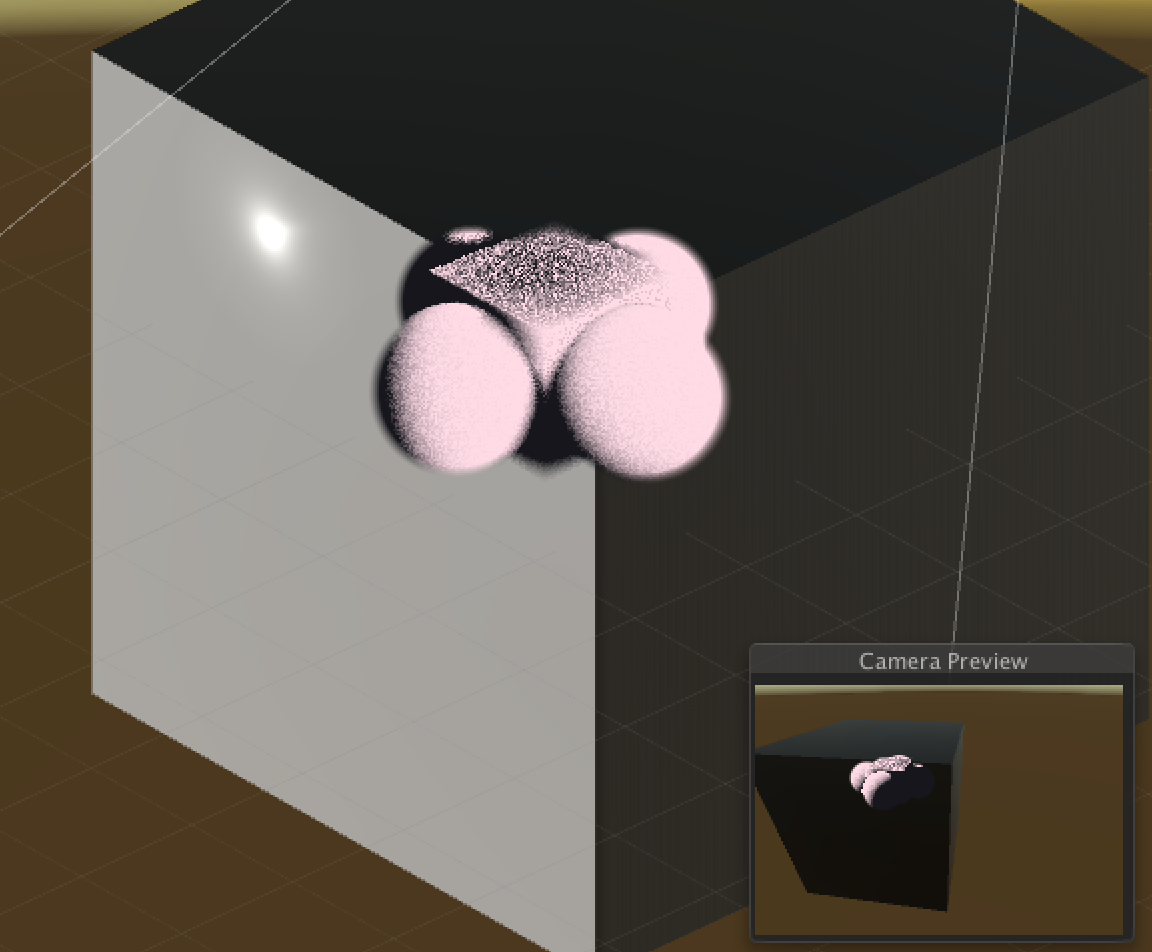
但是,在图像(上面)中,背景中的立方体应该是部分遮挡粉红色固体;这并不是因为:
  struct fragmentOutput {
    float4 color : SV_Target;
    float zvalue : SV_Depth;
  };

  fragmentOutput frag(fragmentInput i) {
    fragmentOutput o;
    ...
    o.zvalue = IF(output[1] > 0, 0, 1);
  }
然而,在我的一生中,我无法知道如何正确地生成一个深度值,从而正确地允许光线行进的固体模糊/不模糊场景中的其他几何图形。
我知道这是可能的,因为这里有一个有用的例子:https://github.com/i-saint/RaymarchingOnUnity5 (关联日语博客http://i-saint.hatenablog.com/)
然而,它是用日语写的,基本上没有文件记载,而且非常复杂。
我正在寻找一个非常简单的版本的相同的东西,从它的基础上。
在着色器中,我目前正在使用片段程序行:
float2 output = march_raycast(i.worldpos, i.viewdir, _far, _step);将四角体上的输入点p映射成输出float2 (密度、距离),其中距离是从四角点到程序表面上的“点”的距离。
问题是,如何以任何有用的方式将其映射到深度缓冲区?
完整的着色器就在这里,要使用它,创建一个大小至少为50的0,0,0球体的新场景,并将着色器分配给它:
Shader "Shaders/Raymarching/BasicMarch" {
  Properties {
    _sun ("Sun", Vector) = (0, 0, 0, 0)
    _far ("Far Depth Value", Float) = 20
    _edgeFuzz ("Edge fuzziness", Range(1, 20)) = 1.0
    _lightStep ("Light step", Range(0.1, 5)) = 1.0
    _step ("Raycast step", Range(0.1, 5)) = 1.0
    _dark ("Dark value", Color) = (0, 0, 0, 0)
    _light ("Light Value", Color) = (1, 1, 1, 1)
    [Toggle] _debugDepth ("Display depth field", Float) = 0
    [Toggle] _debugLight ("Display light field", Float) = 0
  }
  SubShader {
    Tags {"Queue"="Transparent" "IgnoreProjector"="True" "RenderType"="Transparent"}
    Blend SrcAlpha OneMinusSrcAlpha
    Pass {
      CGPROGRAM

      #pragma vertex vert
      #pragma fragment frag
      #pragma target 3.0

      #include "UnityCG.cginc"
      #include "UnityLightingCommon.cginc" // for _LightColor0
      #define IF(a, b, c) lerp(b, c, step((fixed) (a), 0));

      uniform float _far;
      uniform float _lightStep;
      uniform float3 _sun;
      uniform float4 _light;
      uniform float4 _dark;
      uniform float _debugDepth;
      uniform float _debugLight;
      uniform float _edgeFuzz;
      uniform float _step;

      /**
       * Sphere at origin c, size s
       * @param center_ The center of the sphere
       * @param radius_ The radius of the sphere
       * @param point_ The point to check
       */
      float geom_soft_sphere(float3 center_, float radius_, float3 point_) {
        float rtn = distance(center_, point_);
        return IF(rtn < radius_, (radius_ - rtn) / radius_ / _edgeFuzz, 0);
      }

      /**
       * A rectoid centered at center_
       * @param center_ The center of the cube
       * @param halfsize_ The halfsize of the cube in each direction
       */
      float geom_rectoid(float3 center_, float3 halfsize_, float3 point_) {
        float rtn = IF((point_[0] < (center_[0] - halfsize_[0])) || (point_[0] > (center_[0] + halfsize_[0])), 0, 1);
        rtn = rtn * IF((point_[1] < (center_[1] - halfsize_[1])) || (point_[1] > (center_[1] + halfsize_[1])), 0, 1);
        rtn = rtn * IF((point_[2] < (center_[2] - halfsize_[2])) || (point_[2] > (center_[2] + halfsize_[2])), 0, 1);
        rtn = rtn * distance(point_, center_);
        float radius = length(halfsize_);
        return IF(rtn > 0, (radius - rtn) / radius / _edgeFuzz, 0);
      }

      /**
       * Calculate procedural geometry.
       * Return (0, 0, 0) for empty space.
       * @param point_ A float3; return the density of the solid at p.
       * @return The density of the procedural geometry of p.
       */
      float march_geometry(float3 point_) {
        return
          geom_rectoid(float3(0, 0, 0), float3(7, 7, 7), point_) +
          geom_soft_sphere(float3(10, 0, 0), 7, point_) +
          geom_soft_sphere(float3(-10, 0, 0), 7, point_) +
          geom_soft_sphere(float3(0, 0, 10), 7, point_) +
          geom_soft_sphere(float3(0, 0, -10), 7, point_);
      }

      /** Return a randomish value to sample step with */
      float rand(float3 seed) {
        return frac(sin(dot(seed.xyz ,float3(12.9898,78.233,45.5432))) * 43758.5453);
      }

      /**
       * March the point p along the cast path c, and return a float2
       * which is (density, depth); if the density is 0 no match was
       * found in the given depth domain.
       * @param point_ The origin point
       * @param cast_ The cast vector
       * @param max_ The maximum depth to step to
       * @param step_ The increment to step in
       * @return (denity, depth)
       */
      float2 march_raycast(float3 point_, float3 cast_, float max_, float step_) {
        float origin_ = point_;
        float depth_ = 0;
        float density_ = 0;
        int steps = floor(max_ / step_);
        for (int i = 0; (density_ <= 1) && (i < steps); ++i) {
          float3 target_ = point_ + cast_ * i * step_ + rand(point_) * cast_ * step_;
          density_ += march_geometry(target_);
          depth_ = IF((depth_ == 0) && (density_ != 0), distance(point_, target_), depth_);
        }
        density_ = IF(density_ > 1, 1, density_);
        return float2(density_, depth_);
      }

      /**
       * Simple lighting; raycast from depth point to light source, and get density on path
       * @param point_ The origin point on the render target
       * @param cast_ The original cast (ie. camera view direction)
       * @param raycast_ The result of the original raycast
       * @param max_ The max distance to cast
       * @param step_ The step increment
       */
      float2 march_lighting(float3 point_, float3 cast_, float2 raycast_, float max_, float step_) {
        float3 target_ = point_ + cast_ * raycast_[1];
        float3 lcast_ = normalize(_sun - target_);
        return march_raycast(target_, lcast_, max_, _lightStep);
      }

      struct fragmentInput {
        float4 position : SV_POSITION;
        float4 worldpos : TEXCOORD0;
        float3 viewdir : TEXCOORD1;
      };

      struct fragmentOutput {
        float4 color : SV_Target;
        float zvalue : SV_Depth;
      };

      fragmentInput vert(appdata_base i) {
        fragmentInput o;
        o.position = mul(UNITY_MATRIX_MVP, i.vertex);
        o.worldpos = mul(_Object2World, i.vertex);
        o.viewdir = -normalize(WorldSpaceViewDir(i.vertex));
        return o;
      }

      fragmentOutput frag(fragmentInput i) {
        fragmentOutput o;

        // Raycast
        float2 output = march_raycast(i.worldpos, i.viewdir, _far, _step);
        float2 light = march_lighting(i.worldpos, i.viewdir, output, _far, _step);
        float lvalue = 1.0 - light[0];
        float depth = output[1] / _far;

        // Generate fragment color
        float4 color = lerp(_light, _dark, lvalue);

        // Debugging: Depth
        float4 debug_depth = float4(depth, depth, depth, 1);
        color = IF(_debugDepth, debug_depth, color);

        // Debugging: Color
        float4 debug_light = float4(lvalue, lvalue, lvalue, 1);
        color = IF(_debugLight, debug_light, color);

        // Always apply the depth map
        color.a = output[0];

        o.zvalue = IF(output[1] > 0, 0, 1);
        o.color = IF(output[1] <= 0, 0, color);
        return o;
      }
      ENDCG
    }
  }
}
(是的,我知道这很复杂,但是很难把这种阴影简化成一个简单的测试用例)
我很乐意接受任何答案,这是对上面的着色器的修改,它允许程序实体在场景中被模糊/模糊其他几何图形,就好像是‘真实几何’。
--
编辑:通过显式设置场景中其他几何图形的深度值,您可以获得这个“工作”,方法是使用与raymarcher相同的深度函数:
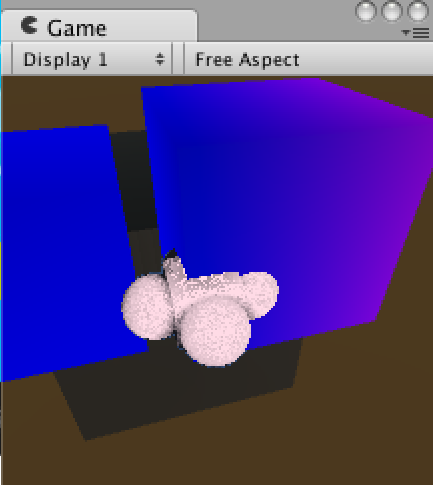
...however,我仍然不能让这个正确的工作与几何使用‘标准’着色器。还在寻找一个可行的解决方案。
回答 2
Stack Overflow用户
发布于 2015-12-30 18:59:49
查看您链接到的项目,我看到的最重要的区别是他们的raycast march function使用一个按引用传递的参数来返回一个名为ray_pos的片段位置。该位置似乎在对象空间中,因此他们transform it using the view-projection matrix获取剪辑空间并读取深度值。
这个项目也有一个compute_depth函数,但是it looks pretty simple。
您的march_raycast函数已经在计算target_位置,因此可以重构一下,应用out关键字将其返回给调用方,并在深度计算中使用它:
//get position using pass-by-ref
float3 ray_pos = i.worldpos;
float2 output = march_raycast(ray_pos, i.viewdir, _far, _step);

...

//convert position to clip space, read depth
float4 clip_pos = mul(UNITY_MATRIX_VP, float4(ray_pos, 1.0));
o.zvalue = clip_pos.z / clip_pos.w;Stack Overflow用户
发布于 2015-12-30 19:06:40
呈现设置可能有问题。
要允许您的着色器输出每像素深度,它的深度测试必须禁用.否则,GPU将--为了优化--假设所有像素的深度都是来自顶点的内插深度。
由于您的着色器不进行深度测试,它必须在执行的几何图形之前呈现,否则它只会覆盖其他几何图形写入深度缓冲区的任何内容。
然而,它必须有深度写入启用,否则您的像素着色器的深度输出将被忽略,而不是写入深度缓冲区。
您的RenderType是透明的,我认为应该禁用深度写入。那就成问题了。您的队列也是透明的,它应该让它呈现所有的实体几何,并回到前面,这也将是一个问题,正如我们已经得出的结论,我们必须渲染。
所以
- 把你的着色器放在一个早期的渲染队列中,在实体几何之前呈现。
- 启用深度写入
- 禁用深度测试
https://stackoverflow.com/questions/34532595
复制相似问题
腾讯云开发者

Copyright © 2013 - 2026 Tencent Cloud. All Rights Reserved. 腾讯云 版权所有
深圳市腾讯计算机系统有限公司 ICP备案/许可证号:粤B2-20090059  粤公网安备44030502008569号
腾讯云计算(北京)有限责任公司 京ICP证150476号 | 京ICP备11018762号