
量角器:有一个错误,但是测试通过了。
我正在创建一个测试工具,使用量角器和其他库,如chai,黄瓜和gherkin。我有三个文件:
- my_feature.feature -用于指定gherkin特性
- test_step.js -此文件包含步骤定义
- index.html -是我正在测试的网页
my_feature.feature
# features/my_feature.feature

Feature: Test cucumber automation
  As a front-end developer
  I want to automate e2e testing


  Scenario: Altro test
    Given I go on "file:///Users/Emanuele/Desktop/lavoro/test-automation/app/html/index.html"
    Then The text of the element with selector "#test-button" should be "My button"
test_step.js
    'use strict';

var chai = require('chai'),
    chaiAsPromised = require('chai-as-promised');

chai.use(chaiAsPromised);

var expect = chai.expect;

// Protractor won't wait for Angular
browser.ignoreSynchronization = true;

module.exports = function() {

  this.World = require('../support/world').World;

  // default timeout for all step definitions
  this.setDefaultTimeout(20 * 1000);

  /*
  ** Open a page based on an absolute url
  ** Ex. https://www.google.com
  */
  this.Given(/^I go on "([^"]*)"$/, function(url, callback){
    browser.get(url);

    callback();
  });

  /*
  ** Check if the text of the element with a given selector is equal to myText.
  */
  this.Then(/^The text of the element with selector "([^"]*)" should be "([^"]*)"$/, function(elementSelector, myText, callback){
    var selectedElement = element(by.css(elementSelector));

    //Resolve the promise
    selectedElement.getText().then(function(text){
      expect(text).to.equal(myText);
    });


    callback();
  });
};
index.html
<html>
<head></head>
<body>

    <button id="test-button">Test button</button>

</body>
</html>现在,当我运行测试时,我得到了一个奇怪的结果,因为给定场景的两个步骤都通过了,但是由于expect(text).to.equal(myText);行,在第二个步骤中出现了一个错误。这是因为,根据gherkin特性,按钮内的文本应该是My按钮,而不是Test按钮。
在这里,您可以在我的控制台中找到结果:
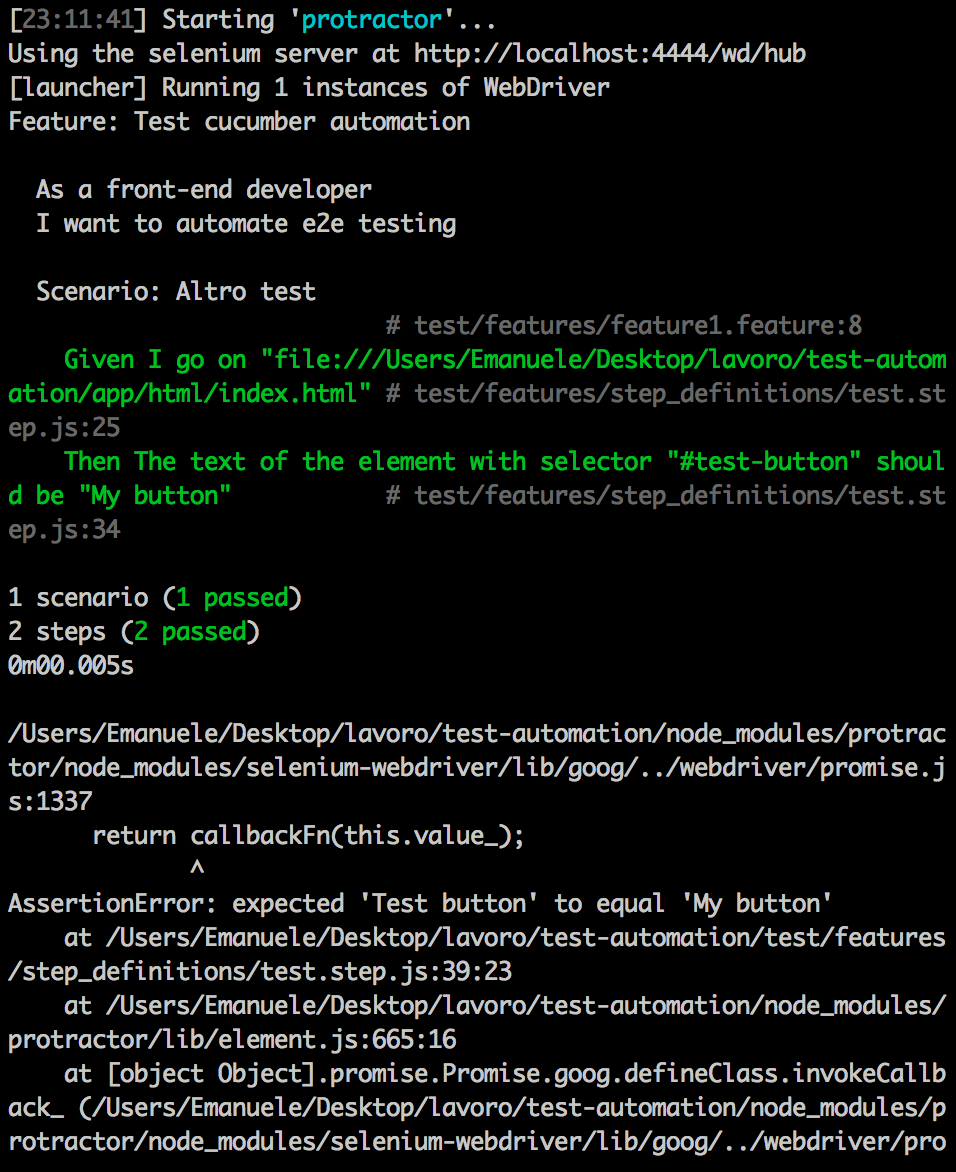
我想知道,即使有错误,为何要通过第二步呢?我认为测试应该失败,因为比较字符串是不同的。我说错了吗?我怎样才能避免这种行为?
编辑:
如果我使用eventually解决来自chai-as-promised的承诺,就会得到相同的结果。所有测试都已通过,但错误文本略有不同:AssertionError: expected 'Test button' to equal 'My Button'
提前谢谢你。
回答 3
Stack Overflow用户
发布于 2016-01-08 10:29:35
我找到了两个解决这个问题的方法。
First:
selectedElement.getText().then(function(text){
      try{
        expect(text).to.equal(myText);
      } catch(error){
        callback(new Error("Compare error"));
      }
      callback();
});在这里,我解析承诺,然后检查元素的文本是否等于字符串myText。我不喜欢这个解决方案,因为,手动解决承诺,我不使用很多的特点,chai-as承诺。
第二版:
expect(selectedElement.getText()).to.eventually.equal(myText).notify(callback); 我认为这是最好的解决方案,并且是基于chai承诺提供的通知。这个关于黄瓜量角器的帖子对这个问题有很大的帮助.
Stack Overflow用户
发布于 2015-12-29 22:25:23
这里发生的情况是,由于断言位于异步操作的回调中,所以测试在遇到expect(text).to.equal(myText);语句之前完成,因此通过测试。
您需要确定,在您等待的承诺得到解决之前,测试不应该通过!
根据有关承诺的柴氏文件,我认为您应该使用的模式是:
expect(selectedElement.getText()).to.eventually.equal(myTest);Stack Overflow用户
发布于 2015-12-29 22:27:15
getText()和Protractor中的许多其他方法一样,返回一个承诺,使用chai-as-promised,它是“最终”:
expect(selectedElement.getText()).to.eventually.equal(myText);而且,很明显,HTML中有Test button,但是由于某种原因,您希望看到My button。换句话说,它不应该是:
Then The text of the element with selector "#test-button" should be "Test button"https://stackoverflow.com/questions/34519996
复制相似问题
腾讯云开发者

Copyright © 2013 - 2026 Tencent Cloud. All Rights Reserved. 腾讯云 版权所有
深圳市腾讯计算机系统有限公司 ICP备案/许可证号:粤B2-20090059  粤公网安备44030502008569号
腾讯云计算(北京)有限责任公司 京ICP证150476号 | 京ICP备11018762号