
设计令人印象深刻的表格和搜索框
设计令人印象深刻的表格和搜索框
提问于 2015-12-27 07:35:35
我想把一个Search Text Box放在桌子上,就像在附图中一样。
我在表演示中使用了这个示例,但这并不符合我的要求。需要一些css的重新设计来改进..。
在上面的例子中,您可以看到搜索框不在表中,而css并不令人印象深刻,我需要像下面的图像那样的表。这是饭盒在桌子里。在我的表设计中,我使用的是angularjs

// Instantiate the app, the 'myApp' parameter must
// match what is in ng-app
var myApp = angular.module('myApp', []);

// Create the controller, the 'ToddlerCtrl' parameter
// must match an ng-controller directive
myApp.controller('ToddlerCtrl', function ($scope) {

  // Define an array of Toddler objects
  $scope.toddlers = [
    {
      "name": "Toddler One",
      "birthday": "1/1/2011",
      "happy": true
    },
    {
      "name": "Toddler Two",
      "birthday": "2/2/2011",
      "happy": true
    },
    {
      "name": "Toddler Three",
      "birthday": "3/3/2011",
      "happy": false
    }
  ];

});
myApp.directive('multiwareswitchitem', function() {
      return {
          restrict: 'E',
          scope: {
              value: '='
          },
          template: '<div>{{value.name}}  <div><small> Birthday {{value.birthday}} </div></small></div>'
      };
});<!DOCTYPE html>
<html ng-app="myApp">
<head>
<script data-require="angular.js@1.2.7" data-semver="1.2.7" src="http://code.angularjs.org/1.2.7/angular.js"></script>
<link href="style.css" rel="stylesheet" />
<script src="script.js"></script>
<style>
.switchBox td {
padding-right: 64px;
}
.switchBox .entBox {
overflow:auto;height:10em; width:300px; border:1px solid #cccccc; border-radius: 4px;float:left; box-shadow: inset 0 1px 1px rgba(0, 0, 0, 0.075); padding-left: 15px; padding-top: 10px;focus: {border-color: #66afe9;};
-webkit-user-select: none;
-khtml-user-select: none;
-moz-user-select: none;
-ms-user-select: none;
-o-user-select: none;
user-select: none;
}
.switchBox .entBox div:hover {
background-color: #3875D7;
}
.switchBox .entBox:focus {
border-color: #66afe9;
outline: 0;
-webkit-box-shadow: inset 0 1px 1px rgba(0,0,0,.075), 0 0 8px rgba(102, 175, 233, 0.6);
box-shadow: inset 0 1px 1px rgba(0,0,0,.075), 0 0 8px rgba(102, 175, 233, 0.6);
}
.switchBox .eBox2.entBox {
background-color: #444;
}
</style>
</head>
<body>
<div ng-controller="ToddlerCtrl">
<table>
<tr>
<th>All Toddler*
<input type="text" name="fname" placeholder="Search City" ng-model="search.name">
</th>
</tr>
<tr class="switchBox">
<td>
<div class="entBox">
<multiwareswitchitem ng-repeat="item in toddlers |filter: search" value="item">
</multiwareswitchitem>
</div>
</td>
</tr>
</table>
</div>
</body>
</html>
回答 2
Stack Overflow用户
回答已采纳
发布于 2015-12-27 09:01:06
尽可能多地使用你自己的风格。我编辑了你的js fidler。你可能喜欢这个-
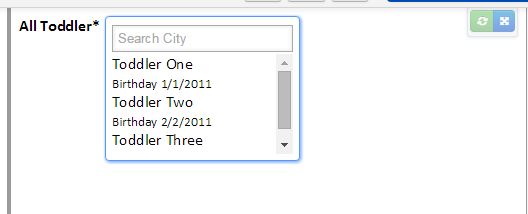
html -
<body>
<div ng-controller="ToddlerCtrl" class="toddler-search-container">
  <label>All Toddler*</label>
  <div class="search-container">
    <input type="text" name="fname" placeholder="Search City" ng-model="search.name">
    <div class="entBox">
                <multiwareswitchitem ng-repeat="item in toddlers |filter: search" value="item">
                </multiwareswitchitem>
            </div>
  </div>

</div>
Css风格-
body {
  font-size: 24px;
}

.toddler-search-container{
  width:100%;
  display:table;
  font-size:16px;
  font-family:calibri;
  position:relative;
}

.toddler-search-container label{
  font-weight:bold;
  float:left;
  display:block;
  margin-right:5px;
  position:relative;
}

.toddler-search-container .search-container{
  float:left;
  background:#ffffff;
  border:solid 1px #5897FB;
  display:table;
  padding:6px;
  border-radius:4px;
  box-shadow:1px 1px 5px #5897FB;
}

.toddler-search-container .search-container input{
  border:solid 1px #aaaaaa;
  margin:2px 0;
  box-shadow:inset 0 0 3px 2px #F3F3F3;
  padding:5px 5px;
}

.toddler-search-container .search-container .entBox{
  height:100px;
  overflow-y:scroll;
}Stack Overflow用户
发布于 2015-12-27 08:34:37
您可以使用jquery.datatable.js与angular.data table.js ...it一起使用好的表模板,并有一个搜索框,它使即时result...you可以使用.我无法添加代码片段,因为connectivity...but i vl很差,所以如果您实现它,就会给出建议
页面原文内容由Stack Overflow提供。腾讯云小微IT领域专用引擎提供翻译支持
原文链接:
https://stackoverflow.com/questions/34478512
复制相关文章
相似问题
腾讯云开发者

Copyright © 2013 - 2026 Tencent Cloud. All Rights Reserved. 腾讯云 版权所有
深圳市腾讯计算机系统有限公司 ICP备案/许可证号:粤B2-20090059  粤公网安备44030502008569号
腾讯云计算(北京)有限责任公司 京ICP证150476号 | 京ICP备11018762号