
使用JDBC领域的身份验证
在我的Java应用程序中,我通过JDBC领域实现了autentication/autorization (我第一次应用这个解决方案)。
下面的代码在成功登录时没有任何问题,问题是当我输入错误的凭据时:它无论如何都会登录,即使它捕获了一个ServletException (登录失败),但这几行代码从未被执行(在调试模式下尝试过):
request.setAttribute("msg",“错误登录”); nextPage = "/errorPage.jsp";
另一件奇怪的事:不管我去了什么
getServletContext().getRequestDispatcher(nextPage).forward(request,反应);
由于nextPage (我试图静态地放置"/errorPage.jsp"),它总是转发给index.jsp。
Login.jsp
 @WebServlet("/Login")
    public class Login extends HttpServlet {
        private static final long serialVersionUID = 1L;

/**
 * @see HttpServlet#HttpServlet()
 */
public Login() {
    super();
    // TODO Auto-generated constructor stub
}

/**
 * @see HttpServlet#doGet(HttpServletRequest request, HttpServletResponse response)
 */
protected void doGet(HttpServletRequest request, HttpServletResponse response) throws ServletException, IOException {
    // TODO Auto-generated method stub
}

/**
 * @see HttpServlet#doPost(HttpServletRequest request, HttpServletResponse response)
 */
protected void doPost(HttpServletRequest request, HttpServletResponse response) throws ServletException, IOException {

    String username = request.getParameter("username").trim();
    String password = request.getParameter("password").trim();
    String nextPage = "/index.jsp";

    try {
        request.login(username, password);
    }
    catch (ServletException ex) {
        request.setAttribute("msg", "Error in login");
        nextPage = "/errorPage.jsp";
    }

        getServletContext().getRequestDispatcher(nextPage).forward(request, response);
    }
}
login.jsp
<%@ page language="java" contentType="text/html; charset=UTF-8"
    pageEncoding="UTF-8"%>
<%
    request.logout();
%>
<!DOCTYPE html PUBLIC "-//W3C//DTD HTML 4.01 Transitional//EN" "http://www.w3.org/TR/html4/loose.dtd">
<html>
<head>
<meta http-equiv="Content-Type" content="text/html; charset=UTF-8">
<title>Welcome</title>
</head>
<body>
    <h1>Hi! You need to login.</h1>
    <form method="POST" action="/MyApp/Login">
        Usuario: <input type="text" name="username" /> Password: <input
            type="password" name="password" /> <input type="submit"
            value="Send" />
    </form>
</body>
</html>
web.xml
<?xml version="1.0" encoding="UTF-8"?>
<web-app xmlns="http://java.sun.com/xml/ns/javaee" xmlns:xsi="http://www.w3.org/2001/XMLSchema-instance"
    xsi:schemaLocation="http://java.sun.com/xml/ns/javaee http://java.sun.com/xml/ns/javaee/web-app_3_0.xsd"
    version="3.0">
    <display-name>MyApp</display-name>
    <welcome-file-list>
        <welcome-file>login.jsp</welcome-file>
    </welcome-file-list>
    <login-config>
        <auth-method>FORM</auth-method>
        <realm-name>jdbcRealm</realm-name>
        <form-login-config>
            <form-login-page>/login.jsp</form-login-page>
            <form-error-page>/errorPage.jsp</form-error-page>
        </form-login-config>
    </login-config>
    <security-constraint>
        <web-resource-collection>
            <web-resource-name>Admin stuff</web-resource-name>
            <url-pattern>/admin/*</url-pattern>
            <http-method>GET</http-method>
            <http-method>POST</http-method>
        </web-resource-collection>
        <auth-constraint>
            <role-name>admin</role-name>
        </auth-constraint>
        <user-data-constraint>
            <transport-guarantee>CONFIDENTIAL</transport-guarantee>
        </user-data-constraint>
    </security-constraint>
    <security-constraint>
        <web-resource-collection>
            <web-resource-name>User stuff</web-resource-name>
            <url-pattern>/user/*</url-pattern>
            <http-method>GET</http-method>
            <http-method>POST</http-method>
        </web-resource-collection>
        <auth-constraint>
            <role-name>user</role-name>
        </auth-constraint>
        <user-data-constraint>
            <transport-guarantee>CONFIDENTIAL</transport-guarantee>
        </user-data-constraint>
    </security-constraint>
    <security-role>
        <role-name>admin</role-name>
    </security-role>
    <security-role>
        <role-name>user</role-name>
    </security-role>
</web-app>在此之前,我尝试了container-managed security解决方案(使用登录的表单操作调用j_security_check组件)。
登录操作很好(即使使用错误的凭据),但我遇到了另一个以前没有的严重问题:在其中一个用例中,用户可以看到项目正在进行中,但它不应该能够看到其他用户的项目。我用下面的servlet实现了这一点,但问题是(与其他解决方案一样),它跳过了一些指令(例如,在DB中查找用户的指令),然后出现异常,重定向到错误页面。
public class ViewUserProjects extends HttpServlet {
    private static final long serialVersionUID = 1L;

    public ViewUserProjects() {
        super();
        // TODO Auto-generated constructor stub
    }

    protected void doGet(HttpServletRequest request,
            HttpServletResponse response) throws ServletException, IOException {
        DAO dao = (DAO) getServletContext().getAttribute("bd");

        Principal p = request.getUserPrincipal();
        String username = p.getName();

        try {
            User user = dao.getUserByName(name);
            request.getSession().setAttribute("user", user);

            ArrayList<Project> projects = new ArrayList<Project>();

            tareas = ad.getUserProjects(Integer.parseInt(user.getId()));

            request.setAttribute("projects", projects);

            getServletContext().getRequestDispatcher(
                    "/user/viewProjects.jsp").forward(request,
                            response);
        } catch (Exception ex) {
            request.setAttribute("msg",
                    "Error");
            getServletContext().getRequestDispatcher("/errorPage.jsp").forward(
                    request, response);
        }
    }

    protected void doPost(HttpServletRequest request,
            HttpServletResponse response) throws ServletException, IOException {
        // TODO Auto-generated method stub
    }

}回答 2
Stack Overflow用户
发布于 2015-12-26 23:24:29
在使用JDBCRealm时,更好的做法是为应用程序authentication/authorization使用container-managed security,而不是从应用程序代码(您正在做的)处理这个问题。
因此,我们允许服务器处理这个问题,这意味着按照form-based authentication使用Servlet规范 (您正在使用的)如下所示:
首先是表格:
<form action="j_security_check" method="POST">
    Username:<input type="text" name="j_username" placeholder="Username" />
    Password:<input type="password" name="j_password" placeholder="Password" />
    <input type="submit" value="Log In" />
</form>然后,在我们的Deployment Descriptor中,我们必须添加一些您似乎已经拥有的配置,但下面是另一个示例:
备注我相信您在使用403错误(即Forbidden resource )时丢失了* <error-page>标记
<security-constraint>
    <display-name>securityConstraint1</display-name>
    <web-resource-collection>
        <web-resource-name>resources</web-resource-name>
        <description />
        <url-pattern>/protected/*</url-pattern>
    </web-resource-collection>
    <auth-constraint>
        <role-name>appUser</role-name>
        <role-name>appAdmin</role-name>
    </auth-constraint>
</security-constraint>

<security-constraint>
    <display-name>securityConstraint2</display-name>
    <web-resource-collection>
        <web-resource-name>resources</web-resource-name>
        <description />
        <url-pattern>/protected/admni/*</url-pattern>
    </web-resource-collection>
    <auth-constraint>
        <role-name>appAdmin</role-name>
    </auth-constraint>
</security-constraint>

<login-config>
    <auth-method>FORM</auth-method>
    <realm-name>appRealm</realm-name>
    <form-login-config>
        <form-login-page>/index.xhtml</form-login-page>
        <form-error-page>/public/forbidden.xhtml</form-error-page>
    </form-login-config>
</login-config>

<security-role>
    <role-name>appUser</role-name>
</security-role>

<security-role>
    <role-name>appAdmin</role-name>
</security-role>

<error-page>
    <error-code>403</error-code>
    <location>/public/forbidden.xhtml</location>
</error-page>我们不能忘记Data Protection(你已经忘记了):
<user-data-constraint>
   <transport-guarantee>CONFIDENTIAL</transport-guarantee>
</user-data-constraint>所以现在我们需要为应用程序定义ROLES,这是在中定义的映射组中完成的--应用服务器,所以首先。,您使用的是哪个应用服务器?
下面是一个使用GlassFish的示例
我们需要添加一个glassfish-web.xml或sun-web.xml
<?xml version="1.0" encoding="UTF-8"?>
<!DOCTYPE sun-web-app PUBLIC "-//Sun Microsystems, Inc.//DTD GlassFish Application Server 3.0 Servlet 3.0//EN" "http://www.sun.com/software/appserver/dtds/sun-web-app_3_0-0.dtd">
<sun-web-app error-url="">

    <security-role-mapping>
        <role-name>appUser</role-name>
        <group-name>1</group-name>
    </security-role-mapping>

    <security-role-mapping>
        <role-name>appAdmin</role-name>
        <group-name>2</group-name>
    </security-role-mapping>

  <class-loader delegate="true"/>
  <jsp-config>
    <property name="keepgenerated" value="true">
      <description>Keep a copy of the generated servlet class' java code.</description>
    </property>
  </jsp-config>
</sun-web-app>因此,角色被映射到real repository中存在的实际组名。(这是直接在应用服务器上创建的)。
为了使其工作,我们需要在我们的TABLE中创建一个DB,以便定义用户组。
这里的Realm是在Server Admin Console中创建的。
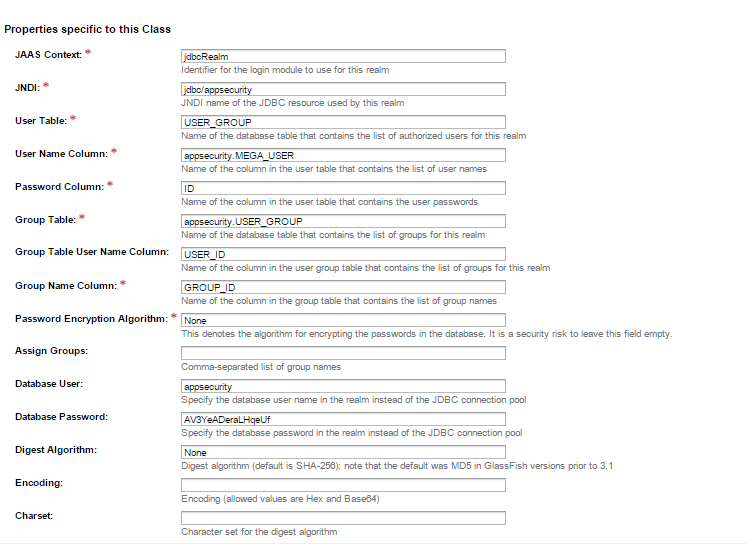
在GlassFish中,转到:
配置>>服务器-Config >>安全>>领域
这里是一个领域配置的例子。
Stack Overflow用户
发布于 2015-12-26 22:48:10
您在哪里检查从表单输入输入的用户名和密码是否正确。您是通过查询数据库进行身份验证,还是通过匹配代码中设置的用户名和密码值进行身份验证?我相信这会给你一个线索。确保来自表单输入的用户名和密码与代码中设置的用户名和密码匹配。如果你有其他问题,请告诉我。如果这解决了你的问题,请把它标记为正确的答案。
 response.setContentType("text/html");
    String msg = " ";

    String username = request.getParameter("username");
    String password = request.getParameter("password");
    try {

if (username.equals("nick") && password.equals("nick_password")) {


            nextPage = "HELLO" + username + "! Your login is SUCESSFULL";

        } else {
            nextPage = "HELLO" + username + "!Your login is UNSUCESSFULL";
        }

}// close tryhttps://stackoverflow.com/questions/34475277
复制相似问题
腾讯云开发者

Copyright © 2013 - 2026 Tencent Cloud. All Rights Reserved. 腾讯云 版权所有
深圳市腾讯计算机系统有限公司 ICP备案/许可证号:粤B2-20090059  粤公网安备44030502008569号
腾讯云计算(北京)有限责任公司 京ICP证150476号 | 京ICP备11018762号