
在Google中显示不同的后缀
在Google中显示不同的后缀
提问于 2015-12-23 17:30:01
我有一个分段显示的结果,总带宽的uplink/downlink。
现在,它们的后缀是GB。
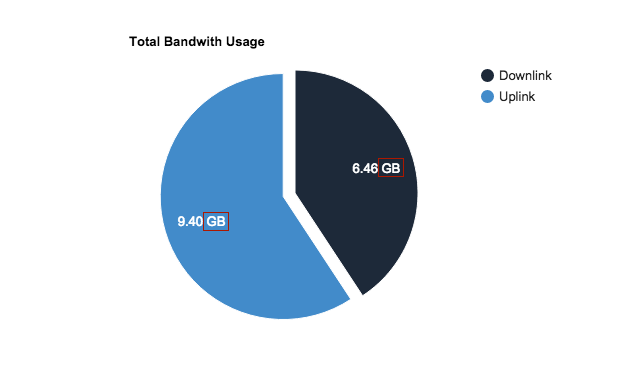
我挣扎着试图显示他们的后缀不同。例如,
GB下行链路- 上行链路在
KB。
我有过
<script>

google.setOnLoadCallback(drawChart);
function drawChart() {

  console.log(color['downlink']);

  var data = google.visualization.arrayToDataTable([
    ['Task', 'Bandwith'],
    ['Downlink', ({{$t_down_bytes}})],
    ['Uplink', ({{$t_up_bytes}})]
  ]);

  var options = {
    legend: 'buttom',
    pieSliceText: 'value', // text | none
    title: 'Total Bandwith Usage',
    colors: [color['downlink'], color['uplink']],
    width:'100%',
    height: 400,
    slices: {
      1: {offset: 0.1}
    },

  };

  var formatter = new google.visualization.NumberFormat({
    fractionDigits:2,
    suffix: ' GB'
  });

  formatter.format(data, 1);

  var chart = new google.visualization.PieChart(document.getElementById('private'));
  chart.draw(data, options);
}

</script>
我能有人帮我弄清楚这件事。
如对此有任何提示或建议,将不胜感激!
回答 1
Stack Overflow用户
回答已采纳
发布于 2015-12-23 17:47:09
一种方法就是自己动手:(将字节大小转换为Javascript中的KB、MB、GB的正确方法可能会有帮助)
    var data = google.visualization.arrayToDataTable([
      ['Task', 'Bandwith'],
      ['Downlink', {v:6.4672328, f:"6.46 GB"}],
      ['Uplink', {v:9.40213213, f:"9.40 KB"}]
    ]);
请注意,v是google用来绘制的“真实”值,f是它将显示的格式化值。
如果您想保留google格式化程序,另一种方法是在formatter.format(data, 1);之后添加这一行。
data.setFormattedValue(1,1,data.getFormattedValue(1,1).replace("GB","KB")),它设置第1行第1列的formattedValue。
考虑到要同时使用两种方法的组合,更新:
var data = google.visualization.arrayToDataTable([
  ['Task', 'Bandwith'],
  ['Downlink', $t_down_bytes],
  ['Uplink', $t_up_bytes],
 ]);

var formatter = new google.visualization.NumberFormat({
    fractionDigits:2
});

formatter.format(data, 1);

data.setFormattedValue(0,1,data.getFormattedValue(0,1) + ' {{$t_down_bytes_suffix}}')

data.setFormattedValue(1,1,data.getFormattedValue(1,1) + ' {{$t_up_bytes_suffix}}')有关setFormattedValue和getFormattedValue的更多信息,请检查
页面原文内容由Stack Overflow提供。腾讯云小微IT领域专用引擎提供翻译支持
原文链接:
https://stackoverflow.com/questions/34440855
复制相关文章
相似问题
腾讯云开发者

Copyright © 2013 - 2026 Tencent Cloud. All Rights Reserved. 腾讯云 版权所有
深圳市腾讯计算机系统有限公司 ICP备案/许可证号:粤B2-20090059  粤公网安备44030502008569号
腾讯云计算(北京)有限责任公司 京ICP证150476号 | 京ICP备11018762号