
PowerShell get-acl列表文件夹内容与ReadAndExecute
这是一个简单的问题,但我还没有在Google或这里找到答案:
通过使用PowerShell或cmd (没有第三方内容),如何检索文件夹权限,使我能够区分“列表文件夹内容”和"ReadAndExecute"?
现在,当我在文件夹上执行Get-Acl时,当组只授予列表访问权或读取和执行权限时,它返回相同的权限级别。如果我右键单击并转到Security选项卡,一个组检查了“列表文件夹内容”,另一个组进行了“读取和执行”检查,但这两个组都在Get-Acl中返回"ReadAndExecute“。
图片如下:
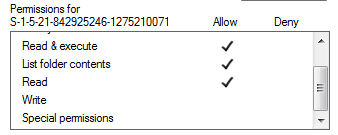
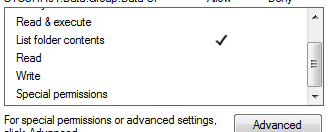
Powershell只返回"ReadAndExecute“两种类型的内容:
FileSystemRights : ReadAndExecute,同步
AccessControlType :允许
IdentityReference : group1
IsInherited :假
InheritanceFlags : ContainerInherit,ObjectInherit
PropagationFlags :无
FileSystemRights : ReadAndExecute,同步
AccessControlType :允许
IdentityReference : group2
IsInherited :假
InheritanceFlags : ContainerInherit
PropagationFlags :无
回答 3
Stack Overflow用户
发布于 2015-12-29 20:23:26
过了一段时间,我自己找到了一个可行的解决办法。
尽管PowerShell (或CMD或C#)总是为ListDirectory或实际ReadAndExecute权限返回"ReadAndExecute“,但只有在权限为"ListDirectory”时,"InheritanceFlag“才会始终是"ContainerInherit”。因此,在检查此标志时,您可能会发现哪个组只授予列表权限,而不是授予读取和执行权限。
我已经在PowerShell中实现了这一检查,到目前为止,它适用于所有测试用例:
foreach($access in (Get-Acl 'C:\test').Access) {
    $filerights = $access.FileSystemRights.ToString();
    $inheritanceFlg = $access.InheritanceFlags.ToString();
    if($inheritanceFlg -eq 'ContainerInherit') {
        $filerights = $filerights.replace('ReadAndExecute','ListDirectory');
    }
    $output = $access.IdentityReference.ToString() + ';' + $filerights;
    $output
}Stack Overflow用户
发布于 2016-05-24 12:28:17
你的回答很好,但有一点小错误。您在第3行的$inheritanceFlags变量处得到了错误的参数。下面是正确的:
foreach($access in (Get-Acl 'C:\Test').Access) {
    $filerights = $access.FileSystemRights.ToString();
    $inheritanceFlg = $access.InheritanceFlags.ToString();
    if($inheritanceFlg -eq 'ContainerInherit') {
        $filerights = $filerights.replace('ReadAndExecute','ListDirectory');
    }
    $output = $access.IdentityReference.ToString() + ';' + $filerights;
    $output
}Stack Overflow用户
发布于 2015-12-22 13:23:37
(get-Acl 'C:\Temp').Access返回System.Security.AccessControl.FileSystemAccessRule对象的集合。
它具有类型为FileSystemRights的System.Security.AccessControl.FileSystemRights属性。这是一个枚举,可以检查单个权限。例如(检查下面的第一个访问规则):
((Get-Acl 'C:\Temp').Access[0].FileSystemRights -band
[System.Security.AccessControl.FileSystemRights]::ExecuteFile) -eq
[System.Security.AccessControl.FileSystemRights]::ExecuteFile
ListDirectory、ExecuteFile、Read是您可以检查的,以捕捉权限的差异。
https://stackoverflow.com/questions/34414438
复制相似问题
腾讯云开发者

Copyright © 2013 - 2026 Tencent Cloud. All Rights Reserved. 腾讯云 版权所有
深圳市腾讯计算机系统有限公司 ICP备案/许可证号:粤B2-20090059  粤公网安备44030502008569号
腾讯云计算(北京)有限责任公司 京ICP证150476号 | 京ICP备11018762号