
本机运行- android-sdk不存在。
本机运行- android-sdk不存在。
提问于 2015-12-20 22:22:33
我正在Windows 10系统上做react-native 快速入门。我能够执行react-native init AwesomeProject命令来工作,现在我需要执行:
>react-native run-android但是这个错误失败了:
FAILURE: Build failed with an exception.

* What went wrong:
A problem occurred configuring project ':app'.
> The SDK directory 'C:\Users\plankton\AppData\Local\Android\android-sdk' does not exist.

* Try:
Run with --stacktrace option to get the stack trace. Run with --info or --debug option to get more log output.

BUILD FAILED

Total time: 2 mins 0.64 secs
Could not install the app on the device, read the error above for details.
Make sure you have an Android emulator running or a device connected and have
set up your Android development environment:
https://facebook.github.io/react-native/docs/android-setup.html我认为问题在于我已经安装了最新的Android,现在的路径是:C:\Users\plankton\AppData\Local\Android\sdk而不是C:\Users\plankton\AppData\Local\Android-sdk。如果我在像OS这样的Unix上做一个系统链接。但是我正在使用Windows 10,我能做什么呢?如何在Windows中建立系统链接?
回答 2
Stack Overflow用户
回答已采纳
发布于 2015-12-20 23:05:02
在Windows上,它查看ANDROID_HOME环境变量。您应该能够更新它,关闭命令提示符或powershell并重新启动它,然后再试一次。
Stack Overflow用户
发布于 2019-01-14 05:46:52
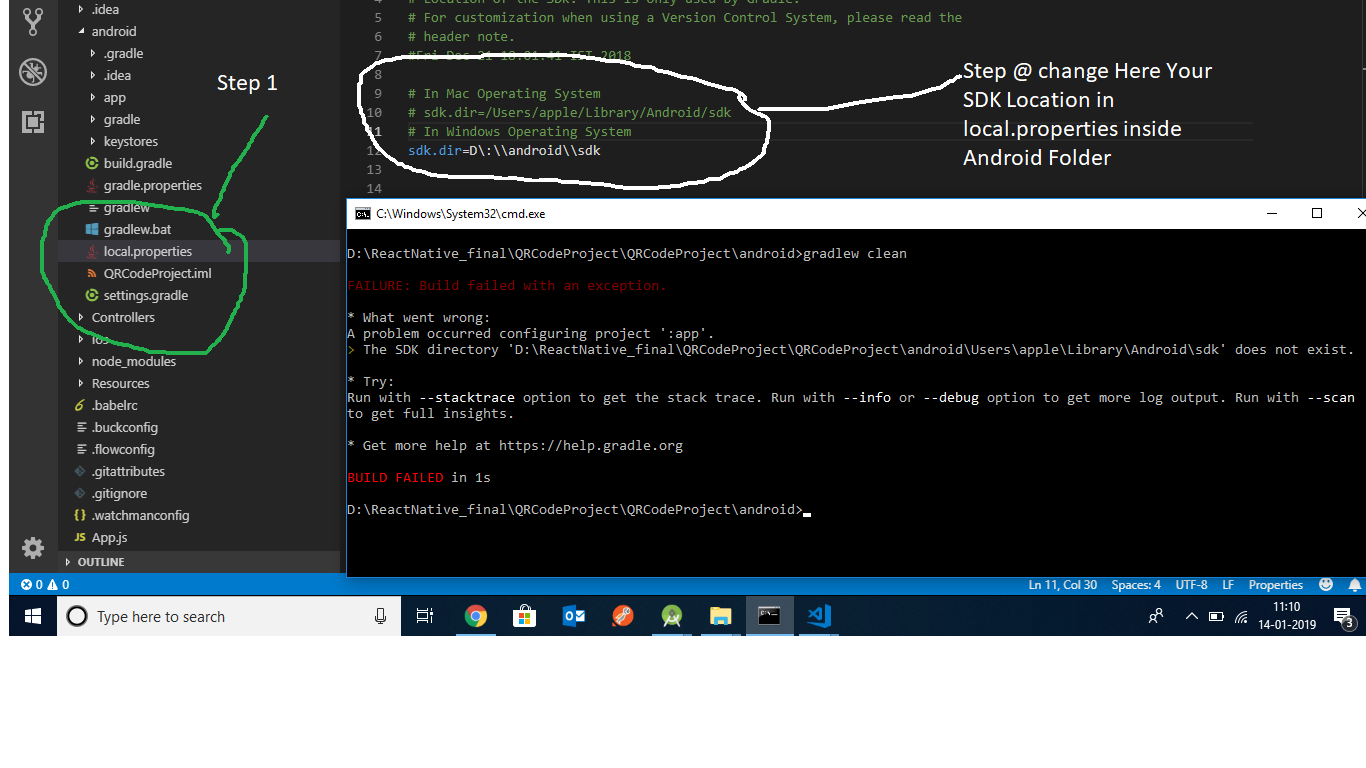
在Android local.properties中更改Sdk位置并解决此问题
反应-本机启动-重置-缓存
然后转到android文件夹cd android,然后清理gradle
2级清洁
并确保卸载之前的应用程序。
页面原文内容由Stack Overflow提供。腾讯云小微IT领域专用引擎提供翻译支持
原文链接:
https://stackoverflow.com/questions/34386510
复制相关文章
相似问题
腾讯云开发者

Copyright © 2013 - 2026 Tencent Cloud. All Rights Reserved. 腾讯云 版权所有
深圳市腾讯计算机系统有限公司 ICP备案/许可证号:粤B2-20090059  粤公网安备44030502008569号
腾讯云计算(北京)有限责任公司 京ICP证150476号 | 京ICP备11018762号