
react本机init Awesomeproject "npm!请尝试以root/Administrator的身份再次运行此命令。“windows 10
我正试着按照“开始反应--本土化”的指示操作。
我知道使用windows作为我的开发平台是实验性的,但这正是我所做的。我启动一个"Node.js命令提示符“然后..。
> npm install -g react-native-cli
> react-native init AwesomeProject
..。但我知道这个错误..。
C:\Users\plankton>react-native init AwesomeProject
This will walk you through creating a new React Native project in C:\Users\plankton\AwesomeProject
Installing react-native package from npm...

> bufferutil@1.2.1 install C:\Users\plankton\AwesomeProject\node_modules\react-native\node_modules\ws\node_modules\bufferutil
> node-gyp rebuild


C:\Users\plankton\AwesomeProject\node_modules\react-native\node_modules\ws\node_modules\bufferutil>if not defined npm_config_node_gyp (node "C:\Program Files\nodejs\node_modules\npm\bin\node-gyp-bin\\..\..\node_modules\node-gyp\bin\node-gyp.js" rebuild )  else (node  rebuild )
Building the projects in this solution one at a time. To enable parallel build, please add the "/m" switch.
  bufferutil.cc
  win_delay_load_hook.c
     Creating library C:\Users\plankton\AwesomeProject\node_modules\react-native\node_modules\ws\node_modules\bufferutil\build\Release\bufferutil.lib and object C:\Users\plankton\AwesomeProject\node_modules\react-native\node_modules\ws\node_modules\bufferutil\build\Release\bufferutil.exp
  Generating code
  Finished generating code
  bufferutil.vcxproj -> C:\Users\plankton\AwesomeProject\node_modules\react-native\node_modules\ws\node_modules\bufferutil\build\Release\\bufferutil.node

> utf-8-validate@1.2.1 install C:\Users\plankton\AwesomeProject\node_modules\react-native\node_modules\ws\node_modules\utf-8-validate
> node-gyp rebuild


C:\Users\plankton\AwesomeProject\node_modules\react-native\node_modules\ws\node_modules\utf-8-validate>if not defined npm_config_node_gyp (node "C:\Program Files\nodejs\node_modules\npm\bin\node-gyp-bin\\..\..\node_modules\node-gyp\bin\node-gyp.js" rebuild )  else (node  rebuild )
Building the projects in this solution one at a time. To enable parallel build, please add the "/m" switch.
  validation.cc
  win_delay_load_hook.c
     Creating library C:\Users\plankton\AwesomeProject\node_modules\react-native\node_modules\ws\node_modules\utf-8-validate\build\Release\validation.lib and object C:\Users\plankton\AwesomeProject\node_modules\react-native\node_modules\ws\node_modules\utf-8-validate\build\Release\validation.exp
  Generating code
  Finished generating code
  validation.vcxproj -> C:\Users\plankton\AwesomeProject\node_modules\react-native\node_modules\ws\node_modules\utf-8-validate\build\Release\\validation.node

> spawn-sync@1.0.13 postinstall C:\Users\plankton\AwesomeProject\node_modules\react-native\node_modules\yeoman-generator\node_modules\cross-spawn\node_modules\spawn-sync
> node postinstall


npm WARN optional dep failed, continuing fsevents@1.0.6
npm ERR! Windows_NT 10.0.10586
npm ERR! argv "C:\\Program Files\\nodejs\\node.exe" "C:\\Program Files\\nodejs\\node_modules\\npm\\bin\\npm-cli.js" "install" "--save" "react-native"
npm ERR! node v4.2.3
npm ERR! npm  v2.14.7
npm ERR! path C:\Users\plankton\AppData\Roaming\npm-cache\brace-expansion\1.1.2\package\package.json.9d769f6c66df6b0ff357401140ec21e2
npm ERR! code EPERM
npm ERR! errno -4048
npm ERR! syscall rename

npm ERR! Error: EPERM: operation not permitted, rename 'C:\Users\plankton\AppData\Roaming\npm-cache\brace-expansion\1.1.2\package\package.json.9d769f6c66df6b0ff357401140ec21e2' -> 'C:\Users\plankton\AppData\Roaming\npm-cache\brace-expansion\1.1.2\package\package.json'
npm ERR!     at Error (native)
npm ERR!  { [Error: EPERM: operation not permitted, rename 'C:\Users\plankton\AppData\Roaming\npm-cache\brace-expansion\1.1.2\package\package.json.9d769f6c66df6b0ff357401140ec21e2' -> 'C:\Users\plankton\AppData\Roaming\npm-cache\brace-expansion\1.1.2\package\package.json']
npm ERR!   errno: -4048,
npm ERR!   code: 'EPERM',
npm ERR!   syscall: 'rename',
npm ERR!   path: 'C:\\Users\\plankton\\AppData\\Roaming\\npm-cache\\brace-expansion\\1.1.2\\package\\package.json.9d769f6c66df6b0ff357401140ec21e2',
npm ERR!   dest: 'C:\\Users\\plankton\\AppData\\Roaming\\npm-cache\\brace-expansion\\1.1.2\\package\\package.json',
npm ERR!   parent: 'minimatch' }
npm ERR!
npm ERR! Please try running this command again as root/Administrator.

npm ERR! Please include the following file with any support request:
npm ERR!     C:\Users\plankton\AwesomeProject\npm-debug.log

`npm install --save react-native` failed错误输出表明:Please try running this command again as root/Administrator.,但是如何在Windows 10系统上这样做呢?
更新:谢谢路易,你的回答奏效了。这是我最后做的事的屏幕截图..。
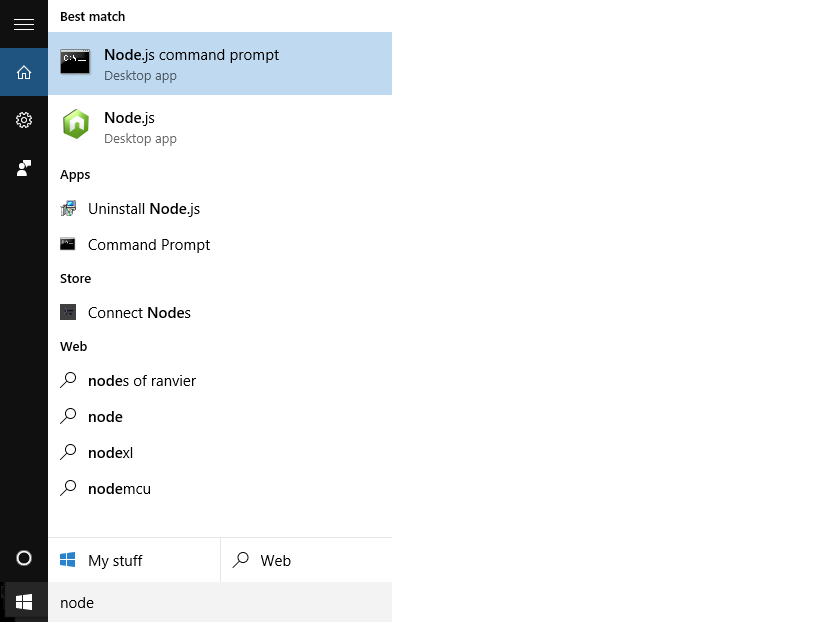
右键单击Node.js command promtpt并选择Run as Administrator。
更新二:在随后的迭代中,我得到了相同的错误。我当时必须做的事情是Louy在评论中说的:
删除文件夹"C:\\Users\\plankton\\AppData\\Roaming\\npm-cache
最新情况三:
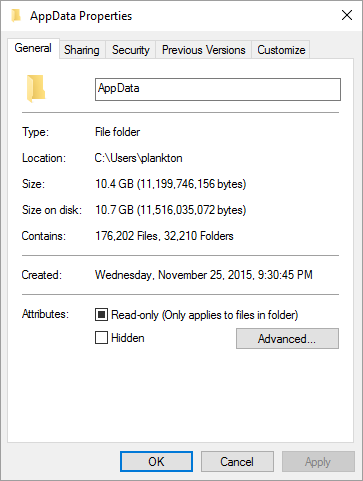
我已经以管理员身份运行了我的Node.js命令提示符,并且删除了文件夹"C:\\Users\\plankton\\AppData\\Roaming\\npm-cache,但是仍然得到了running this command again as root/Administrator错误。我不得不使用Windows将Read only和hidden属性从“C:\Users\ folder \AppData`‘文件夹中取消。
回答 1
Stack Overflow用户
发布于 2015-12-20 21:13:43
您需要作为管理员启动命令行解释器。
- 打开开始菜单
- "cmd“型
- 右击并选择“以管理员身份运行”
那就跟你之前做的一样。
https://stackoverflow.com/questions/34385417
复制相似问题
腾讯云开发者

Copyright © 2013 - 2026 Tencent Cloud. All Rights Reserved. 腾讯云 版权所有
深圳市腾讯计算机系统有限公司 ICP备案/许可证号:粤B2-20090059  粤公网安备44030502008569号
腾讯云计算(北京)有限责任公司 京ICP证150476号 | 京ICP备11018762号