
如何用Rexster服务器加载aws dynamodb泰坦图?
我是新来的AWS DynamoDb泰坦图形DB。所以我在这里遵循https://github.com/awslabs/dynamodb-titan-storage-backend/tree/1.0.0的指示
我可以启动Gremlin服务器并加载GraphOfTheGods ok。然后我想用Rexster服务器加载图形。我启动了Rexster服务器
bin/rexster.sh -s -c config/rexster-local.xml在日志中我看到图表被加载了
...
[INFO] Backend - Initiated backend operations thread pool of size 8
[INFO] AbstractDynamoDBStore - Entering ensureStore table:titan_titan_ids
[INFO] AbstractDynamoDBStore - Entering ensureStore table:titan_edgestore
[INFO] AbstractDynamoDBStore - Entering ensureStore table:titan_graphindex
[INFO] AbstractDynamoDBStore - Entering ensureStore table:titan_txlog
[INFO] AbstractDynamoDBStore - Entering ensureStore table:titan_systemlog
[INFO] AbstractDynamoDBStore - Entering ensureStore table:titan_system_properties
[INFO] KCVSLog$MessagePuller - Loaded unidentified ReadMarker start time 2015-12-20T10:01:21.539Z into com.thinkaurelius.titan.diskstorage.log.kcvs.KCVSLog$MessagePuller@d9f5fce
[INFO] RexsterApplicationGraph - Graph [titan] - configured with allowable namespace [tp:gremlin]
[INFO] GraphConfigurationContainer - Graph titan - standardtitangraph[com.amazon.titan.diskstorage.dynamodb.DynamoDBStoreManager:[127.0.0.1]] loaded
...
但是当我去狗窝的时候,我会犯错误
Error: Could not get the graph profile from Rexster.
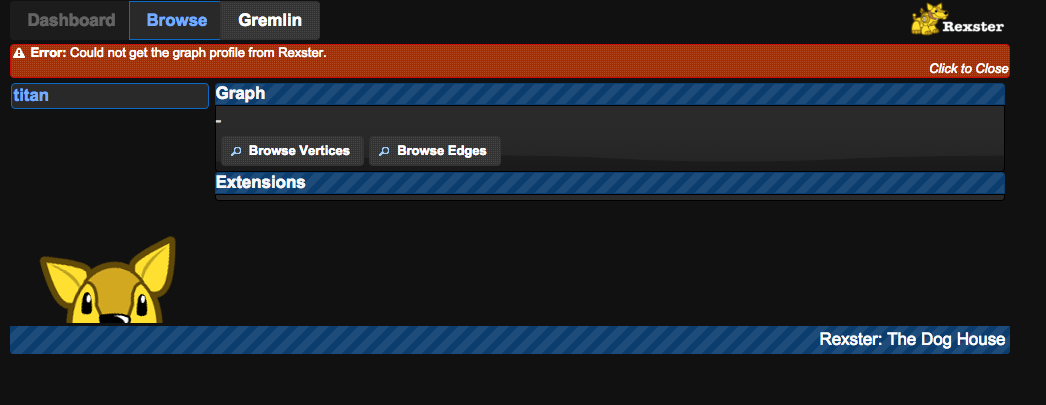
我使用了titan版本1.0.0,dynamodb-titan100-storage-backend-1.0.0-hadoop1和rexster-server-2.6.0。下面是我用来启动Rexster服务器的rexster-local.xml配置。请告诉我如何正确加载图表与Rexster服务器。非常感谢你!
回答 2
Stack Overflow用户
发布于 2016-01-09 02:20:39
泰坦1.0.0的DynamoDB存储后端支持泰坦1.0.0。土卫六1.0.0是针对TinkerPop 3编写的,因此,不随狗屋一起发布。Rexster被重命名为Gremlin,并使用WebSockets流协议代替RexPro二进制协议。您可以在Gremlin配置中使用全局绑定的图形对象,并结合远程命令调用与图形进行交互,就像在狗屋的Gremlin中那样。
Stack Overflow用户
发布于 2015-12-24 11:12:20
您可能应该查看Rexster的故障排除部分:
https://github.com/tinkerpop/rexster/wiki/Troubleshooting
我认为您的问题与<base-uri>仍被设置为localhost有关。如果要远程访问服务器,则应将其设置为服务器的主机名。
https://stackoverflow.com/questions/34380122
复制相似问题
腾讯云开发者

Copyright © 2013 - 2026 Tencent Cloud. All Rights Reserved. 腾讯云 版权所有
深圳市腾讯计算机系统有限公司 ICP备案/许可证号:粤B2-20090059  粤公网安备44030502008569号
腾讯云计算(北京)有限责任公司 京ICP证150476号 | 京ICP备11018762号